Introduction
Delivering a maintenance ticket on Dataverse and Dynamics 365 model-driven apps is a long, manual and tooling-heavy process. A single small ticket moves through the maker portal, a code editor, a git client and Azure DevOps. Schema changes, form changes, view changes, web resources, the solution, the checker, the commit, the pull request and the work item update all happen one after another, by hand, in different tools.
None of those steps is difficult. The difficulty is not skipping one. In practice four things slip, and I have let all four slip myself. The script that never reaches the client's repository. The ticket solution that quietly swallows the client's data model. The naming convention that drifts with each developer. And the reasoning behind a decision, which ends up in somebody's head or in a Teams thread instead of next to the change.
FixForge is a custom MCP server that I designed and developed myself for application maintenance and delivery on Dataverse, Dynamics 365 and the Power Platform. It puts the Dataverse SDK, the Power Platform CLI and the Azure DevOps REST API behind more than seventy typed tools that an AI agent can call. The point of this series is to take those capabilities one at a time and show what they change in a real delivery path, rather than list them in the abstract. (This series is a technical walkthrough, not a product pitch.)
It starts by auditing what is already there. A metadata snapshot indexes the whole environment: tables, columns, forms, views, plug-in steps, flows and business rules. A second index covers the client's source repositories, so the agent can search the plug-in classes and the JavaScript that already exist instead of guessing.
Then it builds. It creates and changes tables, columns, relationships and option sets, with the client's naming conventions checked in code. It patches forms, adds fields and wires script libraries to events. It writes, deploys and versions JavaScript web resources. It adds, updates and hides ribbon command buttons. It scaffolds a plug-in project, compiles it, runs its unit tests and registers its steps. It reads a view and rewrites its FetchXML. It extends a model-driven app and its navigation.
Then it delivers. Everything the ticket produced goes into a segmented solution, dependencies are checked, the Solution Checker runs, the code is committed to the client's repository, the pull requests are opened and the work item is updated. From the Azure DevOps work item to a pull request waiting for review, without leaving the agent's client.
The part that matters is not automation on its own. It is that the server refuses. It refuses to read a ticket nobody has reviewed. It refuses to write a component from a stale copy of its current state. It refuses to move past a decision that belongs to a human. Those refusals are enforced in code, on the server, not asked for in a prompt.
This series is a technical walkthrough, not a product pitch. FixForge is the implementation I use to make the ideas concrete. An off-the-shelf MCP server, or one you write yourself, can do much of what is shown here, and several already exist. What is worth taking away is the set of rules: which operations need a human decision, which reads must happen before which writes, and what has to be written down so that a reviewer who was not in the conversation can still follow what happened. If you build your own, the rules are the interesting part, not my implementation of them.
This first post follows one ticket end to end, on a throwaway Dataverse instance holding a small expense-tracking model built before any of this: two tables, contoso_expensereport and contoso_expense, and a model-driven app. The maintenance work uses its own publisher prefix, ffm_. That detail matters later.
Environment note — All screenshots in this article come from a non-production demo environment and use synthetic data. No customer data, production credentials or secrets are shown.
And the first thing the agent did with my ticket was refuse to read it.
The ticket
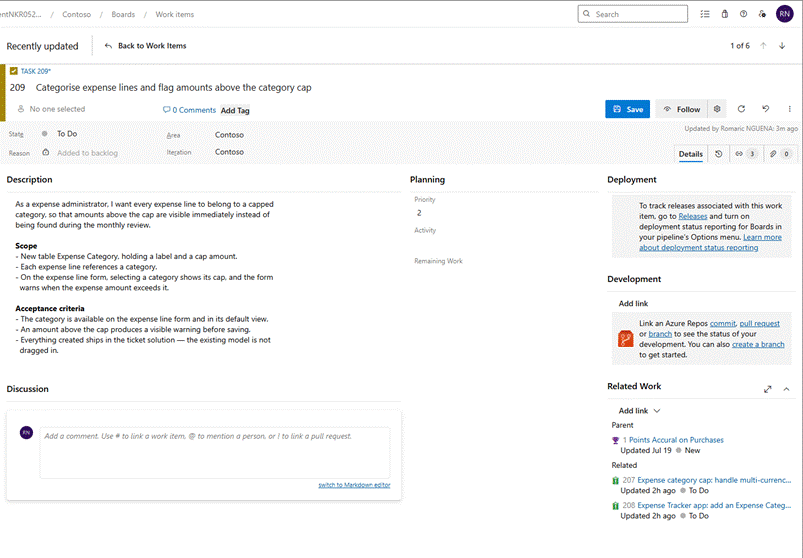
209 – Categorise expense lines and flag amounts above the category cap
As an expense administrator, I want every expense line to belong to a capped category, so that amounts above the cap are visible immediately instead of being found during the monthly review.
Scope
• New table Expense Category, holding a label and a cap amount.
• Each expense line references a category.
• On the expense line form, selecting a category shows its cap, and the form warns when the expense amount exceeds it.
• The category is available on the expense line form and in its default view.
• An amount above the cap produces a visible warning before saving.
• Everything created ships in the ticket solution. The existing model is not dragged in.
Nothing exotic. A table, a lookup, a form script, a view column, an app entry. In my experience, that is roughly half a day for a consultant who knows the environment, and closer to a full day for one who does not. The exact number varies; the point here is the number of handoffs, not the stopwatch.
Before: a typical manual delivery path
First, the baseline. Here is the same ticket by hand, in the order I would normally do it as a consultant.
| Where | What |
1 | Maker portal | Create the solution, pick the right publisher |
2 | Table designer | Create Expense Category, set its primary name |
3 | Table designer | Add Cap Amount, and know that currency is the right type, not decimal |
4 | Table designer | Create the 1:N relationship, name the lookup by the client's convention |
5 | Editor | Write the script |
6 | Maker portal | Create the web resource, upload, publish |
7 | Form designer | User form: add the field, attach the library, wire the handler |
8 | Form designer | Manager form: add the field, read-only |
9 | View designer | Add the column to the default view |
10 | App designer | Add the table to the app |
11 | Site map editor | Add the navigation sub-area |
12 | Maker portal | Publish all customizations |
13 | Solution checker | Run it, read the findings |
14 | Git client | Commit the script to the client's repository |
15 | Azure DevOps | Open the pull request |
16 | Azure DevOps | Comment on the work item, link the PR, move its state |
Sixteen operations across four tools. None of them is hard. That is exactly the problem. The difficulty is not in any single step. It is in not skipping one.
Step 1 is worth a pause. You pick a publisher from a dropdown, once, and nothing afterwards ever checks that choice again. Every schema name you create for the next two hours inherits it. Get it wrong and you may only notice downstream, during review, integration or deployment to another environment, when the schema names no longer match the client's conventions.
The four slips from the introduction all live in this list. Step 14 is the one that gets dropped. Step 10 is where "Include all objects" quietly pulls the client's forms, views, charts and business rules into a solution meant to stay small. And no step anywhere records why a decision was made.
The before-and-after point is not that a machine must do the sixteen steps faster. It is that they become one approved plan, and that those four slips stop depending on discipline.
After: what the server automates, and what sits behind each part
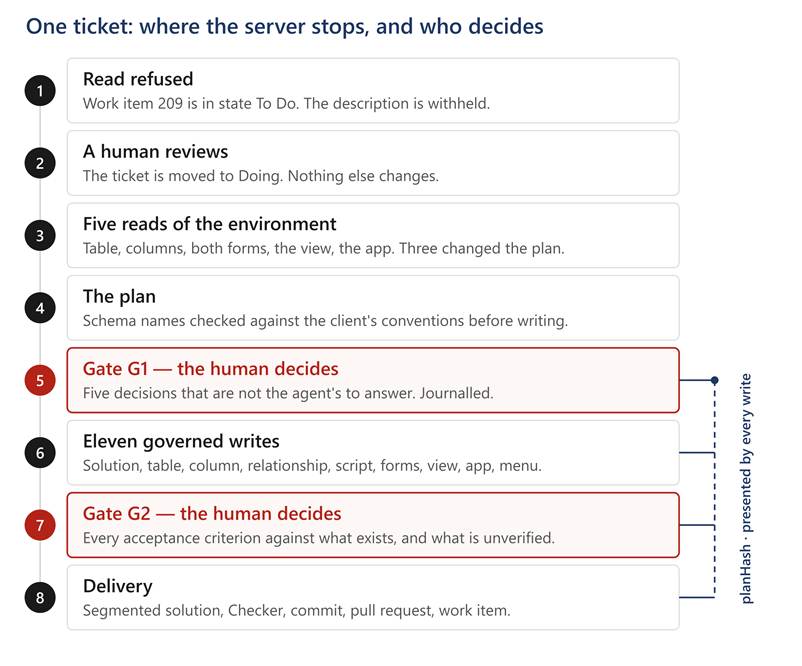
Screenshot 13 — The same ticket, governed. The two gates in red are human decisions. The plan hash agreed at G1 has to be presented by every write that follows it.
The agent talks to the server over MCP, the Model Context Protocol. The server declares tools with typed schemas, the model calls them, and that is the whole mechanism. An MCP tool is a function with a name and parameters. Everything interesting is in what those functions do.
Here is the surface used in this run, and the Microsoft technology behind each part.
Area | What the server can do | What it uses |
Schema | Create and update tables, columns, relationships and option sets, with naming conventions checked in code | Dataverse SDK metadata messages: CreateEntityRequest, CreateAttributeRequest, CreateOneToManyRequest |
Forms | Read the FormXml, add fields, attach script libraries, bind events | systemform.formxml, read and written server-side |
Views | Read a view live, replace its FetchXML, rebuild the column layout | savedquery.fetchxml and layoutxml |
Web resources | Read, create and update JavaScript, then publish it | webresource table, PublishXmlRequest |
Command buttons (classic commanding) | List, add, update and hide ribbon commands | RibbonDiffXml on the table |
Model-driven apps | List apps, add components, read and extend the navigation, validate, publish | appmodule, AddAppComponents / RemoveAppComponents, ValidateApp, sitemap.sitemapxml |
Plug-ins | Scaffold a conforming project, build it, run its unit tests, register steps, read traces | .NET SDK and dotnet on the workstation, pluginassembly and sdkmessageprocessingstep on the server |
Solutions | Create the ticket solution, add components segmented, check dependencies, run the checker, export | AddSolutionComponentRequest, RetrieveMissingDependenciesRequest, the Power Platform Checker API, pac solution unpack |
Knowledge | Snapshot the environment metadata and search it, index the client's source repositories | Dataverse metadata queries, Azure DevOps Git REST API |
Delivery | Read and update work items, open pull requests, write a delivery report | Azure DevOps REST API |
Governance | Open a run, record approvals, lock components, journal every write | its own control plane, in PostgreSQL |
Four things matter more than that list.
Both indexes answer with their age attached. You inherit a codebase you did not write, so the agent searches before it builds. But a search result is only worth its freshness. Every answer carries the snapshot date, so the agent can tell "this does not exist" from "my copy is three days old".
The model never writes component XML. It does not produce FormXml, SiteMapXml or a solution manifest. It describes what it wants, such as add this column to this section of this form. The server builds the XML, checks it against the platform metadata, and refuses what does not hold. That is why it can refuse at all. Validating an opaque block of model-generated XML is much harder than validating a typed intent such as "bind this function to this event on this form".
Reads and writes are not symmetric. This is the trap I kept falling into. Several platform write operations replace a whole object. Updating a view replaces the entire FetchXML. Writing a site map replaces the entire navigation. If your only copy of the current state comes from a cached snapshot, you will silently undo whatever changed since. Every destructive write needs a live read in front of it: read the form before patching it, read the web resource before overwriting it. Half the defects I fixed during this session were places where I had built the write and forgotten the read.
The work is split across two machines. The hosted server has no git and no .NET SDK, so anything needing a working copy runs from a second, local MCP server: committing the script, compiling a plug-in, unpacking a solution with pac. The workstation compiles and commits, the server deploys. Only the server holds the client's Dataverse credentials.
It starts by refusing to read the ticket
Before anything else, one question. Which Dataverse is this?
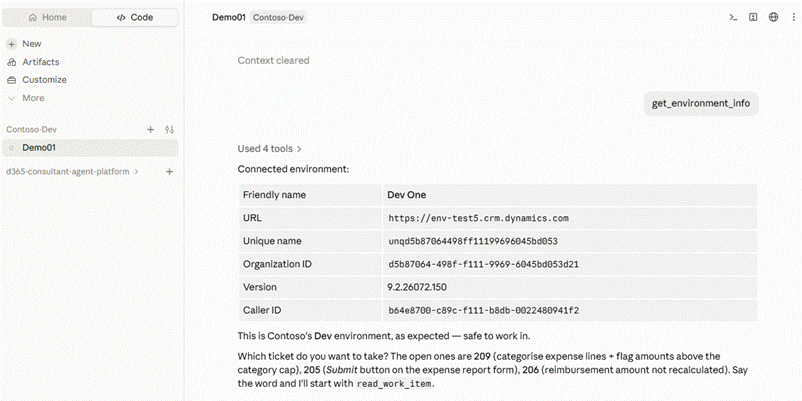
Screenshot 00 — Organization id and URL, read before anything is written. Two clients can both call their environment "Dev One". The id cannot lie.
Organization id, URL, version, and the identity the writes will run under. It sounds like a formality. It is not. Friendly names are not unique, and I have since watched two environments belonging to two different clients both answer to Dev One. The organization id identifies an environment. The name is decoration.
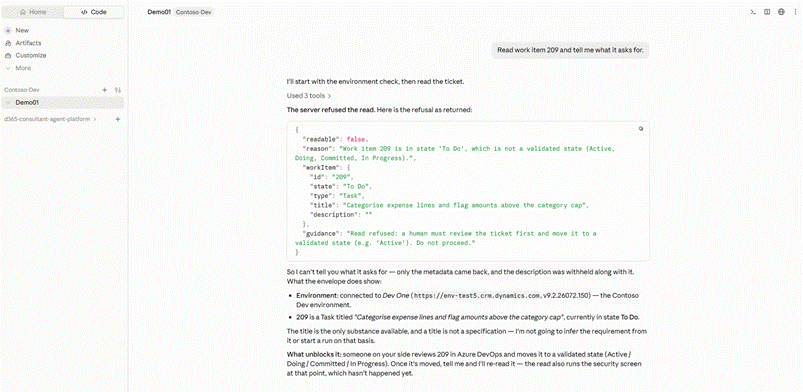
Screenshot 01 — The refusal, with the raw response expanded. Cause and remedy are separate fields, and the description is withheld.
The next thing I typed was "Read work item 209 and tell me what it asks for." The server refused:
readable: false
reason: Work item 209 is in state 'To Do', which is not a validated state
(Active, Doing, Committed, In Progress).
guidance: Read refused: a human must review the ticket first and move it to a
validated state. Do not proceed.
Two things stand out.
The refusal is structured. The cause and the remedy are separate fields, written to be read by an agent as much as by a person. It is also partial. The server returned the id, the type, the state and the title, but held back the description. Enough to explain why it stopped, not enough to act on.
That is deliberate. The body of a ticket is untrusted input. Anyone can type anything into it, including instructions aimed at the agent. A title is enough to get your bearings. The body waits until a human has read it.
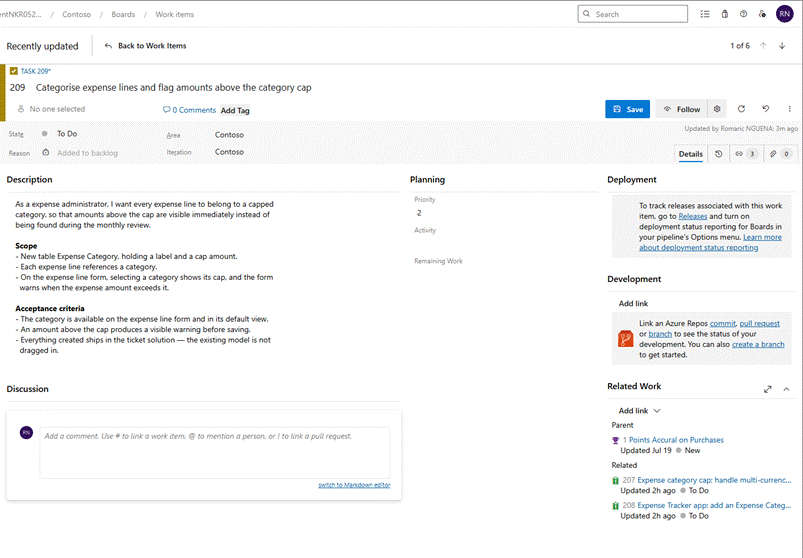
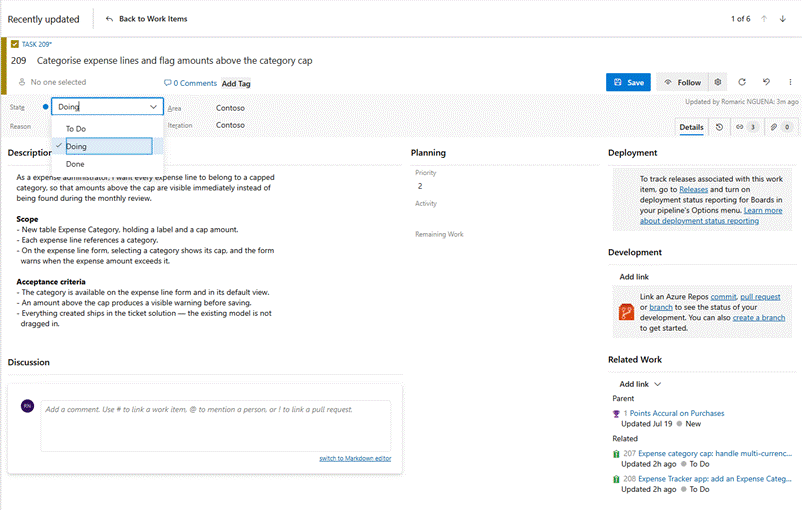
Screenshots 02a / 02b — Before and after the only thing that changes: a human reviews the ticket and moves it to Doing.
I moved 209 to Doing and asked the same question again.
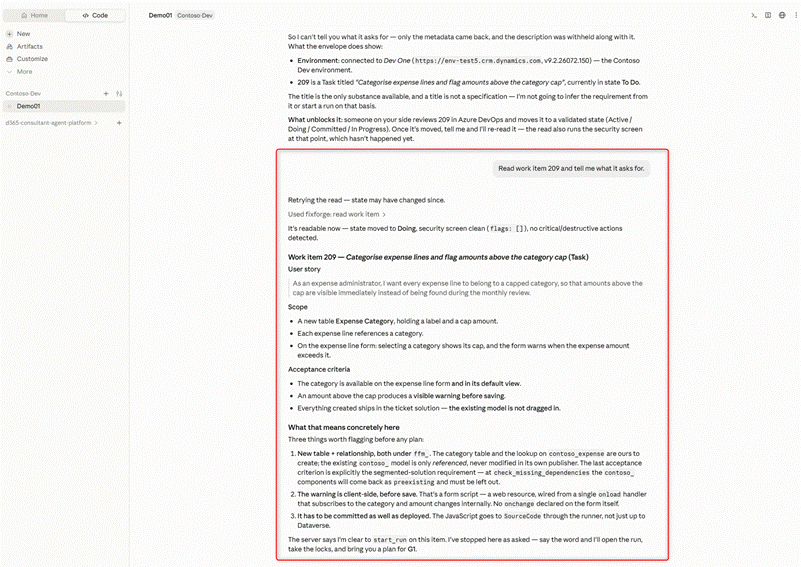
Screenshot 03 — The same call, the same arguments, the opposite result. The security screen runs at this point too, and reports clean.
It's readable now. State moved to Doing, security screen clean (flags: []),
no critical/destructive actions detected.
The security screen is the other half of treating ticket text as data. Before the description reaches the agent, the server looks for injected instructions, attempts to skip a gate, or requests to use the default publisher. Here it found nothing, and said so.
Then it reads the environment before it plans
This is where the time actually goes, and where the value is.
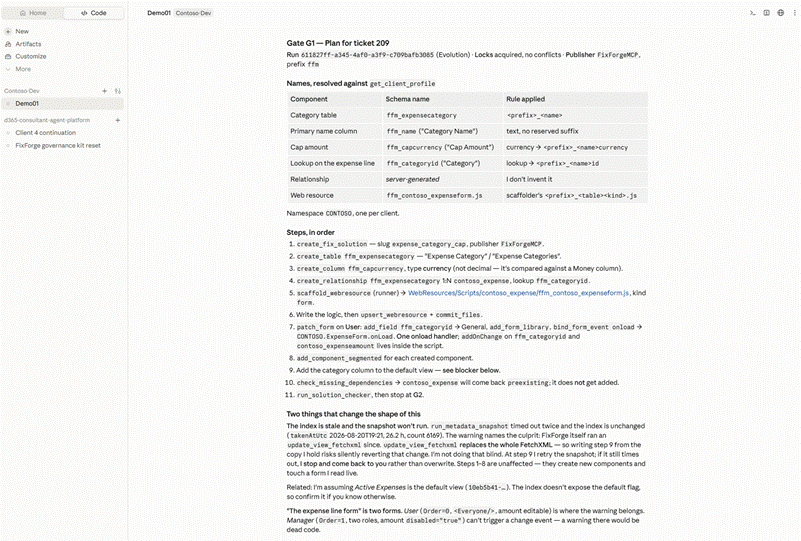
Screenshot 04a — The plan, after five rounds of reads. The naming table is the part to look at: each name carries the rule it follows.
Five rounds of reads before a single line of plan: the table, its columns, both forms, the default view, the app. Three of those reads changed the plan.
The default main form is not the one you would guess. The table has two, User and Manager. Manager is the default, and on it the amount field is disabled="true". The agent's conclusion:
A user can't trigger that change through the disabled control, so wiring a user-driven warning there would provide no value.
The metadata index has an age, and an empty answer from a stale index proves nothing. Every metadata read returns the snapshot date next to the result. Here the agent saw the index was fresh, 14.7 hours old, and only then treated the absence of an ffm_ component as meaningful.
Names are checked against the client's conventions before anything is written. The plan came back with a table of them. ffm_capcurrency, because the rule for a currency column is <prefix>_<name>currency. ffm_categoryid, because a lookup ends in id. The relationship name was left to the server: "I don't invent it."
Gate G1: five questions that are not the agent's to answer
The plan ended with this.
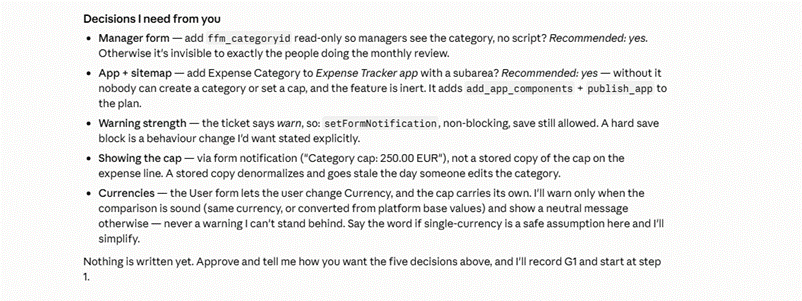
Screenshot 04b — The five questions the agent would not answer on my behalf. None of them is a technical unknown.
Manager form. Add the category read-only so managers see it during the monthly review?
App and navigation. Without a menu entry, nobody can create a category and the feature is
inert.
Warning strength. The ticket says warn, so a non-blocking notification. Blocking the save
would be a behaviour change nobody asked for.
Showing the cap. As a notification, not as a stored copy on the expense line. *"A stored copy
denormalises and goes stale the day someone edits the category."*
Currencies. The user can change the currency on the form, and the cap carries its own. Warn
only when the comparison is sound, and show a neutral message otherwise: "never a warning I can't stand behind."
None of those five is a technical unknown. Every one is a judgement about this client, and every one would have been made silently, and probably differently, by a code generator.
That is the argument for the gate, and it is not ceremony. In any serious maintenance practice someone already validates the approach before the build starts. That checkpoint exists today, but it is informal, untraced and unverifiable. Here it produces a plan hash, and every write that follows has to present it. Deviating from the approved plan becomes a refused call.
I answered the five. The approval was recorded and journalled on the server, and the run started.
The build
Eleven steps, in the plan's order. The solution, the table, the currency column, the relationship and lookup, the web resource, both forms, the view, the app entry and its navigation sub-area.
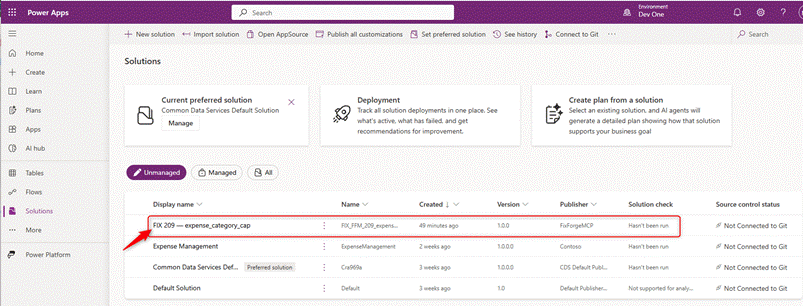
Screenshot 07a — The ticket solution, created under the maintenance publisher rather than the client’s.
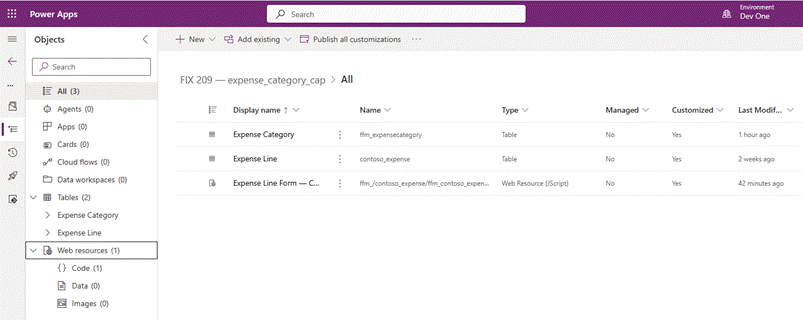
Screenshot 07b — What the solution carries: the new table, the client table it references, and the web resource. Nothing else.
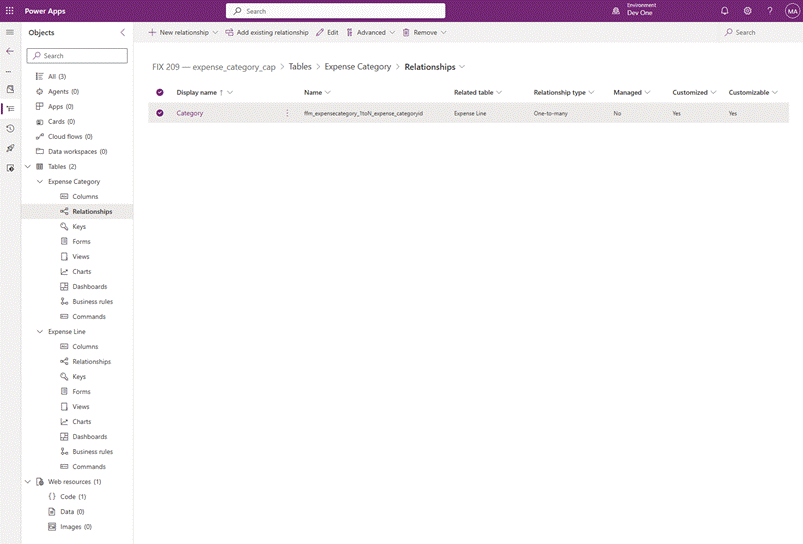
Screenshot 07c — The relationship sits in the solution. The client’s table is referenced, not swallowed.
Two moments are worth pulling out.
The script is wired from one place. A single onload handler is declared on the form, and every subscription is made inside the script:
self.subscribe(formContext, self.CATEGORY);
self.subscribe(formContext, self.AMOUNT);
self.subscribe(formContext, self.CURRENCY);
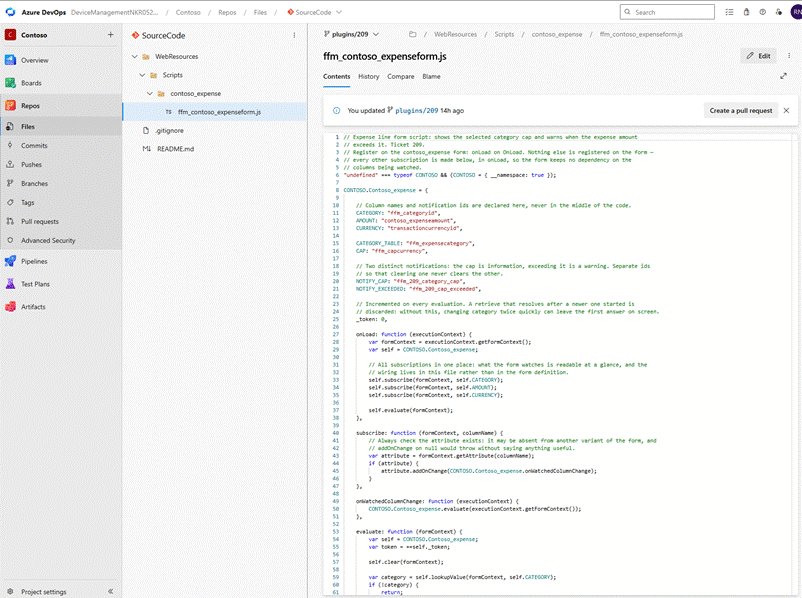
Screenshot 11c — The committed script. One onload handler, and every subscription made inside it rather than declared on the form.
Declaring an onchange in the form designer instead would tie the handler to that column's control. The form then depends on the column. Remove the field from the tab and the handler goes with it, silently. Every new column to watch costs another form change. The server refuses it, and the refusal shows the line to write instead.
Reading before writing caught a regression nobody would have seen. Step 10 updates the default view. That call replaces the whole FetchXML, and the layout defaults to the fetch attributes. One of those attributes is contoso_expenseid. Letting it default would have put a raw GUID column into the users' grid, and the tool would have reported success. The agent read the live view first, saw that the index copy carried no layout at all, and passed the column list explicitly.
Gate G2, and what "delivered" does not cover
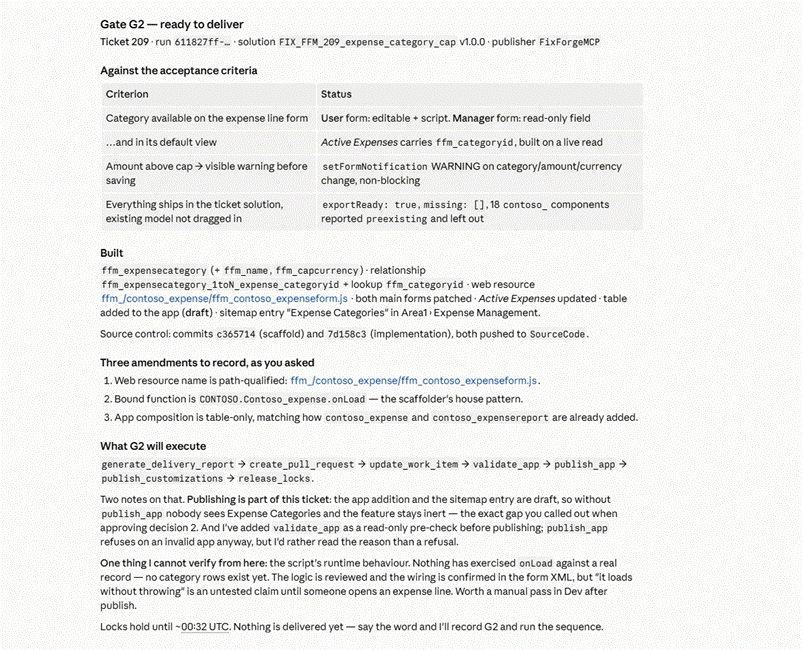
Screenshot 05 — Gate G2. Each acceptance criterion against what exists, three amendments to the plan, and one thing the agent says it cannot verify.
The second gate is the delivery decision. The agent laid out each acceptance criterion against what exists, listed three amendments to the approved plan, and then wrote this:
One thing I cannot verify from here: the script's runtime behaviour. Nothing has exercised `onLoad` against a real record, as no category rows exist yet. The logic is reviewed and the wiring is confirmed in the form XML, but "it loads without throwing" is an untested claim until someone opens an expense line.
That is the sentence I would keep if I could keep only one. An agent that names the limit of what it has established is worth more than one that reports success.
On approval, the delivery sequence ran: delivery report, customization pull request, work item comment, validation, publish and lock release. One source-code pull request was still missing a gap the server detected and reported afterwards..
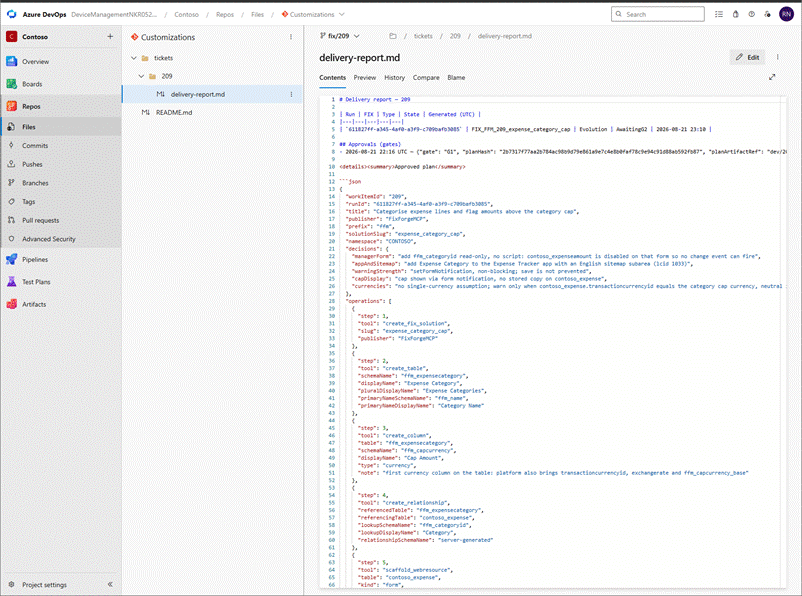
Screenshot 12 — The delivery report, committed to the repository. Run id, plan hash, the five decisions in the words they were settled in, then every operation with its parameters.
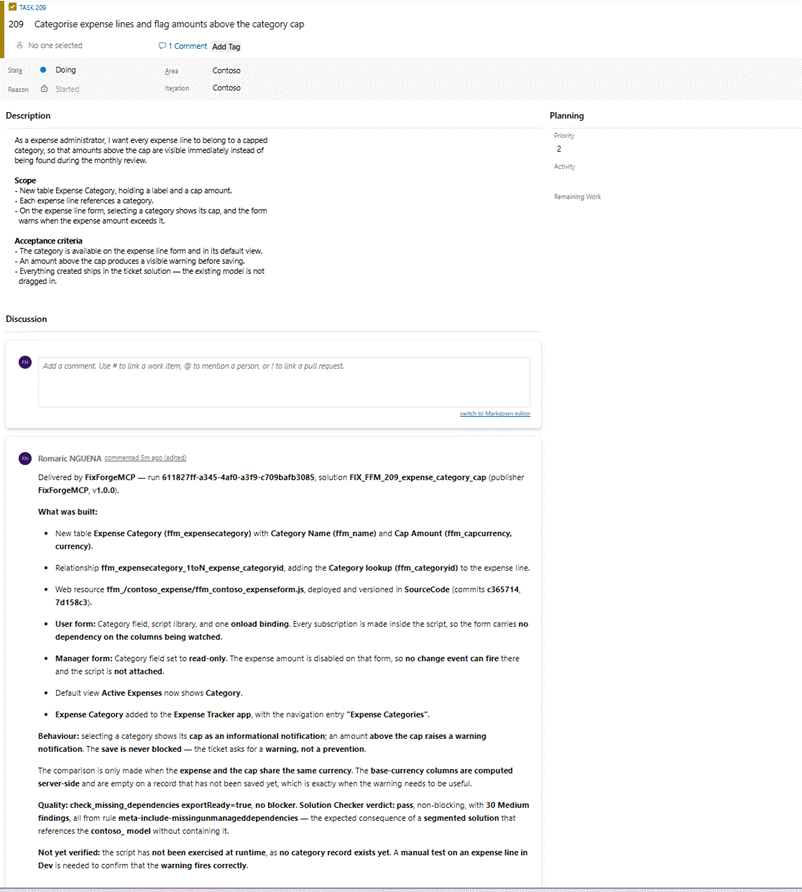
Screenshot 06 — The same delivery, summarised on the work item for whoever opens the ticket next.
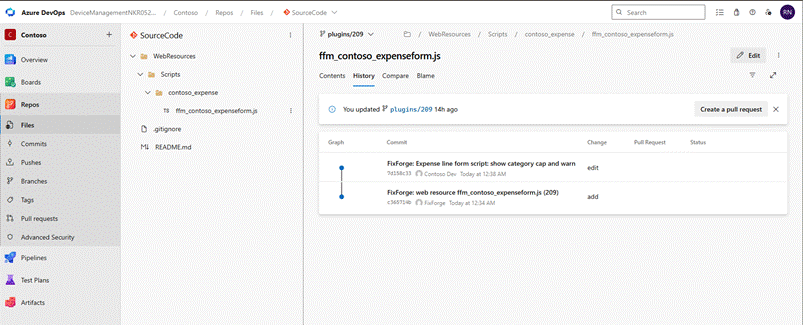
Screenshot 11a — Two commits in the client’s source repository. The script is deployed and versioned, not just deployed.
The report is worth opening. It carries the run id, the approval and its plan hash, the five decisions in the words they were settled in, and every operation with its parameters. Six months from now, the question "why is the cap not stored on the expense line?" has an answer sitting in the repository, next to the change it justifies.
The JavaScript is deployed and versioned. That second half is easy to skip and expensive to skip. A web resource that lives only in Dataverse is a change nobody can review, diff or roll back.
The manual pass
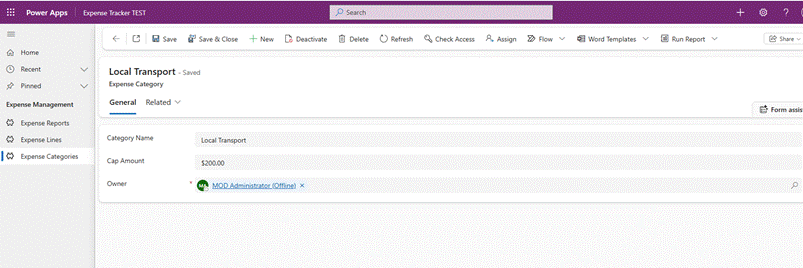
Screenshot 10a — A category and its cap, created through the navigation entry the agent added.
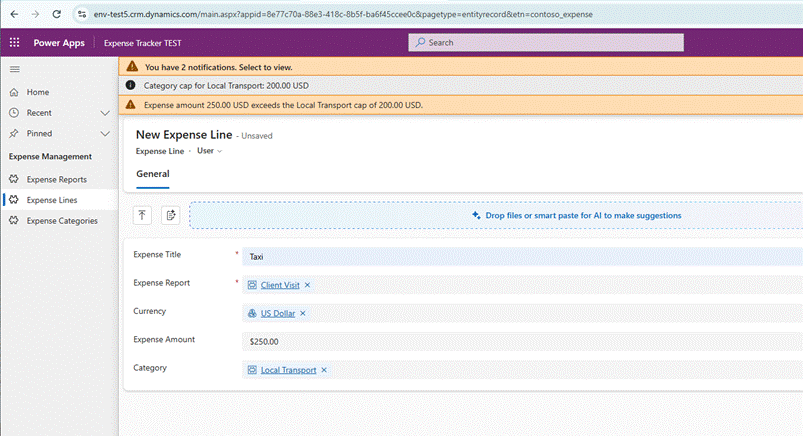
Screenshot 10b — 250 USD against a 200 USD cap. The warning appears before saving, and the save still works.
A category, Local Transport, capped at 200 USD. An expense line at 250 USD. Two notifications appear before the record is saved: the cap as information, the overage as a warning. The save is not blocked, because the ticket asked for a warning, not a prevention.
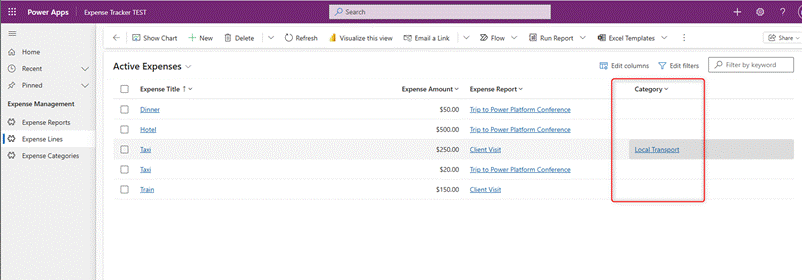
Screenshot 11b — The category column in the default view, built from a live read rather than from the index.
Reviewed became verified. It took two minutes, and it was the only way.
The part that survived the session
Three times during this run, the session died. A token expired in the middle of an approval. The server stopped responding because of something I did to it myself. Then a full restart of the client.
Each time the work survived, because the run does not live in the conversation. The run id, the approved plan hash, the journalled approval and the component locks all sit on the server. The chat is just a client.
The best moment came on resume. The agent did not replay its approval:
Firing it again blind could journal a second approval for the same gate. I'd rather you have one clean record than two ambiguous ones.
It checked instead, and found the approval had never landed. Two timeouts in that session, two opposite outcomes. The approval had failed, the table had succeeded. It verified each one rather than assuming.
One honest qualification. What survives is the governed state, not the reasoning. The agent had to read again to rebuild its understanding of the ticket. That is a real cost, and it is not zero.
The consultant is not replaced. Five decisions at G1, one manual verification, two state changes on the work item, and a judgement call on a plan amendment. What changed is not who decides. It is that the decisions now have a place, a record, and a hash that ties them to what follows.
It reported its own gaps rather than waiting to be found out.
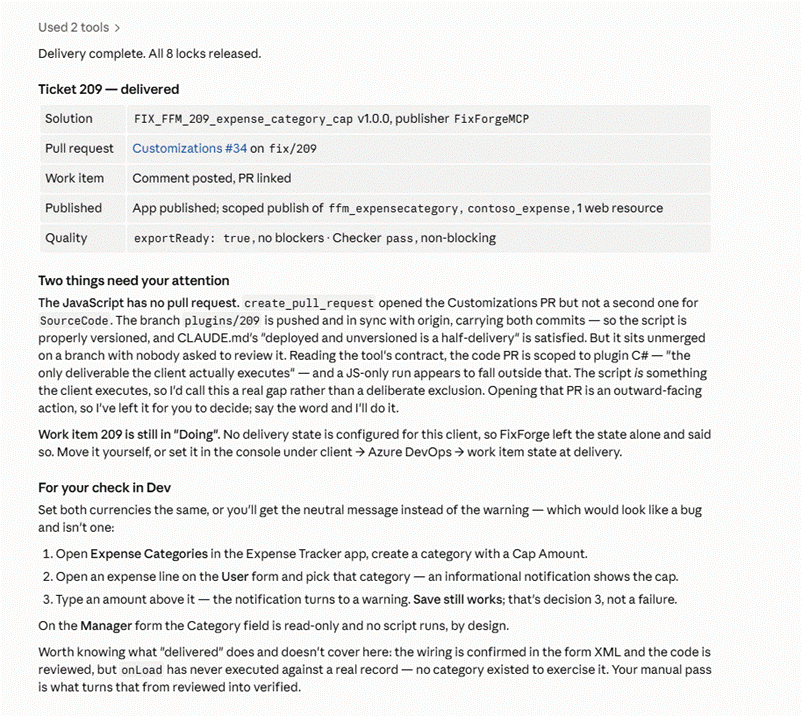
Screenshot 08 — What the agent flagged after delivering, without being asked: the missing pull request, and the work item state it would not guess.
Two of them. The JavaScript had been committed and pushed, but no pull request had been opened for it. So the one artefact the client actually runs was sitting on a branch with nobody asked to read it. And the work item stayed in Doing, because no delivery state was configured for this client, which the server said rather than guessing.
Neither is dramatic. Both are the kind of thing that quietly does not happen, and that nobody notices until an audit.
It is not autonomous. It stopped at both gates. It refused to read an unvalidated ticket. It refused to write a view from a stale copy. It refused to rewrite a navigation it could not read. It refused to declare a repair done on the strength of a call that had not failed.
Every one of those refusals was the most useful thing it did that hour.
And one step went wrong in a way I still cannot fully explain. Adding the navigation entry left the existing model-driven app in an inconsistent state. The site map stored and published in Dataverse was correct. I verified it by export, by re-import and through the Web API. But the running app kept showing sub-area identifiers that no longer existed anywhere in the published metadata. A new app built over the same three tables worked immediately. I have not identified the mechanism, and I am not going to guess at one.
That is why the runtime screenshots in the previous section come from the rebuilt app rather than the original. It is also the sharpest lesson of the session, and it has nothing to do with agents. A model-driven app can be importable, publishable and correct in the maker studio while being wrong at runtime. Save, Publish and Publish All succeeding is not a validation. Opening the published app is.
What comes next
This is the first post in a feature-by-feature series, and a new one goes out every week.
Next week: command buttons. Adding a button to a form, wiring it to a JavaScript action, then changing its label, its icon, its position and the function it calls, and hiding one that should no longer be there. All of it in plain language with an agent, without opening Ribbon Workbench or XrmToolBox.
The week after: a plug-in, end to end. Scaffolding a project that follows the client's conventions, building the assembly, registering its steps on the right message and stage, and reading the traces when something misbehaves. No Plugin Registration Tool, no XrmToolBox: the same conversation, from an empty project to a registered step.
Then automated tests. Writing the unit tests alongside the plug-in, running them from the agent, and reading what the counts mean. An empty test project exits with code zero, so "the build passed" can quietly mean "nothing ran".
If there is a maintenance task you would like to see taken apart this way, put it in the comments.


