







Dynamics GP Tip: See Which User Posted The Journal Entry
 AC@CAL
 3,100
3,100
 Like
Like Share
Share
 Report
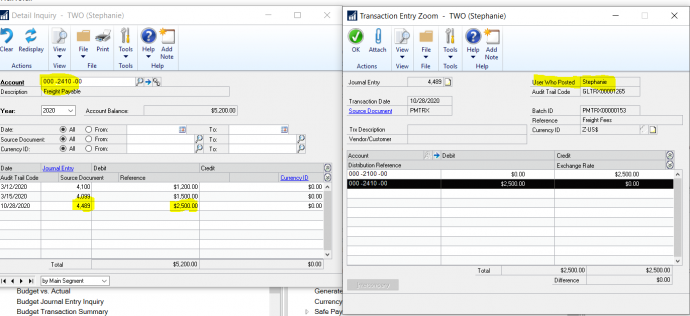
In the latest version of Microsoft Dynamics GP, you can now see the user who posted the journal entry.
Say your company is doing a monthly reconciliation of the balance sheet account. You have a question about a transaction that hit an account. Who do ask? You need to know who posted that entry.
In previous versions, if you drilled back to the entry itself you did not have this information available on the screen. You could only see the user name that posted the journal entry in the SQL database or if you created a SmartList.
Now, in the latest release of Dynamics GP, you can see the journal entry details and who posted it.
If you are interested in upgrading to the most recent version of Microsoft Dynamics GP or need support or training, contact us at support@calszone.com.
For more Microsoft Dynamics GP tips visit www.calszone.com/tips.
By Stephanie Olbrych, CAL Business Solutions, Microsoft Dynamics GP and Acumatica Partner, www.calszone.com
The post Dynamics GP Tip: See Which User Posted The Journal Entry appeared first on CAL Business Solutions-Acumatica-Microsoft Dynamics GP-ERP Partner.
This was originally posted here.
*This post is locked for comments