







HOW TO SETUP BASIC BUDGETING IN MICROSOFT DYNAMICS 365?
Views (4343)
 Mahmoud Hakim
 17,887
 Like
Like Share
Share
 Report
In Dynamics 365, we have 3 boxed approaches for budgeting as the below
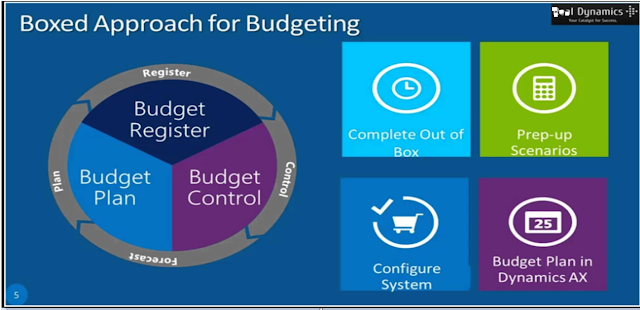
to implement the budget in Dynamics 365, you need some prerequisites
Prerequisites
I suppose you have a chart of account and create the fiscal calendar, financial dimension ..etc
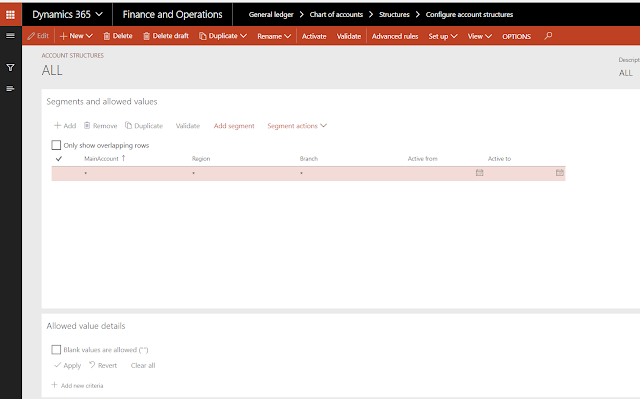
1- you must configure account structure
you can create one account structure with a financial dimension for budget
General ledger /chart of accounts / structure / configure account structure
2- Define currency exchange rate
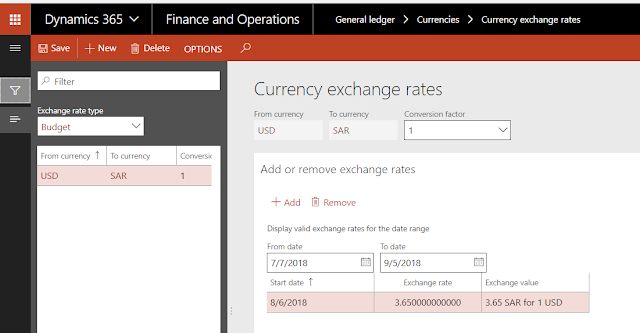
just go to General ledger /currencies /currency exchange rate
and set up your rate for the type budget
3- Configure ledger set up
link budget account structure, fiscal calendar, and budget exchange rate in Ledger form
General ledger / ledger setup / ledger

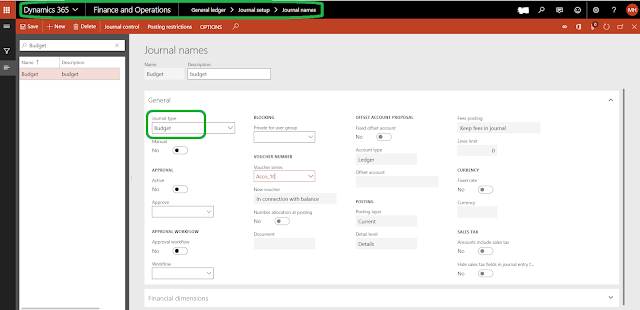
4- create a journal for the budget if you need
it must be with budget journal type
General ledger /journal setup /journal names
5- create the financial reasons
Go to General ledger /journal setup /financial reasons

Basic budget set up
1-define basic budget parameters
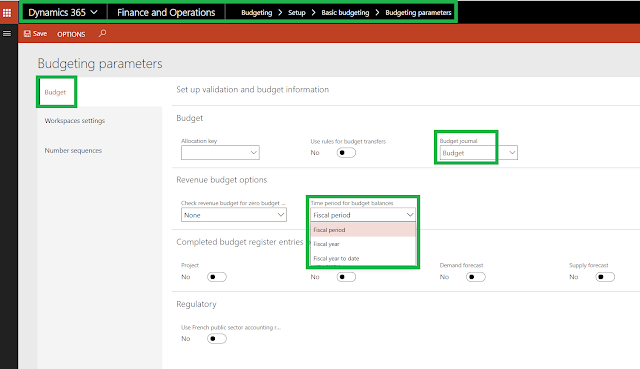
select the budget journal and set the time period for budget balances
to understand the time period for budget balances parameter
you can see more details about budget parameters here
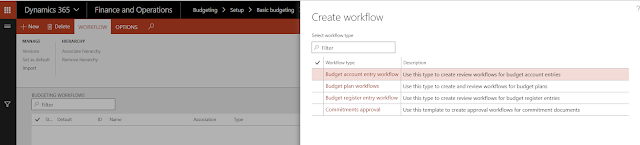
2-create budget workflow if you need
Go to Budgeting > Setup > Basic budgeting > budgeting workflow
3-define budgeting Dimension
Go to Budgeting > Setup > Basic budgeting > Dimension for budgeting

4-Create budget models
also, you can assign submodels if needed
Go to Budgeting > Setup > Basic budgeting > budget models

5-Create budget Codes

click here for more details
6-Create budget Allocation terms
Go to Budgeting > Setup > Basic Budgeting > Budget Allocation terms

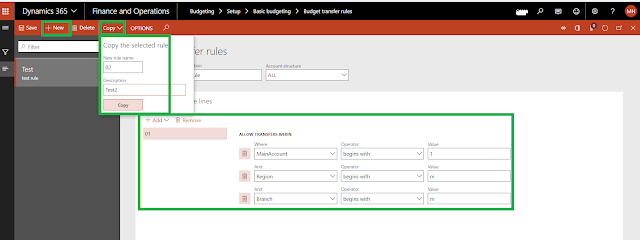
7-Create budget Transfer rules
Go to Budgeting > Setup > Basic Budgeting > Budget Transfer rules
for more details
https://technet.microsoft.com/en-us/library/hh209073.aspx?f=255&MSPPError=-2147217396

to implement the budget in Dynamics 365, you need some prerequisites
Prerequisites
I suppose you have a chart of account and create the fiscal calendar, financial dimension ..etc
1- you must configure account structure
you can create one account structure with a financial dimension for budget
General ledger /chart of accounts / structure / configure account structure

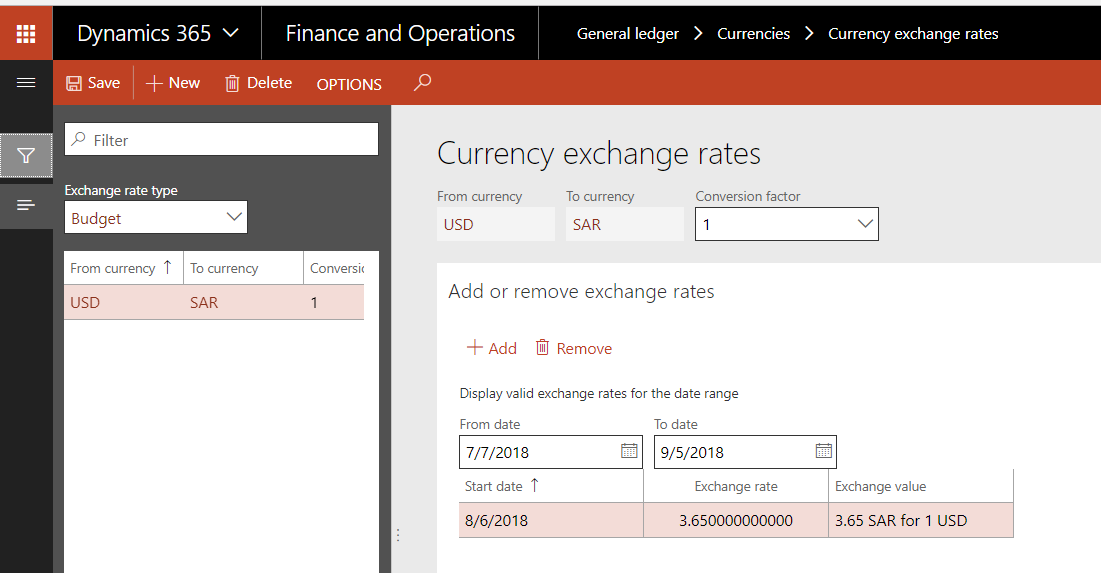
2- Define currency exchange rate
just go to General ledger /currencies /currency exchange rate
and set up your rate for the type budget
3- Configure ledger set up
link budget account structure, fiscal calendar, and budget exchange rate in Ledger form
General ledger / ledger setup / ledger

4- create a journal for the budget if you need
it must be with budget journal type
General ledger /journal setup /journal names

5- create the financial reasons
Go to General ledger /journal setup /financial reasons

Basic budget set up
1-define basic budget parameters
Go to Budgeting > Setup > Basic budgeting > Budgeting Parameters

select the budget journal and set the time period for budget balances
to understand the time period for budget balances parameter
Imagine you have a budget for the account of $ 6000 for the year 2018 divided into $ 500 per month.
So your budget entries: Jan 2013: $ 500, Feb 2013: $ 500, etc.
You have posted an invoice with the amount $ 400 in January.
It is now February. You want to create a new transaction (amount $ 550). The options will do the next:
Fiscal period: Your budget space is not enough. It is only $ 500
Fiscal year: The remaining budget is now $ 6000-$ 400 = $ 5600. So enough budget to proceed.
Fiscal year to date: The remaining budget is: (2 * $ 500) - $ 400 = $ 600.
2-create budget workflow if you need
Go to Budgeting > Setup > Basic budgeting > budgeting workflow

3-define budgeting Dimension
Go to Budgeting > Setup > Basic budgeting > Dimension for budgeting

4-Create budget models
also, you can assign submodels if needed
Go to Budgeting > Setup > Basic budgeting > budget models

5-Create budget Codes
You can use budget codes to categorize budget types
Go to Budgeting > Setup > Basic Budgeting > Budget Codes

Original budget – Use when you are creating an initial budget amount for an account.
Transfer – Use when you are moving a budget amount from one account to another.
Revision – Use when you are changing the budget amount for an account. Use this budget type after you have posted an original budget register entry for the account
6-Create budget Allocation terms
to define the financial dimension values and the percentages that are used to generate budget allocations

These budget allocation terms provide an automated way to distribute percentages of budget amounts across financial dimension values
To enable the budget transfer rules that you defined, select Use rules for budget transfers in the Budget parameters form

select the account structure and define rule lines as above mention
you can copy from existing rule by click copy button
for more details
https://technet.microsoft.com/en-us/library/hh209073.aspx?f=255&MSPPError=-2147217396
This was originally posted here.
*This post is locked for comments