




 6,361
6,361 Like
Like Share
Share
 Report
The management of semi-finished goods in the Production control module in Dynamics 365 SCM is notoriously messy in conjunction with the WHS (warehouse management), see my blog Missing flushing principle. The challenge is posed by the system if the material flows on the production shop floor do not require license plate handling, i.e. if people only need scanners to pick raw materials from the warehouse, but do not need them when passing semi-finished products from one working station to another. It becomes even harder if production orders overlap, i.e. if the downstream production order relies on a constant inflow of semi-finished orders and started shortly after the upstream production order.
Preamble
We evaluated various scenarios:
- a separate non-advanced warehouse in production is awkward, because every demand of raw materials results then in a transfer order which is an overhead. Moreover, transfer order put way directives do not ‘sense’ warehouse locations with material shortage, i.e. you cannot ‘aim’ multiple work station locations in one transfer order. Managing multiple transfer orders to different logical warehouses is even a greater overhead compared to a warehouse production picking wave, which flexibly consolidates all picking work for a production order or even for a set of production orders;
- withdrawal Kanbans are awkward, because they require standalone rules for every material and every workstation. Managing BOMs is much easier than managing Kanban flows and withdrawal Kanban rules (where you don’t even have a data entity to import or update them in bulk!).
Moreover, Kanbans do not ‘sense’ locations either, and rely on the MRP to trigger. But the master planning usually does not consider the warehouse location level: if you do so, this renders the advanced warehouse management obsolete. Moreover, the MRP is not instant, the master planning may run for hours.
The below approach uses classic BOMs and production routes in combination with work policies or automatic work. Every route has a resource (machine, work station), and every resource is associated with one inbound and one outbound warehouse location. Materials in the BOM are marked for Resource consumption i.e. to be consumed from the inbound location of the respective machine. Provided that the locations are NOT license plate controlled, the warehouse management module may be configured to automatically pass the semi-finished materials from one location to another.
Converging or sequential material flows
Consider the following scenario: whatever the semi-finished products are, one machine supplies the them one single downstream machine. Or 2 or more machines fed together the next one, and the graph never changes. In this case, the output location of the upstream machine can be defined the same as the input location of the downstream machine.
In the below example the outbound location of the machine 145 equals the inbound of 146: O145 = I146.
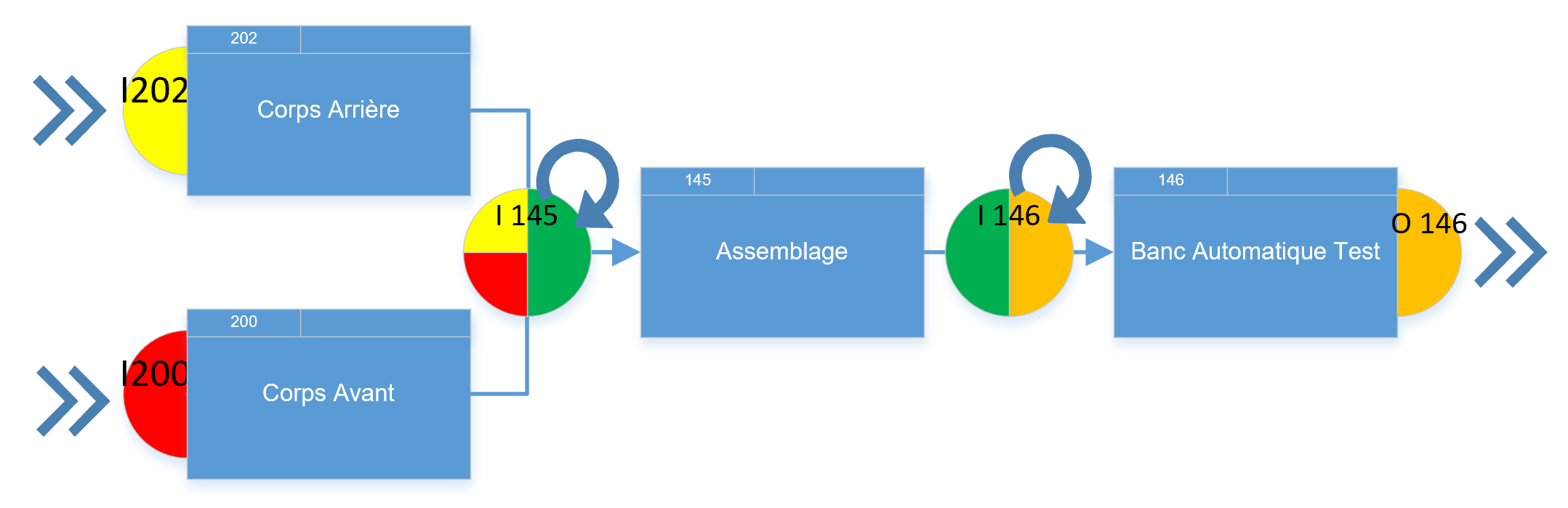
The inbound and outbound locations are set for a resource (Production control > Setup > Resources > Resource) in connection with a resource group. The group in turn specifies the [advanced] inbound and the outbound warehouses, which are normally the same (unless it’s subcontracting).
However, on an attempt to select a non-license plate controlled location warehouse location (the one where in the Location profile the parameter Use license plate tracking = No) for the output, a warning message is shown: “A work policy does not exist for location %1. A work policy must exist for a non-license plate controlled output location”.
Indeed, a work policy must be created to inhibit put-away work on reporting products as finished into this location:

A put away work is bad even if it shows into the same location I146 -> I146, because it reserves the semi-finished product and makes it unavailable to the next machine. With the above policy no put-away work is going to be created out of the location I146, the material is reported as finished into this location and stays there, ready to be reserved and consumed by the downstream resource.
Diverging material flows
Forks in the material flow makes much harder to configure. For example, if one resource may feed different downstream resources depending on the context, then the above setup with a work policy is not going to work.
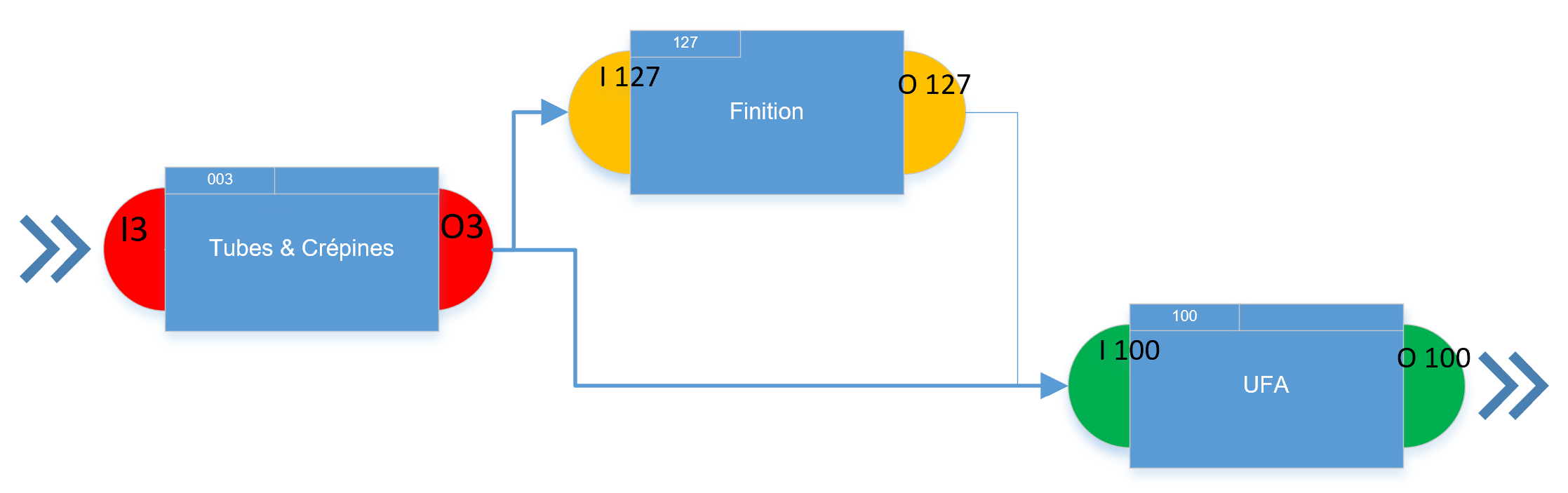
In short, one needs 3 ‘ingredients’:
- a Work template with an automatic processing;
- a specially prepared Location;
- a set of “put” Location directives (“pick” directives are not requited, because the picking location is always dictated by the resource).
The Work template (Warehouse management > Setup > Work > Work templates) for the Finished goods put away work order type should have a typical Pick-Put pair, an Automatically process flag (!) set and a distinct Query to react to pre-defined semi-finished products.
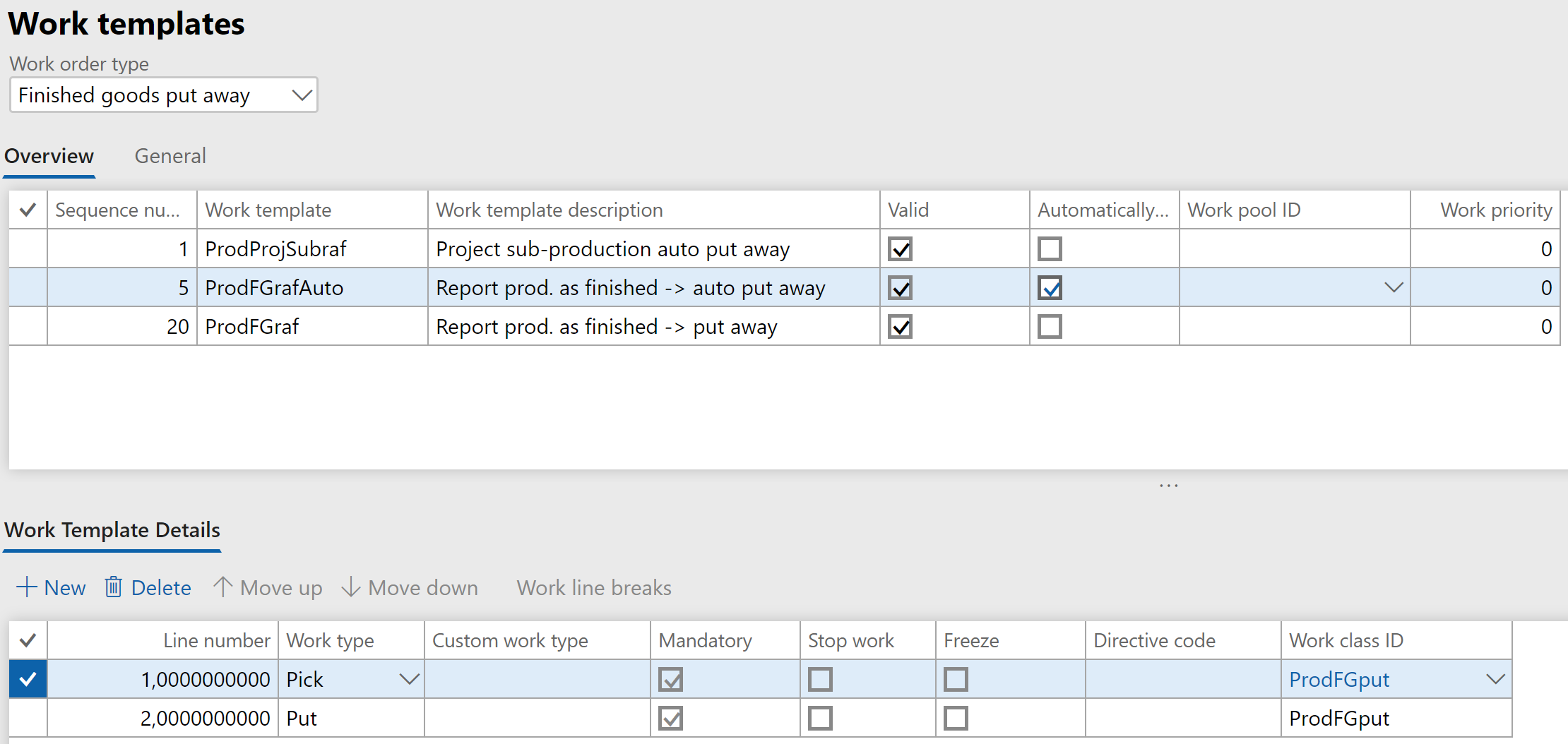
Bear in mind that (1) the automatic work processing requires a Default work user ID in the Warehouse management parameters; (2) the automatic work processing fails if the product is serial number controlled; (3) the number sequence for the license plates must exist: the system is going to need a temporary target LP ID.
The Location should not be license plate controlled, because if it was, the production worker would need to manually select a distinct LP on the Report as finished or the Manufacturing execution Feedback screen.
However, such a location cannot be selected in a resource, as we know. On the one hand, you don’t wish to have license plates, on another hand you need an automatic put away work to a certain location, and a prohibitive put work policy is not an option anymore.
This is not intended by Microsoft to work, but one can trick the system into it. First, assign a LP-tracked profile to the output location, and select it in the resource. Second, change the profile of the location to a Non-LP-tracked one!
The Put Location directives (Warehouse management > Setup > Location directives) for the Finished goods put away work react to certain products or resources with the help of the directive header Query (one can join the production table with the production route in the query) and divert the automatic put operation from one location to another:
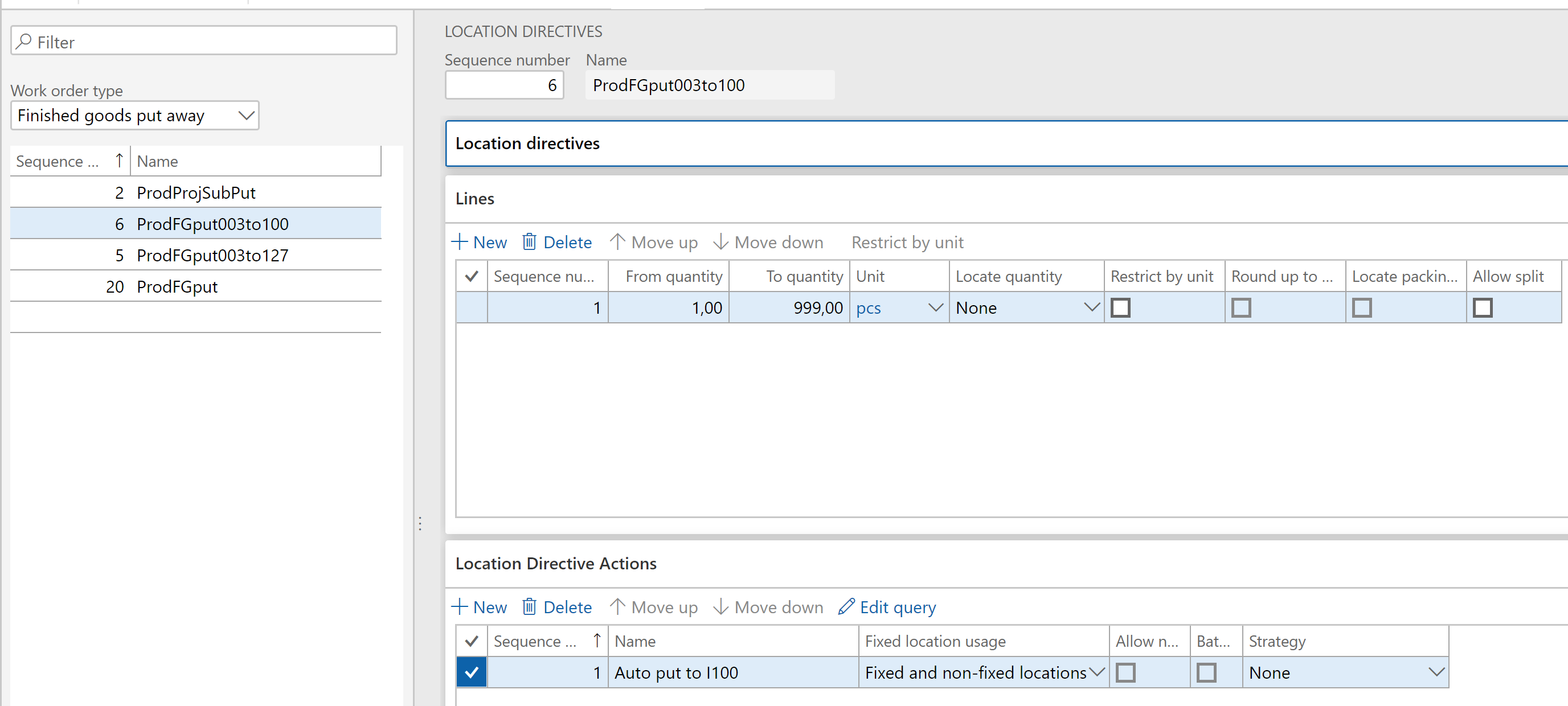
The target location is “hardcoded” in the Location directive action Query.
Let the worker report the production order as finished: the system creates and executes put away work despite the missing license plate. One product goes ‘left’ and another goes ‘right’ from the same station fully automatically:

Conclusion
It is possible to “hard-wire“ a certain material flow between machines into the Warehouse management. Overlapping production orders remains a nuisance, because BOM lines do not exhibit a location if the warehouse is an “advanced” one: the input location of the machine is derived dynamically and the WHS module does its working through the reservation: the raw material must be reserved in the inbound location prior to consumption. But how do you reserve a material if it did not exist as you started the downstream production order?! The orders may be chained by the “Pegged supply” or automatically “re-released to warehouse” every X minutes.
The post Semi-finished goods in an advanced warehouse appeared first on ER-Consult.
*This post is locked for comments