







Disable field in Business Process Flow in D365 CE using JavaScript
Views (117)

 Like
Like Share
Share
 Report
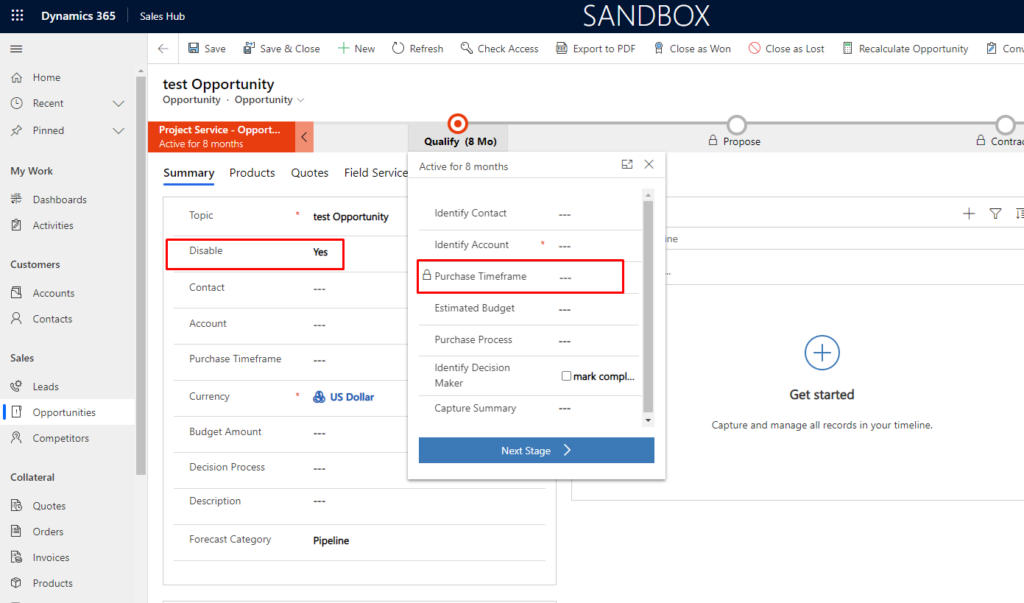
Use case – Our requirement is to mark field Purchase time Frame disabled in Business process flow on change of disable field(custom field) on opportunity form.
Let’s see how we can achieve this
Solution –
Step 1 – Create web resource with below function-
Add header_process before schema name of field.
Here schema name of purchase time frame field is purchasetimeframe. And after adding header_process_purchasetimeframe
 var opportunityCustomization =
 {
     //opportunityCustomization.disableField
     disableField : function(executionContext)
     {
         var formContext = executionContext.getFormContext();
         var disable = formContext.getAttribute("cf_disable").getValue();
         if (disable == true)
         {
             formContext.getControl("header_process_purchasetimeframe").setDisabled(true);
         }
     }
 }
Step 2: Add this web resource on form load, on Save and on change of the field. And try
Output –
Hope this helps !
The post Disable field in Business Process Flow in D365 CE using JavaScript appeared first on Cloudfronts - Microsoft Dynamics 365 | Power BI | Azure.
*This post is locked for comments