




 37,172
 Like
Like Share
Share
 Report
Today in a forum someone asks this question: can I serialize a Microsoft Dynamics NAV object (record in a table) as JSON in C/AL?
The new AL language (Extensions 2.0) has native support for JSON (for example JsonObjectClass) but in C/AL there’s no a native way to serialize objects as JSON. JSON is supported only in OData objects (by appending ?$format=json in the url).
In C/AL we can use the wonderful JSON.NET addin (always available when installing Visual Studio on your machine) and use them to handle JSON serialization.
To do this, copy the Newtonsoft.Json.dll assembly in the Add-ins folder on the service tier (or in the RoleTailored client folder if you want to use it client-side).
If you’re useful to JSON.NET in Visual Studio you already knows that, after referencing JSON.NET, you can use JSONConvert.SerializeObject(<YourObject>) to obtain its JSON serialization. But what about C/AL and NAV?
Imagine that you want to serialize a NAV Customer as JSON. Unfortunately, writing something like this it doesn’t work:

In order to serialize a Customer object from C/AL with JSON.NET, you’ve to manually declare the attributes of your NAV object that you want to add in your JSON class. You can do the following:
Create the following 3 DotNet variables by referencing the .NET assembly mscorlib:
- StringBuilder: System.Text.StringBuilder.’mscorlib, Version=4.0.0.0, Culture=neutral, PublicKeyToken=b77a5c561934e089′
- StringWriter: System.IO.StringWriter.’mscorlib, Version=4.0.0.0, Culture=neutral, PublicKeyToken=b77a5c561934e089′
- JSON: System.String.’mscorlib, Version=4.0.0.0, Culture=neutral, PublicKeyToken=b77a5c561934e089′
Then reference the JSON.NET assembly:
- JSONTextWriter: Newtonsoft.Json.JsonTextWriter.’Newtonsoft.Json, Version=6.0.0.0, Culture=neutral, PublicKeyToken=30ad4fe6b2a6aeed’
Create a function called CreateJSONAttribute as following:
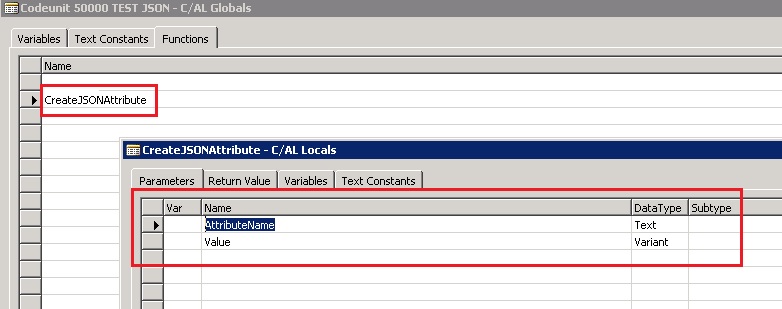
and in the function code write these lines:

In this function, we create a JSON property and its value and we write it to the JSON serialization.
The JSON serialization of a NAV Customer object is handled as following:

Here, we use the JSONTextWriter class to create a JSON object on a StringWriter, then the StringWriter object writes to the specified StringBuilder object used in its constructor. At the end, here we retrieve the JSON text and we output it on NAV.
This is the final result:

Not as easy as in C# or in AL but it could be useful (and obviously we can handle also the parsing of an input JSON request).
*This post is locked for comments