




 6,125
6,125 Like
Like Share
Share
 Report
There are two way to restrict your customization with country region..
- Code Level Restriction
- Elements Level Restriction
Code Level Restriction
Below is code & Screenshot sample to restrict#ISOCountryRegionCodes
if (SysCountryRegionCode::isLegalEntityInCountryRegion([#isoPK]))
{
// TODO
}
Elements Level Restriction
Below is element property & Screenshot sample to restrict.In this blog we are using output menu item to implement country specific restriction
Select Menu Item properties and Enter Country Code in country region code Property.
Screenshot sample
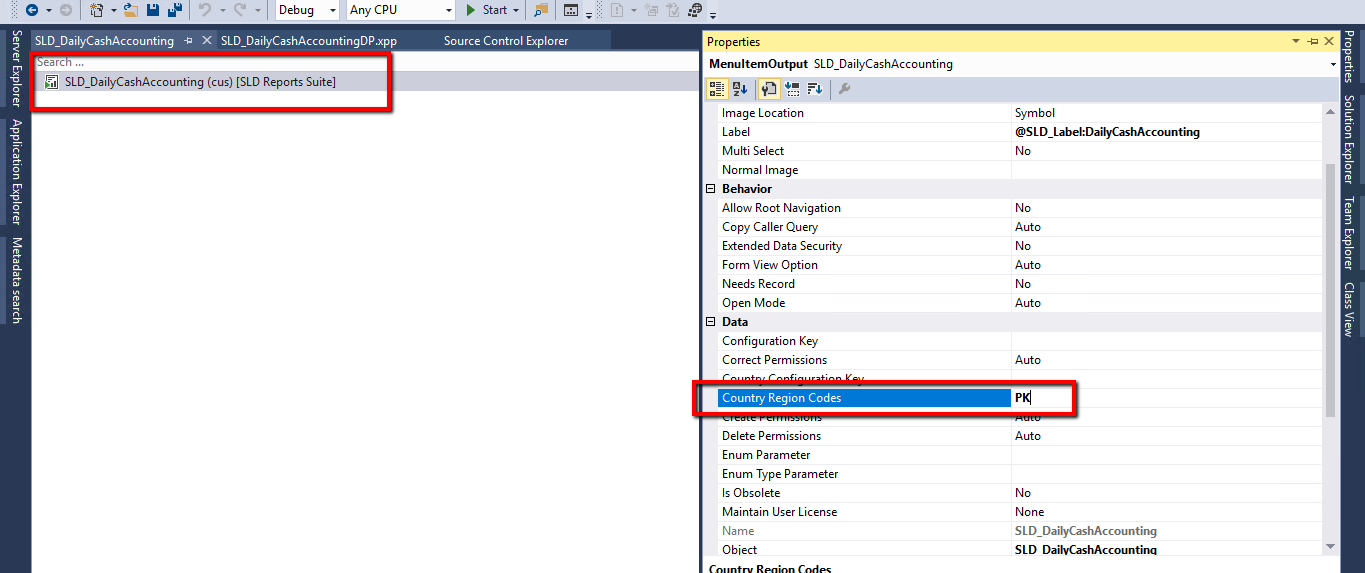
Now Build Your D365 Model and verify... Your code will execute and element will show only if you company address set as PAKISTAN..
*This post is locked for comments