




 17,021
 Like
Like Share
Share
 Report
In CRM we don't have option to show picklist / option set as a radio button. we can show radio buttons/ check box / drop down for boolean attirbute but not for option set.
If you want to show option set as radio button list we can achieve this by adding one HTML web resource and some Jquery code..
Here are steps to convert Option set into radio button list.
1. Create HTML web resource and give proper name
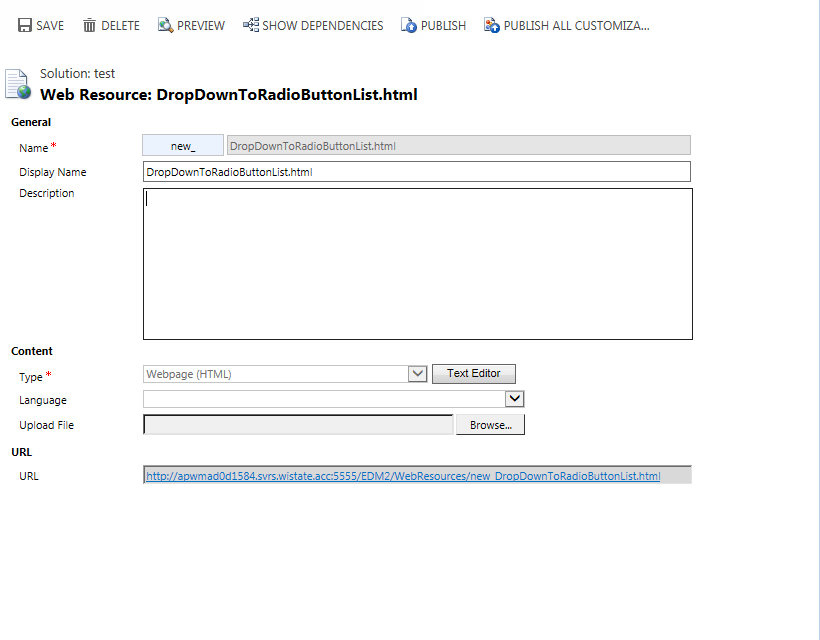
3. As I am using Jquery functions in this HTML web resource, so we need to add Jquery library.
< script type="text/javascript" src="new_jquery_1.10.2" > < / script >
If you are using folder structure for web resources name like new_JavaScript/jquery_1.10.2.js
then reference library like
< script type="text/javascript" src="../new_JavaScript/jquery_1.10.2.js" > < / script >
4. In HTML web resource I am using option set attribute name "new_radiobuttongroup", and to get option set values & Text from CRM form I am using
var dropdownOptions = parent.Xrm.Page.getAttribute("new_radiobuttongroup").getOptions();
5. Save HTML web resource, and open Entity form where you want to convert option set to radio button.
6. Add Jquery library which we used in HTML web resource in form library.

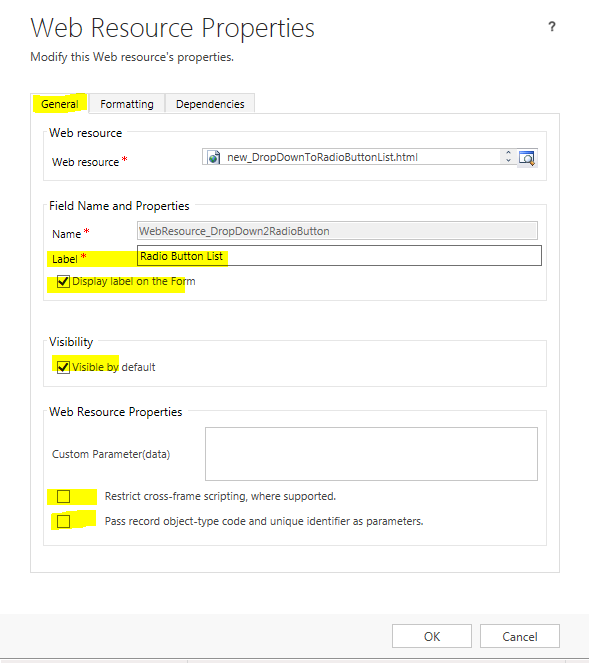
6. Add above created web resource on form. and set web resource properties as shown

7. Add your option set attribute on form which you want to show as radio button list. and set
Visible by default property to false.
your form will look like

8. Save and publish your customization.
Now here is option set shown as radio button list..

If you want to show option set as radio button list we can achieve this by adding one HTML web resource and some Jquery code..
Here are steps to convert Option set into radio button list.
1. Create HTML web resource and give proper name
2. Add following code in your HTML web resource
3. As I am using Jquery functions in this HTML web resource, so we need to add Jquery library.
< script type="text/javascript" src="new_jquery_1.10.2" > < / script >
If you are using folder structure for web resources name like new_JavaScript/jquery_1.10.2.js
then reference library like
< script type="text/javascript" src="../new_JavaScript/jquery_1.10.2.js" > < / script >
4. In HTML web resource I am using option set attribute name "new_radiobuttongroup", and to get option set values & Text from CRM form I am using
var dropdownOptions = parent.Xrm.Page.getAttribute("new_radiobuttongroup").getOptions();
5. Save HTML web resource, and open Entity form where you want to convert option set to radio button.
6. Add Jquery library which we used in HTML web resource in form library.
6. Add above created web resource on form. and set web resource properties as shown
You can set number or rows depending on your number of option set options.
Visible by default property to false.
your form will look like
8. Save and publish your customization.
Now here is option set shown as radio button list..
*This post is locked for comments