







Microsoft CRM 2011/2013: Colorizing Service Calendar
Views (5851)
 a33ik
a33ik
 84,331
Most Valuable Professional
84,331
Most Valuable Professional
 Like
Like Share
Share
 Report
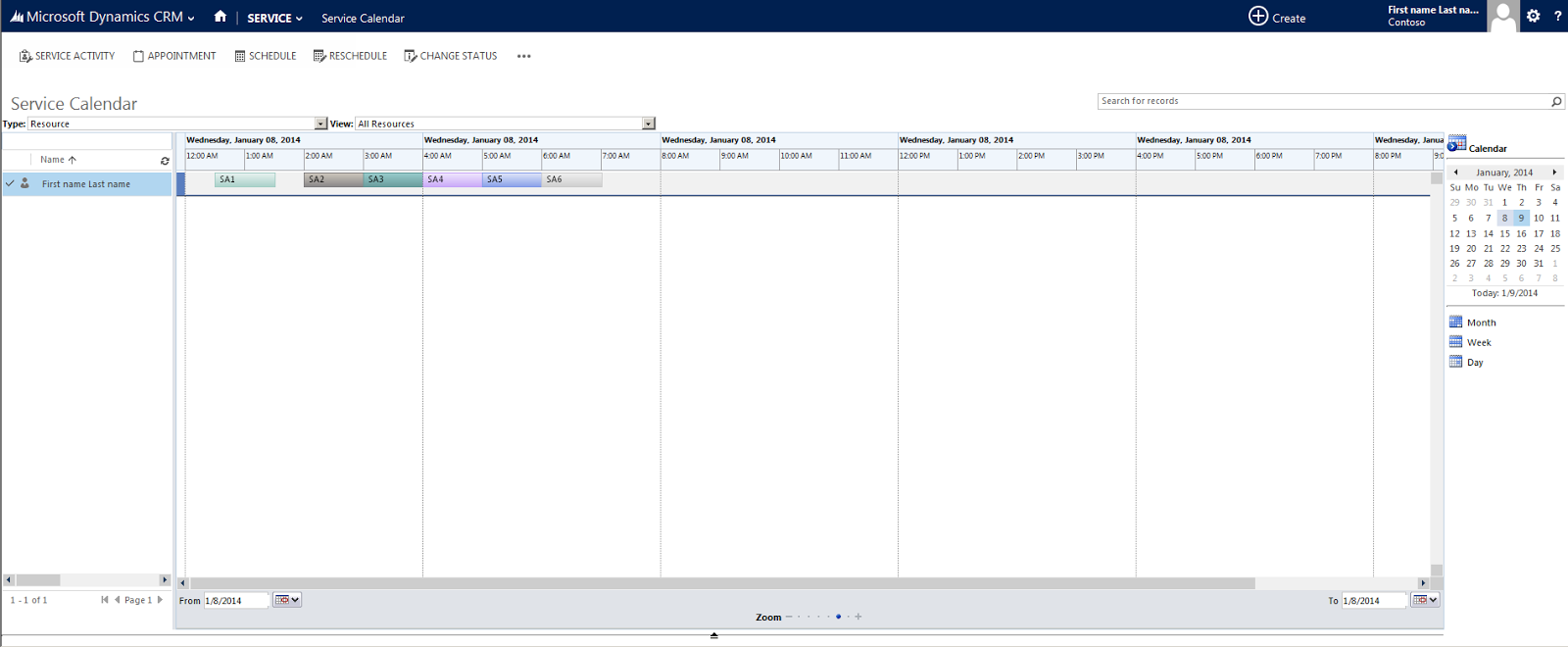
This is how standard service calendar looks like:
Today I was asked with customer is it possible to change colorizing schema of Service Calendar. I started to look for information about it and found following article - http://msdn.microsoft.com/en-us/library/gg309501.aspx
Unfortunately I was not able to understand now to make it from first attempt and I contacted Microsoft to get some clarification and help. I’m really appreciated to Jim Daly who got in touch with me and gave some explanations regarding SDK article. I will share with results I've got in this article.
Follow the steps to change appearance of Service Calendar:
1. Create a css webresource with Display Name AppointmentBookConfig and put following CSS inside:
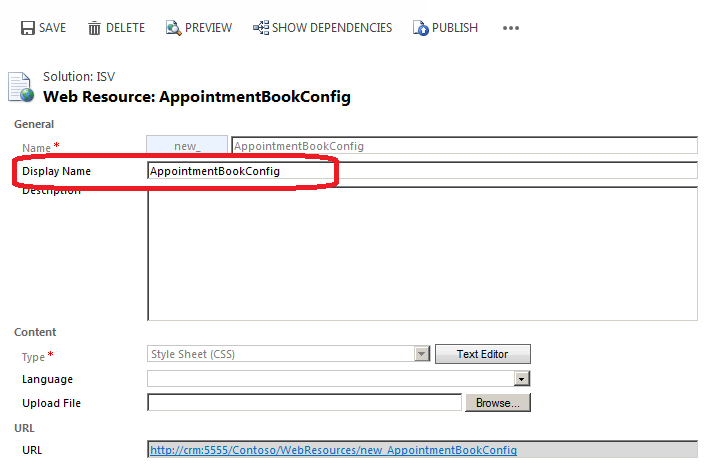
Note: Display Name of webresource has to be AppointmentBookConfig!!!
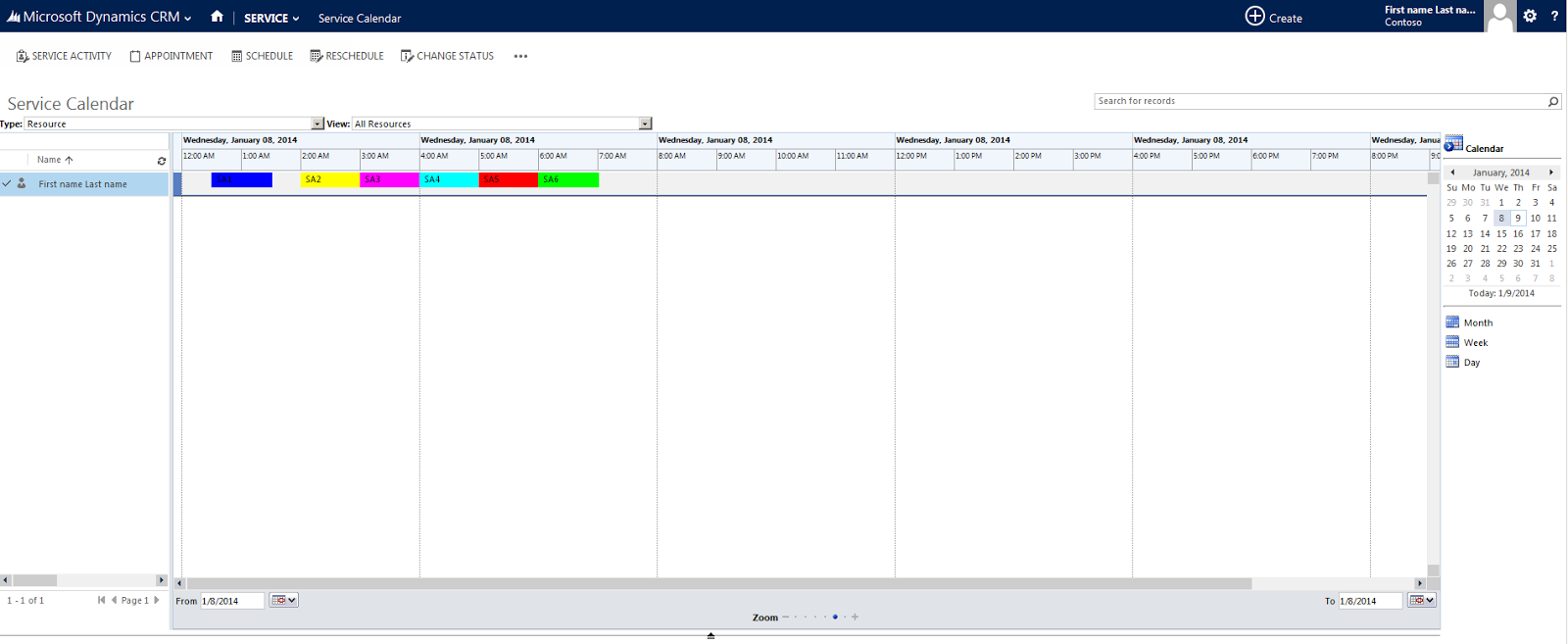
3. Reload Service calendar and check that changes were applied in accordance to your webresource:
Today I was asked with customer is it possible to change colorizing schema of Service Calendar. I started to look for information about it and found following article - http://msdn.microsoft.com/en-us/library/gg309501.aspx
Unfortunately I was not able to understand now to make it from first attempt and I contacted Microsoft to get some clarification and help. I’m really appreciated to Jim Daly who got in touch with me and gave some explanations regarding SDK article. I will share with results I've got in this article.
Follow the steps to change appearance of Service Calendar:
1. Create a css webresource with Display Name AppointmentBookConfig and put following CSS inside:
Note: Display Name of webresource has to be AppointmentBookConfig!!!
div.ganttBlockserviceappointmentStatus1
{
    border: 1px solid #FF0000;
    FILTER: progid:DXImageTransform.Microsoft.gradient(GradientType=0,startColorstr='#FF0000',endColorstr='#FF0000');
    background: -moz-linear-gradient(top,  #FF0000 0%, #FF0000 100%);
    background: -webkit-linear-gradient(top,  #FF0000 0%,#FF0000 100%);
    background: -ms-linear-gradient(top,  #FF0000 0%,#FF0000 100%);
    background: linear-gradient(top,  #FF0000 0%,#FF0000 100%);
}

div.ganttBlockserviceappointmentStatus2
{
    border: 1px solid #00FF00;
    FILTER: progid:DXImageTransform.Microsoft.gradient(GradientType=0,startColorstr='#00FF00',endColorstr='#00FF00');
    background: -moz-linear-gradient(top,  #00FF00 0%, #00FF00 100%);
    background: -webkit-linear-gradient(top,  #00FF00 0%,#00FF00 100%);
    background: -ms-linear-gradient(top,  #00FF00 0%,#00FF00 100%);
    background: linear-gradient(top,  #00FF00 0%,#00FF00 100%);
}

div.ganttBlockserviceappointmentStatus3
{
    border: 1px solid #0000FF;
    FILTER: progid:DXImageTransform.Microsoft.gradient(GradientType=0,startColorstr='#0000FF',endColorstr='#0000FF');
    background: -moz-linear-gradient(top,  #0000FF 0%, #0000FF 100%);
    background: -webkit-linear-gradient(top,  #0000FF 0%,#0000FF 100%);
    background: -ms-linear-gradient(top,  #0000FF 0%,#0000FF 100%);
    background: linear-gradient(top,  #0000FF 0%,#0000FF 100%);
}

div.ganttBlockserviceappointmentStatus4
{
    border: 1px solid #FFFF00;
    FILTER: progid:DXImageTransform.Microsoft.gradient(GradientType=0,startColorstr='#FFFF00',endColorstr='#FFFF00');
    background: -moz-linear-gradient(top,  #FFFF00 0%, #FFFF00 100%);
    background: -webkit-linear-gradient(top,  #FFFF00 0%,#FFFF00 100%);
    background: -ms-linear-gradient(top,  #FFFF00 0%,#FFFF00 100%);
    background: linear-gradient(top,  #FFFF00 0%,#FFFF00 100%);
}

div.ganttBlockserviceappointmentStatus6
{
    border: 1px solid #FF00FF;
    FILTER: progid:DXImageTransform.Microsoft.gradient(GradientType=0,startColorstr='#FF00FF',endColorstr='#FF00FF');
    background: -moz-linear-gradient(top,  #FF00FF 0%, #FF00FF 100%);
    background: -webkit-linear-gradient(top,  #FF00FF 0%,#FF00FF 100%);
    background: -ms-linear-gradient(top,  #FF00FF 0%,#FF00FF 100%);
    background: linear-gradient(top,  #FF00FF 0%,#FF00FF 100%);
}

div.ganttBlockserviceappointmentStatus7
{
    border: 1px solid #00FFFF;
    FILTER: progid:DXImageTransform.Microsoft.gradient(GradientType=0,startColorstr='#00FFFF',endColorstr='#00FFFF');
    background: -moz-linear-gradient(top,  #00FFFF 0%, #00FFFF 100%);
    background: -webkit-linear-gradient(top,  #00FFFF 0%,#00FFFF 100%);
    background: -ms-linear-gradient(top,  #00FFFF 0%,#00FFFF 100%);
    background: linear-gradient(top,  #00FFFF 0%,#00FFFF 100%);
}

div.ganttBlockserviceappointmentStatus8
{
    border: 1px solid #7F7F7F;
    FILTER: progid:DXImageTransform.Microsoft.gradient(GradientType=0,startColorstr='#7F7F7F',endColorstr='#7F7F7F');
    background: -moz-linear-gradient(top,  #7F7F7F 0%, #7F7F7F 100%);
    background: -webkit-linear-gradient(top,  #7F7F7F 0%,#7F7F7F 100%);
    background: -ms-linear-gradient(top,  #7F7F7F 0%,#7F7F7F 100%);
    background: linear-gradient(top,  #7F7F7F 0%,#7F7F7F 100%);
}
Note: div classes since UR 12 CRM 2011 are case sensitive so be attentive!!!
2. Save and publish this webresource.
3. Reload Service calendar and check that changes were applied in accordance to your webresource:
This was originally posted here.
*This post is locked for comments