







Create flows with Power Automate to update Title field in libraries of newly created SharePoint site automatically
 StefanS365
 3,575
Most Valuable Professional
3,575
Most Valuable Professional
 Like
Like Share
Share
 Report
The Title field / property of files in SharePoint document libraries is important for the search index, so it’s a best practice to set the Title field manually or automatically by Power Automate flow for instance. Using Power Automate means you need to create flows that trigger on created and modified files in the relevant document libraries and that is a challenge to manage by hand. So I’ve been looking for a way to Power Automate this.
The first step is to create a template flow that will update the Title field with the file name when a file is created or modified. Here is the overview of this simple flow.

It’s important to add trigger condition(s) to the trigger, so the flow is triggered only when the condition(s) are met. For example when the Title and Name fields are not equal
@not(equals(triggerBody()?['Title'],triggerBody()?['{Name}']))or when the Title field is empty
@empty(triggerBody()?['Title'])
The next step is to create the flow that can be called from your site provisioning process. In case you are using site designs and site scripts, or site provisioning engine and templates it’s possible to call Power Automate flow in / at the end of the process. Here is an overview of the flow.
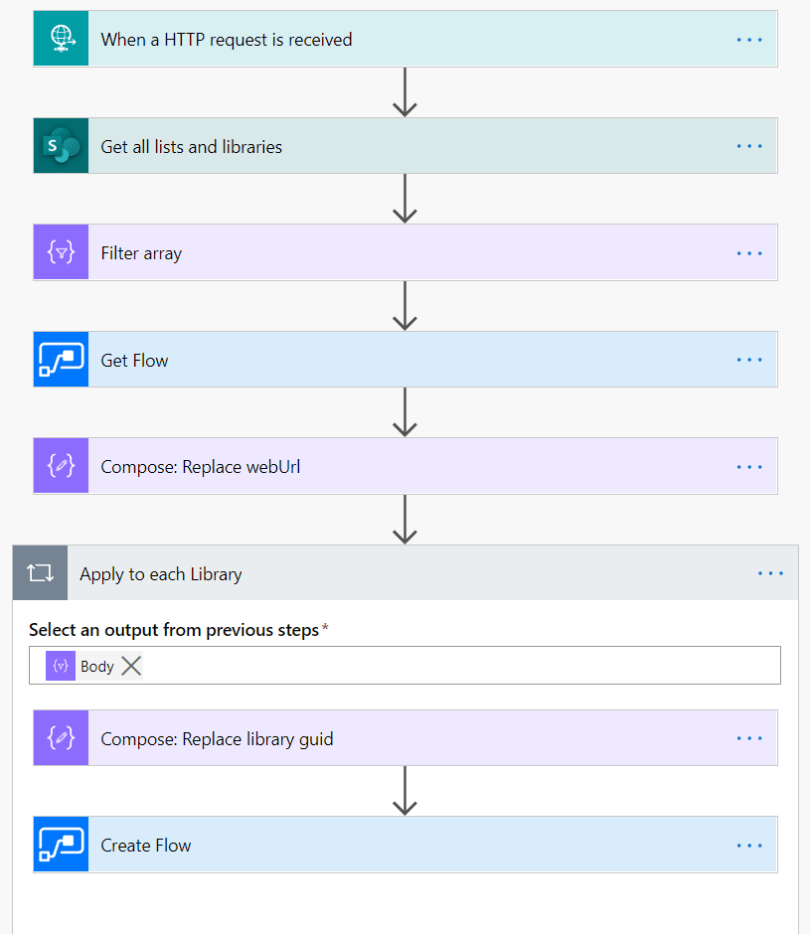
Create the flow with a ‘When a HTTP request is received’ trigger and follow steps 1-5 from the tutorial Calling Power Automate from a site script.

Use the webUrl to set as custom value for the Site Address in the SharePoint action Get all lists and libraries.
Then use the Filter array action to select the document libraries (Type = 101) from the output of the previous action, with the following result:

In the next action we get the template flow ‘Update Title field’, and we replace the url in the Flow Definition of the template flow with the webUrl of the newly created site.
replace(string(body('Get_Flow')['properties']['definition']),'https://server.sharepoint.com/sites/web',triggerBody()?['webUrl'])
Then for each library from the Filter array body we take the Name field to replace the guid in the Flow Definition of the template flow.
replace(outputs('Compose:_Replace_webUrl'), '0c50cdd6-____-____-____-b1af844e8cda', items('Apply_to_each_Library')?['Name'])
The last action is to create a flow and set the Flow Display Name as follows:
concat(items('Apply_to_each_Library')?['DisplayName'],': ',body('Get_Flow')['properties']['displayName'])and add the Flow Definition that is composed to refer to the library:
json(outputs('Compose:_Replace_library_guid'))So the flow is ready to be tested and I use a simple flow to call the flow with a specified webUrl.

The called flow has run successfully and five flows were created.

Now when a file is created / added or modified the Title field will be updated with the file name when the trigger conditions are met.

The post Create flows with Power Automate to update Title field in libraries of newly created SharePoint site automatically appeared first on There's Something About Dynamics 365.
This was originally posted here.
*This post is locked for comments