







New Functionality In Microsoft Dynamics 365 Business Central 2023 Wave 1: Set Default Dimensions on Locations, Inventory Documents and Journals
 Ian Grieve
 22,784
 Like
Like Share
Share
 Report
 This post is part of the New Functionality In Microsoft Dynamics 365 Business Central 2023 Wave 1 series in which I am taking a look at the new functionality introduced in Microsoft Dynamics 365 Business Central 2023 Wave 1.
The nineteenth of the new functionality in the Application section is Set default dimensions on locations, inventory documents, and journals.
Dimensions are values that categorize entries so you can track and analyze them using various reporting tools. For example, dimensions can indicate the department or project an entry came from. Having default dimensions on entities helps people avoid making mistakes and having to enter dimensions manually on the transaction level if all goods come from a single location and department.
Enabled for: Users, automatically
Public Preview: Mar 2023
General Availability: Apr 2023
Feature Details
In this release we’re completing the Default Dimension on Location feature that we introduced several releases ago.
You can set default dimensions for a location on the Location Card page by choosing the Dimensions action. When you choose the location on a line in one of the following documents, its default dimensions are copied to the document:
- Transfer Order
- Physical Inventory Order
- Inventory Shipment
- Inventory Receipt
- Item Journals
If needed, you can delete or change the dimension on the line.
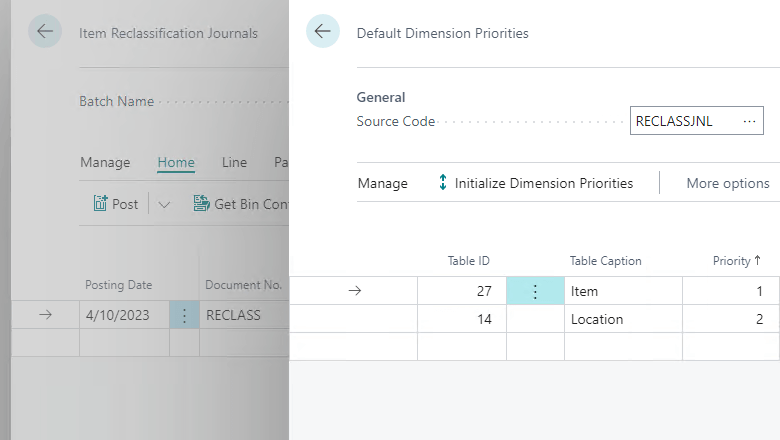
You can require that people specify dimensions for specific locations before they can post an entry. You can also include location dimension values in Default Dimension Priorities and Dimension Combinations for combinations of priority and dimension rules.
Because transfer order documents and reclassification journals deal with more than one location, the order in which you enter data is important. Default dimensions are copied from the last location field (In-Transit Location is ignored). The following examples illustrate the default dimension that will be used.
You have the following dimension settings:
- Location EAST. Department dimension is ADM
- Location WEST. Department dimension is PROD
You specify the location on a transfer order as follows:
- From Location = EAST
- To Location = WEST
The PROD dimension will be copied from location WEST.
You fill in the fields in the opposite order, as follows:
- To Location = WEST
- From Location = EAST
The ADM dimension will be copied from location EAST.
My Opinion
I’m fairly new to working with Dynamics BC, but I am finding that dimensions are quite a useful way of managing additional information on postings. The previous ERPs I worked with did not use dimensions so the concept is fairly new to me.
Having default dimensions on locations makes a lot of sense, to the extent that I’m surprised they weren’t already available.
New Functionality In Microsoft Dynamics 365 Business Central 2023 Wave 1
Read original post New Functionality In Microsoft Dynamics 365 Business Central 2023 Wave 1: Set Default Dimensions on Locations, Inventory Documents and Journals at azurecurve|Ramblings of an IT Professional
This was originally posted here.
*This post is locked for comments