




 32,729
 Like
Like Share
Share
 Report
The development of a COM component with .Net for usage in Navision needs a special approach. Start with a new C# project, project type Class Library. Set the project to “Make assembly com-visible”. The simple automation provides a string property and a method to show a .net message box.
// a sample code
using System;
using System.Runtime.InteropServices;
using System.Windows.Forms;

namespace SampleAutom
{
 // the interface, so that the methods and properties are shown in Nav
 // needed attributes InterfaceType and Guid
 [InterfaceType(ComInterfaceType.InterfaceIsDual)]
 // create a new Guid
 [Guid("9304DD04-5EF0-498E-893E-CB644CD34656")]
 interface IMyInterface
 {
  // set a DispId for each method/property
  [DispId(1)]
  int MsgBox(string message);

  [DispId(2)]
  string Title { get; set; }
 }

 // class attributes
 [ClassInterface(ClassInterfaceType.AutoDual)]
 [Guid("D9E556F3-4D85-45C9-965A-DB3D918528CD")]
 // implement the interface
 public class TestCom : IMyInterface
 {
  string _title = "Dynamics Nav";

  public TestCom()
  { }

  // with property Title you can set/read the title of the msgbox
  public string Title
  {
    get
    { return _title; }

    set
    { _title = value; }
  }

  // method msgbox returns an integer value according the clicked button
  // Yes = 6, No = 7, Cancel = 2
  public int MsgBox(string message)
  {
    var result = MessageBox.Show(message, Title,
       MessageBoxButtons.YesNoCancel, MessageBoxIcon.Information);
    return (int)result;
  }
 }
}
To install the new automation run visual studio in admin mode. after restart and loading the project build/compile the project.
Now start Navision and create a new codeunit. In the OnRun trigger add following code:
// TestCom, Automation, 'SampleAutom'.TestCom
// RetVal, Integer
CREATE(TestCom);
TestCom.Title := '.Net Msgbox run in Navision';
RetVal := TestCom.MsgBox('Your message text ...');
MESSAGE(FORMAT(RetVal));
CLEAR(TestCom);
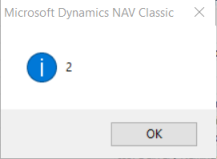
Now run the codeunit. It results in:

cheers
Filed under: .net, automation, c/al, dynamics nav, nav 2009, nav 2013, nav 5, nav functions Tagged: .net, c#, class library, com component, interface

*This post is locked for comments