







Clearing remembered / default login for SQL Server Management Studio
Views (4105)

 Like
Like Share
Share
 Report
Occasionally I have to test different SQL Server logins with varying permissions to troubleshoot random GP or integration errors. Sometimes I test those logins by launching SQL Server Management studio and logging in to SQL to confirm they work and behave as expected.
Well, if you have ever tried this, you know that Management Studio suddenly falls in love with the last login that you used and will always display it as the default Login.
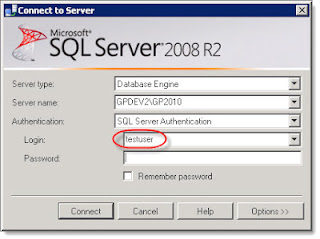
So, after I tested with a login of "testuser", every time I launched SQL Management Studio, I was prompted to login using "testuser", and had to always switch to the 'sa' login on my dev machine. Seems trivial, but it's incredibly annoying, especially when you are just using to pressing enter to login as 'sa' with saved password.
I tried searching for this issue, but didn't get any relevant results.
Thanks to some help from a fellow expert on Experts Exchange, I was pointed to this Stack Overflow thread that explains how to delete the "remembered" logins for SQL Server Management Studio:
Deleting the SqlStudio.bin file worked like a charm, and my 'testuser' is now nowhere to be found.
Just be aware that deleting the file will clear ALL saved server connections, logins, and saved passwords.
Steve Endow is a Dynamics GP Certified Trainer and Dynamics GP Certified IT Professional in Los Angeles. He is also the owner of Precipio Services, which provides Dynamics GP integrations, customizations, and automation solutions.
http://www.precipioservices.com
Well, if you have ever tried this, you know that Management Studio suddenly falls in love with the last login that you used and will always display it as the default Login.

So, after I tested with a login of "testuser", every time I launched SQL Management Studio, I was prompted to login using "testuser", and had to always switch to the 'sa' login on my dev machine. Seems trivial, but it's incredibly annoying, especially when you are just using to pressing enter to login as 'sa' with saved password.
I tried searching for this issue, but didn't get any relevant results.
Thanks to some help from a fellow expert on Experts Exchange, I was pointed to this Stack Overflow thread that explains how to delete the "remembered" logins for SQL Server Management Studio:
SQL Server Management Studio 2008 delete the fileC:\Users\%username%\AppData\Roaming\Microsoft\Microsoft SQL Server\100\Tools\Shell\SqlStudio.bin
SQL Server Management Studio 2005 delete the file – same as above answer but the Vista path.C:\Users\%username%\AppData\Roaming \Microsoft\Microsoft SQL Server\90\Tools\Shell\mru.dat
Deleting the SqlStudio.bin file worked like a charm, and my 'testuser' is now nowhere to be found.
Just be aware that deleting the file will clear ALL saved server connections, logins, and saved passwords.
Steve Endow is a Dynamics GP Certified Trainer and Dynamics GP Certified IT Professional in Los Angeles. He is also the owner of Precipio Services, which provides Dynamics GP integrations, customizations, and automation solutions.
http://www.precipioservices.com
This was originally posted here.
*This post is locked for comments