







Microsoft Dynamics GP VBA Showing as Locked
 Ian Grieve
 22,784
 Like
Like Share
Share
 Report
 I was asked to help a customer with a new Microsoft Dynamics GP client installation as they were encountering some issues with some old VBA customisations. Hearing it was a new server, I wondered if the problem was that they had used Windows Server 2019, on which VBA customisations will not work and will actually cause Dynamics GP to crash immediately.
However, when I delved into the issue with them we found that the VBA customisations were showing as locked in the Customisation Maintenance window (()):
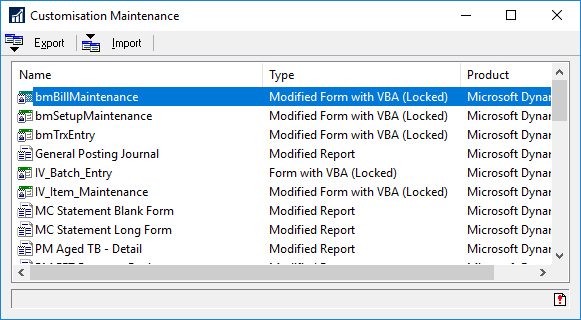
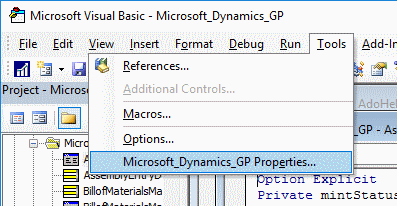
There is a couple of common reasons for this. The first is that the VBA project is locked; to check this open the Microsoft Visual Basic window and click Tools » Microsoft Dynamics GP Properties:
If the Lock project for viewing box is marked, remove the check and click OK:
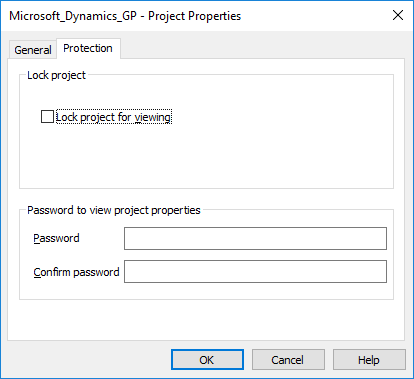
In the case I was investigating tis box was unmarked, so I followed up looking at the second option; that there is a missing reference. From the Tools menu open the References window and check for any missing components; as the screen shot below shows, there was a missing ReportPrinter component:
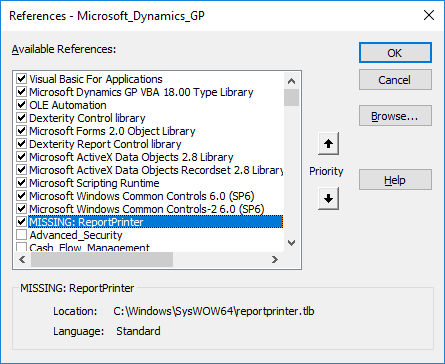
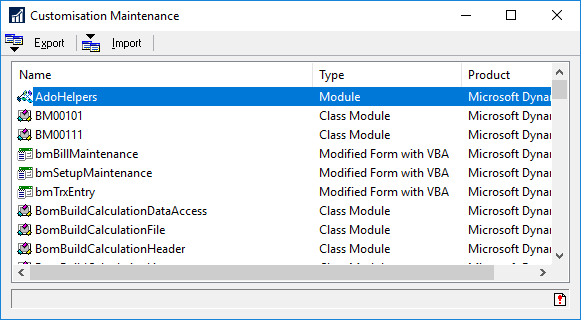
Once this component was added to the machine, VBA customisations no longer showed as locked:
Read original post Microsoft Dynamics GP VBA Showing as Locked at azurecurve|Ramblings of an IT Professional
This was originally posted here.
*This post is locked for comments