




 Like
Like Share
Share
 Report
Introduction:
There can be a case where developers might need to display data from different companies in NAV or Unique view of Tables displaying unique values of a table or Joins from Tables. In such cases, developers can use the “LinkedObject” property of a table.
Pre-requisites:
- VS Code
- AL Language Extension
- Microsoft Dynamics NAV
Solution:
Step 1:
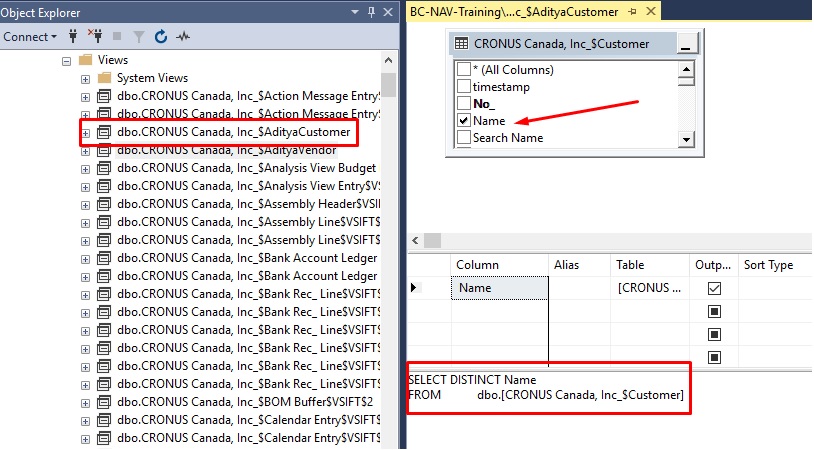
Go to SQL Server Management Studio and create a view of the table from where you want to display field values.
Here I have created a view of Customer Table to display distinct Customer Names.
And saved the view as “AdityaCustomer” Company Name as the prefix.
 |
| View |
Step 2:
Now, In NAV Development Environment create a table with the same as the view that has been
created, Do not include the company prefix. And add the field with the same name of the field included
in View.
 |
| Table in NAV |
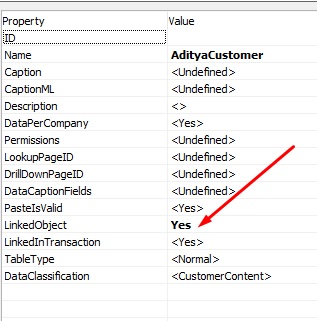 |
| Linked Object Property |
Step 3:
When this Table is run, you can see distinct Customer names in the Table.

Conclusion:
This way developers can display data from Views using LinkeObject property.
Hope this helps!
The post How to use LinkedObject property appeared first on .
*This post is locked for comments