




 Like
Like Share
Share
 Report
I recently lead a webinar about the new features in CRM 2015, and one of the attendees asked a great question:
“Is there anything new in 2015 that can prevent server synchronization from sending an update to meeting attendees when the description field is updated? Users record their notes in that field, and we don’t want negative comments about a client being sent to the client.”
This is a good question, because many people don’t realize that Server Synchronization broadcasts meeting changes to attendees. With Outlook synchronization, changes to meetings are not sent to attendees unless someone in Outlook chooses to send an update. With server synchronization, meeting changes are sent out to attendees, even if the meeting occurred in the past.
But there are things that you can do to prevent sensitive notes from being sent to a client.
- Don’t use the Description field to record meeting notes. Besides the risk that the sensitive notes may get sent back to attendees, the other down side is that this field is just a massive long text field. What if you and two other users update the record? Your notes may get overwritten, and are not time/date stamped like standard CRM notes.
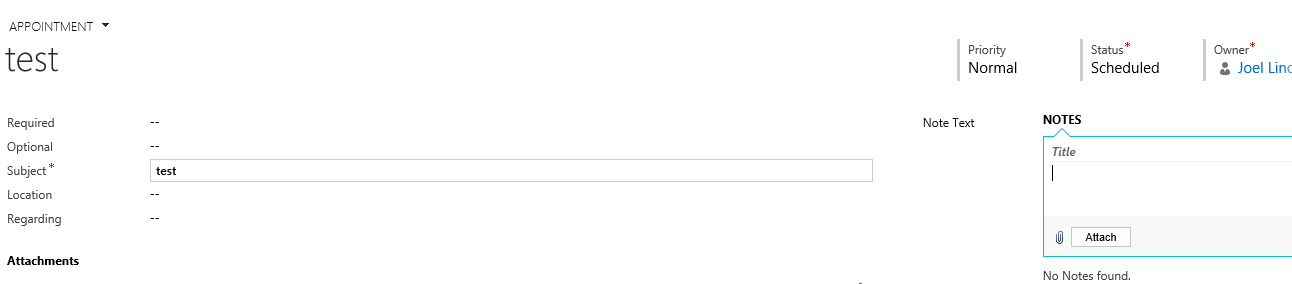
- Add the Notes pane to the CRM Appointment form. If you add the Notes control in customization, you will be able add date/time stamped notes to an appointment, and these notes won’t be sent back to the attendees. This will also make the experience consistent with adding notes to other CRM records.
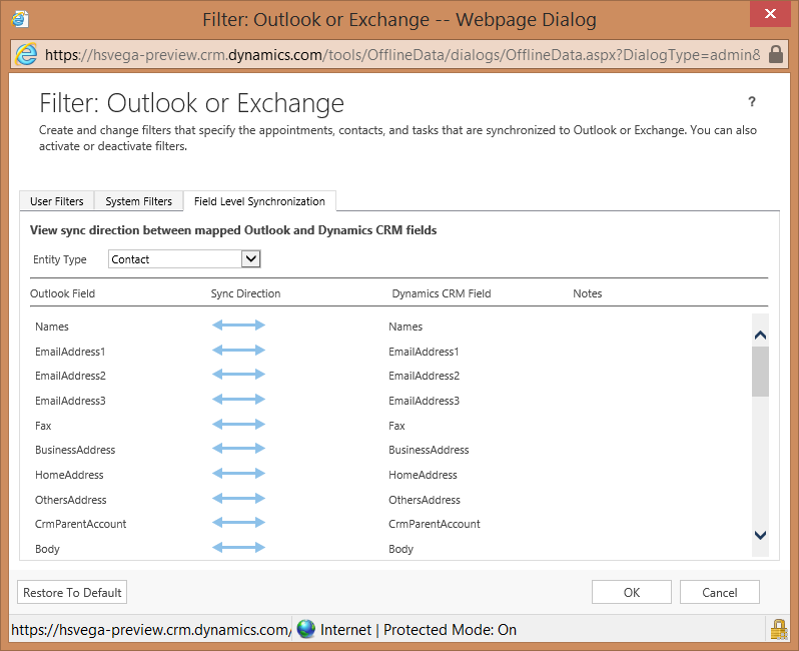
- If you have CRM 2015, you can configure the outlook synchronization pipe to prevent body/description field changes from synchronizing back to Exchange (and getting sent out to attendees).
*This post is locked for comments