




 32,738
 Like
Like Share
Share
 Report
When inventory items are either purchased, manufactured or sold through the associated modules accordingly; Purchase Order Processing, Manufacturing or Sales Order Processing, these items will be exposed to specifically four different scenarios in which cost variance documents are calculated. Each of these scenarios have its own characteristics and considerations.
Understanding these scenarios comes as an essential part of understanding these modules behaviors and their effects on the inventory module from one side, and the inventory versus General Ledger on the other side.
In this post, I will be shedding a light on the first scenario, which is the override documents.
Setup and Configuration
On the setup level of Dynamics Great Plains, Quantity Shortage option can be mainly setup in one of the following;
- Inventory Control | Dynamics GP > Tools > Setup > Inventory > Inventory Control
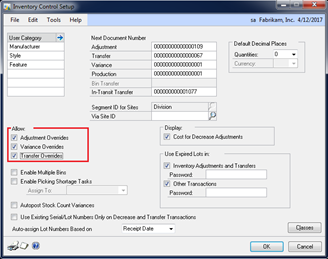
Inventory Control – Override Setup
There are three basic options to check which will allow quantity shortage to be handled through override documents. Checking one of these options will allow the quantity on hand to drop to a “negative value” since the required quantity to be withdrawn is bigger than the available quantity

- Sales Order Processing | Dynamics GP > Tools > Setup > Sales > Sales Order Processing > Sales Document Setup > Fulfillment Order/ Invoice
This option will allow the sales of quantities less than the quantity available, which results with quantity shortage and override documents

Sales Order Processing – Override Setup
Understanding Override Documents – Functional Point of View
Though this section, I will provide a practical example through which an adjustment override is allowed in Inventory to withdraw less than the quantity available resulting with negative quantity on hand.

Transaction Level – Quantity Shortage
- Document Type: Adjustment Out
- Item Number: Chair
- Current Cost: 5
- Quantity on Hand: 0
Adjustment Transaction
| Account | Debit | Credit |
| Inventory | 0 | 50 |
| Inventory Offset | 50 | 0 |
After the transaction is posted, the quantity on hand will be (-10).
Now, supposing that the after a while, an inventory replenishment occurs to relieve the override document. The replenishment is done through a receiving document (Shipment/Invoice) but with a higher unit cost (7).
The inventory replenishments will result not only with the receiving document, but with a cost adjustment document as well. The following journal entries will be posted;
Receiving Transaction
| Account | Debit | Credit |
| Inventory | 70 | 0 |
| Inventory Offset | 0 | 70 |
Cost Adjustment Document
| Account | Debit | Credit |
| Inventory | 0 | 20 |
| Inventory Offset | 20 | 0 |
Understanding Override Documents – Technical Point of View
Inventory tables responds to the override document in the best way to best fulfills data accuracy, by recording all the required fields. It’s worth saying that each of the inventory tables has its own behavior which are all working in consistency and harmony to provide several insights on the same piece of information
Section One | Quantity Shortage and Override Documents
IV10200
As for the purchase receipt layer work table, there is no available purchase layer from which to adjust out, therefore Dynamics GP throws an override purchase receipt layer with a zero quantity received and 10 quantity sold
IV10201
As for the purchase receipt layer details, a detail record for the adjustment out will be thrown and linked through the criteria
- (IV10200.ReceiptSequenceNo = IV10201.SourceReceiptSequence No)
SEE30303
Most importantly, the historical inventory trial balance table, records most of the essential details since it will be later the only inventory table containing cost adjustment document

Database View – Inventory Tables with Override Document
Section Two | Inventory Replenishment and Cost Adjustment
Now, to go with our scenario, a receiving transaction (Shipment/Invoice) for the same item is posted later on. Most importantly, with different cost. See below how tables are updated.
As for the Inventory Transaction Amount History (IV30300), no changes are performed on this table since the behavior of this table is to record historical transaction as is, and keep them in the same historical state regardless of any further changes
As for the Inventory Purchase Receipt Layer (IV10200), changes on the quantity received as long as the receipt sequence number (the link with IV10201)
As for the Inventory Purchase Receipt layer details, the original receipt sequence number is changed accordingly to be linked with the purchase receipt layer. On the other hand, the unit cost is replaced with the new cost while the old cost is recorded in ADJ cost field.
As for the HITB, a cost adjustment record is thrown with the cost adjustment journal that will be posted to General Ledger in order to adjust the previous layer unit cost. And keep Inventory versus GL tied together.

Database View – Inventory Tables with Inventory Replenishment
Cost Adjustment – Case 1 out of 4 (Override)
To be Continued …
Best Regards,
Mahmoud M. AlSaadi
*This post is locked for comments