







eConnect Error: Requested registry access is not allowed
Views (2962)

 Like
Like Share
Share
 Report
While testing a new eConnect 9 integration for a client, I received the following error when trying to send my XML data to eConnect:
Requested registry access is not allowed.
After Googling this error, I recalled that I've probably run into this somewhere in the past, but can't recall ever having the issue with eConnect.
I found this thread which suggested that the problem was due to the application or eConnect being unable to write to the event log. Okay, I can see that.
So I open Event Viewer, and sure enough, there is no eConnect event log. But I know that I've developed at least one other eConnect integration for this client, and I'm sure that eConnect is installed and working.
Assuming that the missing Event Log was the issue, I found some KB articles that suggested turning off UAC, as that can prevent a .NET application from creating an event log on newer OSs like Server 2008, Windows Vista, or Windows 7. Well, the virtual server that I use for this client is Server 2003, so UAC can't be the cause.
I then found this MS support article and this KB article that both offer some possible causes and additional information about the problem. I didn't feel like spending the time to determine the exact cause of the missing event log, but the articles told me the location of the Event Log registry entries. Just as my server has no eConnect event log, the registry is also missing any eConnect entries in the registry, as one would expect.
I didn't want to figure out if the eConnect installation created the event log, or whether a call to eConnect would create it on the fly--I just wanted to create the registry entries and get the log setup. Rather than trying to manually create registry keys, I dug through my pile of virtual servers and found an old one that had a GP 9 and GP 10 installation, with both versions of eConnect. That server had an eConnect event log, and corresponding registry entries.
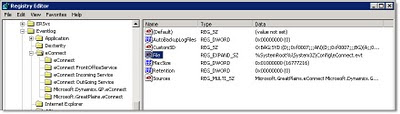
So I exported the eConnect key from HKEY_LOCAL_MACHINE\SYSTEM\CurrentControlSet\Services\Eventlog to a .reg file, copied that to my problem server, and imported the .reg file.
Like magic, the registry access error went away, and I was able to get the actual eConnect error for the data I was trying to import.
This was with eConnect 9, so this resolution is probably pretty dated, and presumably this is a pretty rare server-specific problem, but in case anyone else runs into it, this approach seemed to shortcut the troubleshooting process and let me jump right to a simple resolution.
Requested registry access is not allowed.
After Googling this error, I recalled that I've probably run into this somewhere in the past, but can't recall ever having the issue with eConnect.
I found this thread which suggested that the problem was due to the application or eConnect being unable to write to the event log. Okay, I can see that.
So I open Event Viewer, and sure enough, there is no eConnect event log. But I know that I've developed at least one other eConnect integration for this client, and I'm sure that eConnect is installed and working.
Assuming that the missing Event Log was the issue, I found some KB articles that suggested turning off UAC, as that can prevent a .NET application from creating an event log on newer OSs like Server 2008, Windows Vista, or Windows 7. Well, the virtual server that I use for this client is Server 2003, so UAC can't be the cause.
I then found this MS support article and this KB article that both offer some possible causes and additional information about the problem. I didn't feel like spending the time to determine the exact cause of the missing event log, but the articles told me the location of the Event Log registry entries. Just as my server has no eConnect event log, the registry is also missing any eConnect entries in the registry, as one would expect.
I didn't want to figure out if the eConnect installation created the event log, or whether a call to eConnect would create it on the fly--I just wanted to create the registry entries and get the log setup. Rather than trying to manually create registry keys, I dug through my pile of virtual servers and found an old one that had a GP 9 and GP 10 installation, with both versions of eConnect. That server had an eConnect event log, and corresponding registry entries.

So I exported the eConnect key from HKEY_LOCAL_MACHINE\SYSTEM\CurrentControlSet\Services\Eventlog to a .reg file, copied that to my problem server, and imported the .reg file.
Like magic, the registry access error went away, and I was able to get the actual eConnect error for the data I was trying to import.
This was with eConnect 9, so this resolution is probably pretty dated, and presumably this is a pretty rare server-specific problem, but in case anyone else runs into it, this approach seemed to shortcut the troubleshooting process and let me jump right to a simple resolution.
This was originally posted here.
*This post is locked for comments