







Dynamics 365 Portal – Access Denied on all pages
Views (1318)
 Zohaib Uddin Khan
 2,822
2,822
 Like
Like Share
Share
 Report
Author: Zohaib Uddin Khan
Credit for this Solution: Chid
Problem:
I’m browsing the ‘Dynamics 365 Portal’ Homepage and I’m always redirected to Login page. I even tried to directly access the Images/JavaScript/CSS files, but still redirected to Login page.
Solution:
Since I come from web development background, so restart the portal and clear cache of the browser are my first bet. And, I highly recommend doing that in case you are experiencing absurd behavior. But, in my case, the problem didn’t get solved. Luckily, I found a thread on MS Community forum where I found the solution:
- Do ‘Advanced Find’ the entity ‘Publishing States’.
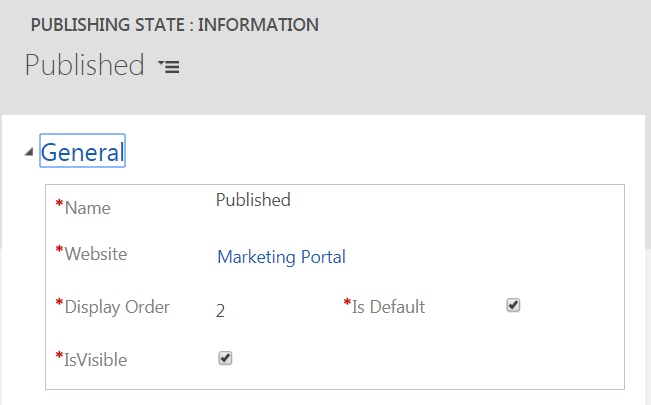
- Open the ‘Published’ record for your portal. In one Dynamics 365 organization, the number of ‘Published’ records is equal to the number of portals configured.
- Make sure IsVisible and IsDefault are checked as shown below:
This was originally posted here.
*This post is locked for comments