web
You’re offline. This is a read only version of the page.
close
Skip to main content

Notifications

Announcements

No record found.

Community site session details

Community site session details

Session Id :

In Microsoft Dynamics 365 Business Central (Customisation), how do I… Personalize the Action Bar

Ian Grieve Profile Picture Ian Grieve 22,784
Microsoft Dynamics 365 Business CentralThis post is part of the In Microsoft Dynamics 365 Business Central (Customisation), how do I… series and of the wider In Microsoft Dynamics 365 Business Central, how do I… series which I am posting as I familiarise myself with Microsoft Dynamics 365 Business Central.

If you’ve been following this series, you’ll have seen that we can do a lot to personalize Dynamics BC including pages and FactBoxes. The action bar is no different; you can tailor it to improve your efficiency by moving items you use a lot or hide ones you don’t use at all.

There is a few personalization actions which can be taken:

  • Move actions.
  • Hide actions.
  • Remove personalizations.

To personalize the action bar, click the Settings icon in the top right corner and select Personalize:
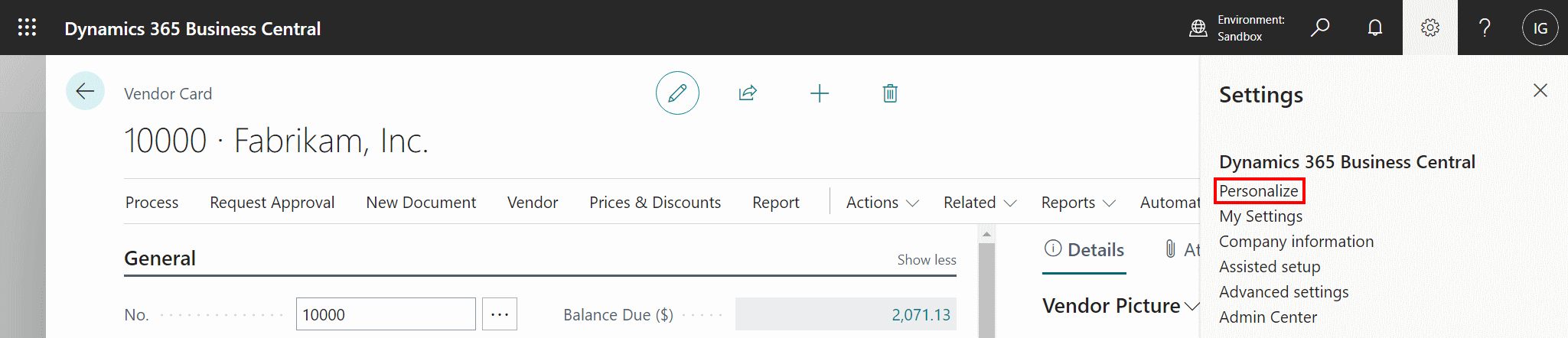
Open Personalization

If you hover over an action and click and hold on the red triangle you can drag-and-drop the action to a new location; if you left-click the red triangle you can choose Hide:
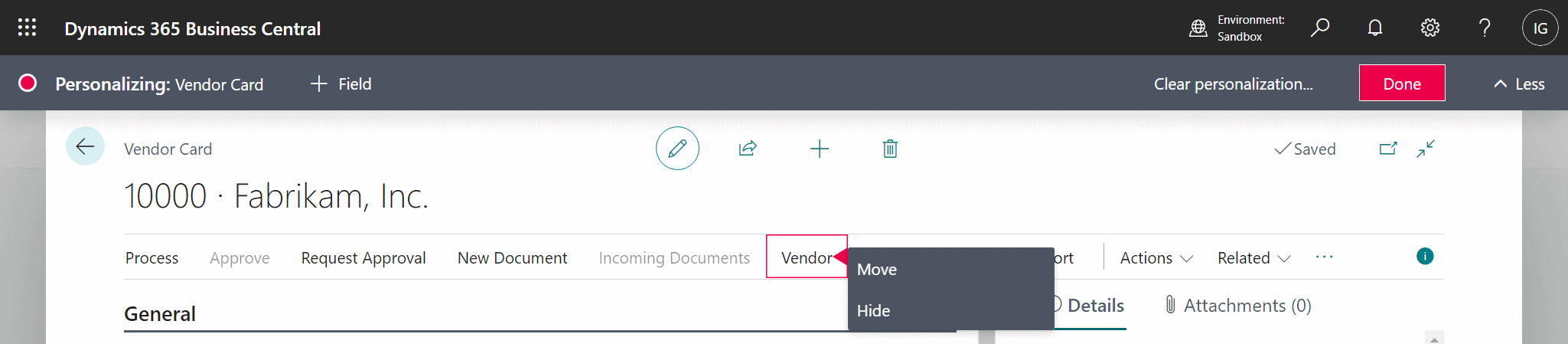
Move or hide an action

Personalization also includes moving actions from the menus to new locations:
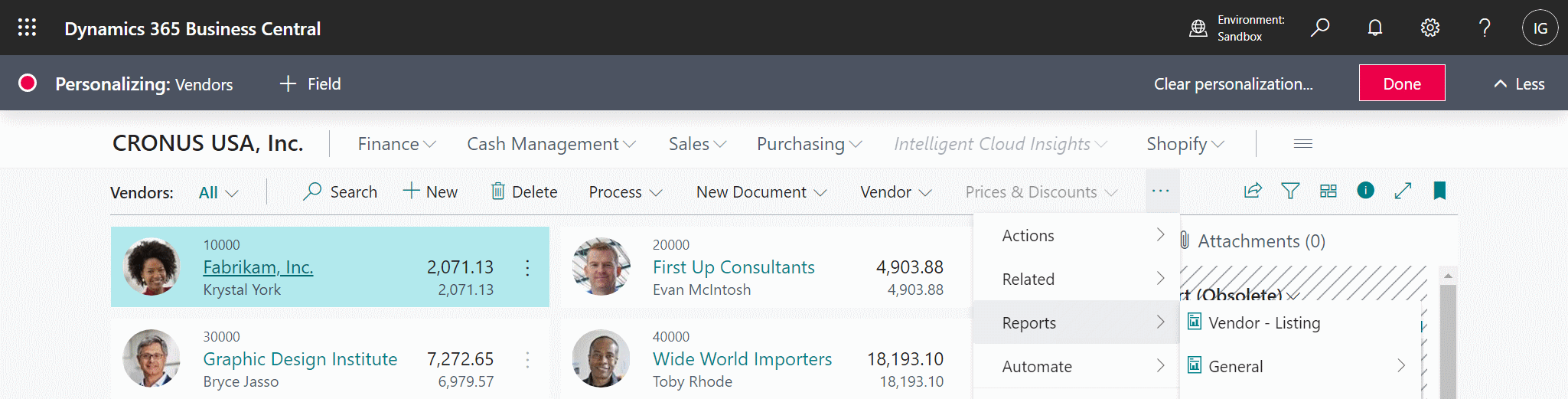
Personalize action menus

If you have moved an action from a menu to a new location then there is a new option available on that field if you click the red triangle; you can click Remove to remove the personalization, after which the action will return to its original location:
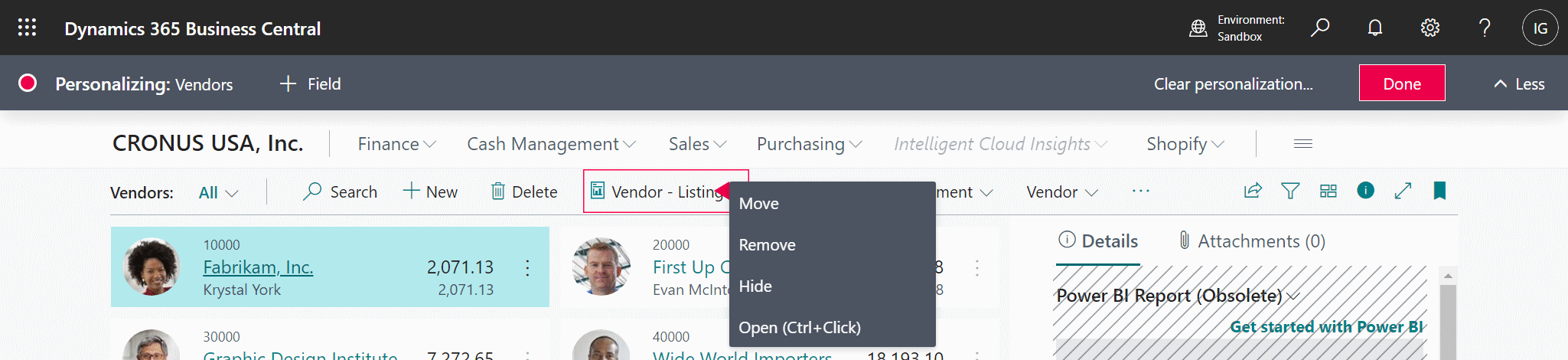
Remove a personalization

In Microsoft Dynamics 365 Business Central, how do I…

In Microsoft Dynamics 365 Business Central, how do I…
In Microsoft Dynamics 365 Business Central, how do I… Sign Up For a Trial
In Microsoft Dynamics 365 Business Central, how do I… Get Access to the Microsoft 365 Admin Center
In Microsoft Dynamics 365 Business Central, how do I… Create a Company
In Microsoft Dynamics 365 Business Central, how do I… Copy a Company
In Microsoft Dynamics 365 Business Central, how do I… Switch Between Companies
In Microsoft Dynamics 365 Business Central, how do I… Create a Sandbox Environment With Cronus
In Microsoft Dynamics 365 Business Central, how do I… Access Dynamics BC Admin Centre
In Microsoft Dynamics 365 Business Central, how do I… Create a Sandbox Environment With a Copy of Production
In Microsoft Dynamics 365 Business Central, how do I… Create a User
In Microsoft Dynamics 365 Business Central, how do I… Add a User In 365 Admin Center
In Microsoft Dynamics 365 Business Central, how do I… Add a User in Dynamics BC
In Microsoft Dynamics 365 Business Central, how do I… Change My Role
In Microsoft Dynamics 365 Business Central, how do I… Create an Advanced Evaluation Company
In Microsoft Dynamics 365 Business Central (Administration), how do I… Understand the Role Center
In Microsoft Dynamics 365 Business Central, how do I… Change the User Experience in a Company from "Essentials" to "Premium"
In Microsoft Dynamics 365 Business Central (Administration), how do I… Understand the Update Rollout Timeline
In Microsoft Dynamics 365 Business Central, how do I… Hide the Teaching Tips
In Microsoft Dynamics 365 Business Central (Administration), how do I… Set Update Date
In Microsoft Dynamics 365 Business Central (Administration), how do I… Set Update Window
In Microsoft Dynamics 365 Business Central (Administration), how do I… Extend Trial
In Microsoft Dynamics 365 Business Central (Administration), how do I… Understand Search
In Microsoft Dynamics 365 Business Central (Administration), how do I… Understand the Types of Pages Available
In Microsoft Dynamics 365 Business Central (Administration), how do I… Know Which Keyboard Shortcuts Are Available
In Microsoft Dynamics 365 Business Central (Administration), how do I… Switch Between Companies
In Microsoft Dynamics 365 Business Central (Administration), how do I… Use List Pages
In Microsoft Dynamics 365 Business Central (Administration), how do I… Use Advanced Filters on Lists
In Microsoft Dynamics 365 Business Central (Administration), how do I… Use Card Pages
In Microsoft Dynamics 365 Business Central (Administration), how do I… Understand the FactBox
In Microsoft Dynamics 365 Business Central (Administration), how do I… Understand the Action Bar
In Microsoft Dynamics 365 Business Central (Customisation), how do I… Personalize a Page
In Microsoft Dynamics 365 Business Central (Customisation), how do I… Remove Personalization from a Page
In Microsoft Dynamics 365 Business Central (Customisation), how do I… Personalize Card Pages
In Microsoft Dynamics 365 Business Central (Customisation), how do I… Understand the Best Way of Customising a Card Page
In Microsoft Dynamics 365 Business Central (Customisation), how do I… Personalize the FactBox
In Microsoft Dynamics 365 Business Central (Customisation), how do I… Personalize the Action Bar
In Microsoft Dynamics 365 Business Central (Customisation), how do I…
In Microsoft Dynamics 365 Business Central (Customisation), how do I… Personalize a Page
In Microsoft Dynamics 365 Business Central (Customisation), how do I… Remove Personalization from a Page
In Microsoft Dynamics 365 Business Central (Customisation), how do I… Personalize Card Pages
In Microsoft Dynamics 365 Business Central (Customisation), how do I… Understand the Best Way of Customising a Card Page
In Microsoft Dynamics 365 Business Central (Customisation), how do I… Personalize the FactBox
In Microsoft Dynamics 365 Business Central (Customisation), how do I… Personalize the Action Bar

Read original post In Microsoft Dynamics 365 Business Central (Customisation), how do I… Personalize the Action Bar at azurecurve|Ramblings of an IT Professional


This was originally posted here.

Comments

*This post is locked for comments