







CRM Deployment Manager: MMC has detected an error in a snap-in
Views (10970)

 Like
Like Share
Share
 Report
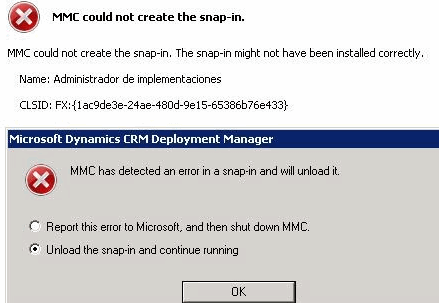
Got some rare issue here, running CRM deployment manager in server, as screen capture below:
MMC could not create the snap-in.
CLSID: FX:{1ac9de3e-24ae-480d-9e15-65386b76e433}
First thing comes into my mind is to check for the following things:
Unable to obtain DNS hostname of Active Directory domain controller with ntdsa object name "CN=NTDS Settings,CN=WIN-6H9L2IUM336,CN=Servers,CN=Tier3DC,CN=Sites,CN=Configuration,DC=mydomain,DC=com".
If you guys faced similar issues, try following solution;
MMC could not create the snap-in.
CLSID: FX:{1ac9de3e-24ae-480d-9e15-65386b76e433}
First thing comes into my mind is to check for the following things:
- Run as administrator
- Run with user that used to install crm
- Run with domain admin account
- ping domain controller, IP address
Unable to obtain DNS hostname of Active Directory domain controller with ntdsa object name "CN=NTDS Settings,CN=WIN-6H9L2IUM336,CN=Servers,CN=Tier3DC,CN=Sites,CN=Configuration,DC=mydomain,DC=com".
If you guys faced similar issues, try following solution;
- open regedit, navigate to :HKLM\Software\Microsoft\MSCRM
- Right Click and click on NewString value as "PreferredDc"
- Add the value to PreferredDc is YourDomainControllerName
- We can find this in AD by typing the command in command prompt echo %logonserver%
This was originally posted here.
*This post is locked for comments