







Export list of model elements to Excel using PowerShell
Views (4876)
 Tommy Skaue
Moderator
Tommy Skaue
Moderator
 Like
Like Share
Share
 Report
So you want to get a list of all elements in a given model?
I tend to do it now and then, so here is how I do it.
Simply use the Get-AxModel to collect the details and pipe it to a Export-CSV.
I've added the -NoTypeInformation to remove some unnecessary information, and I wanted to have the semicolon as delimiter in order for the file to open seamlessly in Excel 2013.
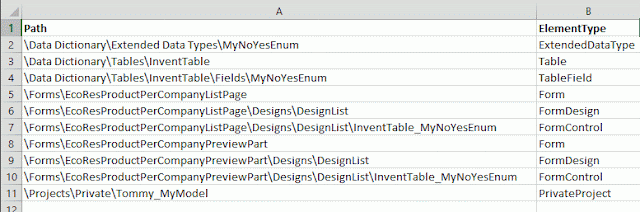
You can also list out other information as columns like the ElementHandle and ParentHandle.
I tend to do it now and then, so here is how I do it.
Simply use the Get-AxModel to collect the details and pipe it to a Export-CSV.
(Get-AXModel -Model 'MyModel' -Details).Elements | select path, elementtype | `
Export-Csv -NoTypeInformation -Delimiter ';' c:\mymodel.csv
I've added the -NoTypeInformation to remove some unnecessary information, and I wanted to have the semicolon as delimiter in order for the file to open seamlessly in Excel 2013.

You can also list out other information as columns like the ElementHandle and ParentHandle.
This was originally posted here.
*This post is locked for comments