







Use of Automation APIs to create new companies and view existing in Business Central

 Like
Like Share
Share
 Report
Introduction:
Automation APIs provide capability for automating company setup through APIs. Here we are going to use the Automation APIs to create a new company in the Microsoft Dynamics 365 Business Central and then view the existing companies information using the same.
Pre-requisites:
- Microsoft Dynamics 365 Business Central
- Postman
Steps:
1. Create a Company:
To create a company we make use of the automation Endpoint available. Here we create a post request in Postman which is in the following format:
POST https://api.businesscentral.dynamics.com/v1.0/api/microsoft/automation/{api version}/companies{company id}/automationCompanies
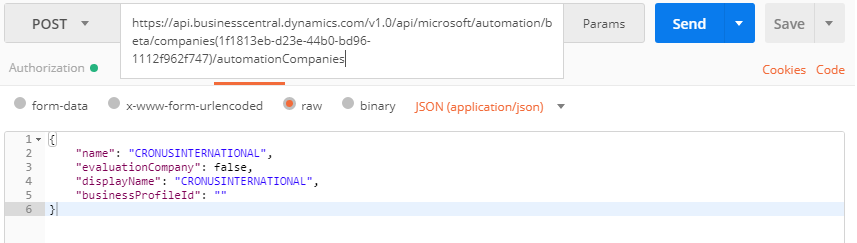
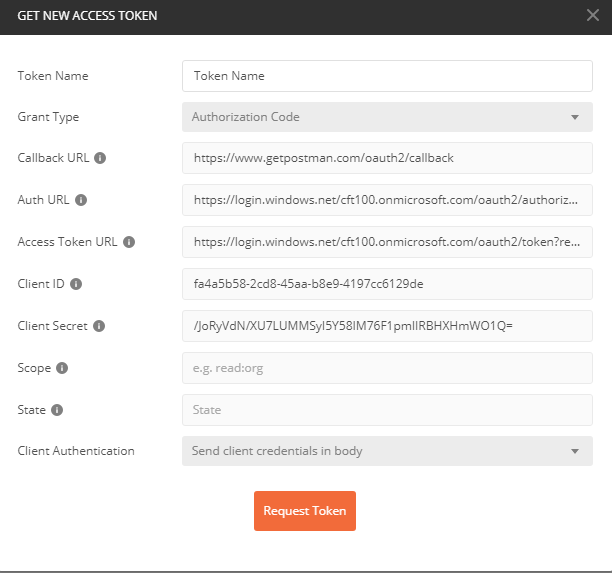

For this we make use of OAuth 2.0 Authorization(Bearer Token).
2. To View Information about existing Companies in Business Central
Retrieves the properties and relationships of an automationCompany object for Dynamics 365 Business Central. Here we use the GET request from Postman which has the following format:
GET
https://api.businesscentral.dynamics.com/v1.0/api/microsoft/automation/{api version}/companies{company id}/automationCompanies
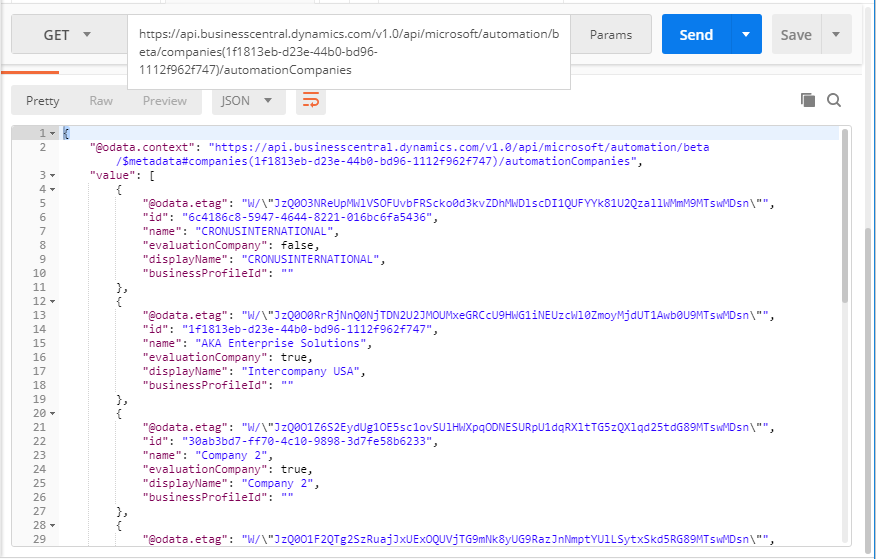
For this we make use of OAuth 2.0 Authorization(Bearer Token).
Conclusion:
Thus, by making use of these existing Automation APIs we can automate the initial setup process of creating companies, packages, users, permission sets etc.
The post Use of Automation APIs to create new companies and view existing in Business Central appeared first on CloudFronts - Microsoft Dynamics 365 | Power BI | Azure.
This was originally posted here.
*This post is locked for comments