






{fixed} Solution Import failure: The import file is too large to upload.
Views (2862)
 Arun Vinoth
 11,615
Moderator
11,615
Moderator
 Like
Like Share
Share
 Report
When I was importing a brand new development un-managed solution into QA environment, I faced this weird error. The import file is too large to upload.
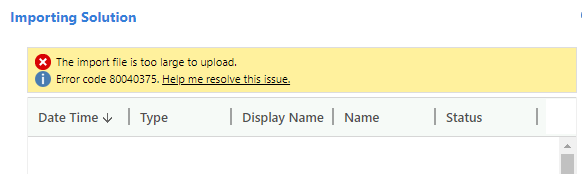
Attempt 1:
The link added Help me resolve this issue. was not useful in my case as it says chances of Duplicate column names which is not true in my solution. I have downloaded the log file to dig more.

When I scrolled all the way down to see the unprocessed rows. Gotcha! There was a Business rule which caused lot of trouble in Unit testing itself like not triggering at all in Quick create. So I get rid of it.
Attempt 2:
Again when I tried to import the latest solution in QA, failed this time with the same error message. Again download log & dig.... This time a new culprit!

Canvas App import failure. voila! I was trying some cool Canvas Power App into my Model driven Power App (our same CRM UCI app :)) but not so fruitful. So some messy left overs bothering me now.
 1. Delete the CanvasApps folder
2. Remove this line in solution.xml
<RootComponent type="300" schemaName="xxx_xxx_e4543" behavior="0" />
3. Clean up/Delete the below entry in [Content_Types].xml
<Override PartName="/CanvasApps/xxx_xxx_e4543_BackgroundImageUri" ContentType="application/octet-stream"/>
4. Remove this below portion from customizations.xml
Attempt 1:
The link added Help me resolve this issue. was not useful in my case as it says chances of Duplicate column names which is not true in my solution. I have downloaded the log file to dig more.

When I scrolled all the way down to see the unprocessed rows. Gotcha! There was a Business rule which caused lot of trouble in Unit testing itself like not triggering at all in Quick create. So I get rid of it.
Attempt 2:
Again when I tried to import the latest solution in QA, failed this time with the same error message. Again download log & dig.... This time a new culprit!
CanvasApp import: FAILURE: One or more errors occurred.

Canvas App import failure. voila! I was trying some cool Canvas Power App into my Model driven Power App (our same CRM UCI app :)) but not so fruitful. So some messy left overs bothering me now.

2. Remove this line in solution.xml
<RootComponent type="300" schemaName="xxx_xxx_e4543" behavior="0" />
3. Clean up/Delete the below entry in [Content_Types].xml
<Override PartName="/CanvasApps/xxx_xxx_e4543_BackgroundImageUri" ContentType="application/octet-stream"/>
4. Remove this below portion from customizations.xml
<CanvasApps>
</CanvasApps>
Success!!! After all this cleanup - Solution is imported fine. Good luck.
This was originally posted here.
*This post is locked for comments