







Enable scripting of table indexes in SQL Server Management Studio
Views (1313)

 Like
Like Share
Share
 Report
By Steve Endow
If you create custom tables for Dynamics GP customizations or have situations where you need to backup and recreate tables via SQL script, you've probably used the "Script Table" feature in SQL Server Management Studio.
But if you have ever scripted a table, you have probably noticed that by default, SQL Server Management Studio does not include table indexes. This is a pretty big omission.
You can change this behavior in Management Studio Options, but I always forget where to find the setting and end up spending 5 minutes every time trying to find the setting.
So, documenting the location for posterity, it is under Tools -> Options -> SQL Server Object Explorer -> Scripting.

Set Script Indexes to True.
While you are at it, you may want to also enable "Check for object existence" and "Script permissions" as well.

If you create custom tables for Dynamics GP customizations or have situations where you need to backup and recreate tables via SQL script, you've probably used the "Script Table" feature in SQL Server Management Studio.
But if you have ever scripted a table, you have probably noticed that by default, SQL Server Management Studio does not include table indexes. This is a pretty big omission.
You can change this behavior in Management Studio Options, but I always forget where to find the setting and end up spending 5 minutes every time trying to find the setting.
So, documenting the location for posterity, it is under Tools -> Options -> SQL Server Object Explorer -> Scripting.
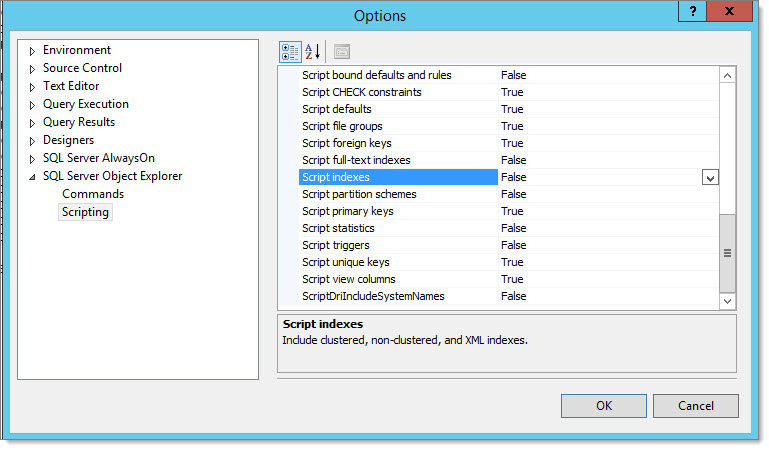
Set Script Indexes to True.
While you are at it, you may want to also enable "Check for object existence" and "Script permissions" as well.
Steve Endow is a Microsoft MVP for Dynamics GP and a Dynamics GP Certified IT Professional in Los Angeles. He is the owner of Precipio Services, which provides Dynamics GP integrations, customizations, and automation solutions.
This was originally posted here.
*This post is locked for comments