







New ‘Capacity’ analytics on PowerPlatform Admin Center
 Priyesh
 7,396
User Group Leader
7,396
User Group Leader
 Like
Like Share
Share
 Report
Syndicated from - https://d365demystified.com/2019/07/03/new-capacity-analytics-on-powerplatform-admin-center/
We are quickly transitioning over from Organization Insights which came as a managed solution inside D365 to CDS For Apps Analytics on the PowerPlatform Admin Center. My past blog on the same (CDS For Apps Analytics instead of Organization Insights. Power Platform Admin Center).
And now, the same is revamped as Capacity in PowerPlatform Admin Center.
So, if you go to Storage in CDS For Apps analytics, you’ll see this –

Capacity
You can access Capacity section directory from this URL – https://admin.powerplatform.microsoft.com/analytics/capacity
Or from the left hand menu as below –

Now, as opposed to previously summarized % of the total capacity available, Microsoft is providing new entitlements for different types of storage consumption –

Zoomed below
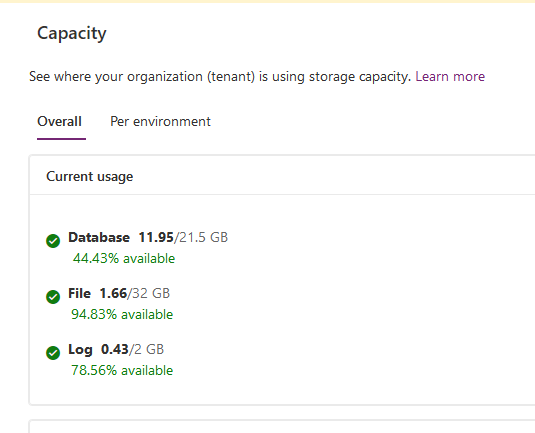
As mentioned above, the bifurcation is as follows –
DATABASE: All other entities apart from the ones mentioned below.
FILE: Attachment, AnnotationBase tables
LOG: AuditBase, PluginTraceLogBase tables
Per Environment View
A Per Environment View looks like below and you can click on the Graph icon to go into the details

At this point, information for the Graphical details are yet to be available. I’ll update post this is available for me too.
Availability
New Capacity model differs and will be available once the current term ends. More information from the links in the More Information section below

More Information
You can refer more on Capacity here – https://docs.microsoft.com/en-us/power-platform/admin/capacity-storage
Microsoft’s FAQs – https://docs.microsoft.com/en-us/power-platform/admin/capacity-storage#faq
Hope this quick summary helps!
This was originally posted here.
*This post is locked for comments