







Dexterity for Microsoft Dynamics GP 2016 Install Error
 David Musgrave MVP ...
 14,095
Most Valuable Professional
14,095
Most Valuable Professional
 Like
Like Share
Share
 Report
I came across an interesting issue yesterday when I installed Microsoft Dynamics GP 2016 and its matching Dexterity 16.0 version.
When installing Dexterity I received an error message which in turn caused the installation process to be cancelled.
Note: We have skipped version 15.0, so that GP 2016 is version 16.0. This avoids the confusion we have had previously with the version “year” not matching the version “number”.
The error was as follows:

The internal instance name is already in use. Specify a different instance transform.
This first error dialog is then followed by an Installation Failed message.

I did not get this error when I first installed Dexterity 16.0 from the first ISV drop of GP 2016. But I did get it when re-installing Dexterity 16.0 when I updated to the second ISV drop of GP 2016. I thought this was because I accidently started the Dexterity install before the GP install had finished.
Now, because I have written installers for my own products, I had a fairly good idea of the cause of this issue. I was able to locate the registry settings which tell the installer what instances of Dexterity 16.0 are installed and remove them. Then I was able to reinstall.
However, after uninstalling the second ISV drop yesterday to install the RTM versions of GP 2016 and Dexterity 16.0, the same error occurred and this time I was careful to wait for the GP 2016 installer to finish before starting the Dexterity 16.0 installer.
It appears that the Dexterity 16.0 installer is not cleaning up the registry correctly when un-installing.
So, if you come across this problem while re-installing Dexterity 16.0, here is the fix:
Using RegEdit.exe go to the following key:
HKLM\SOFTWARE\WOW6432Node\Microsoft\Dexterity\v16
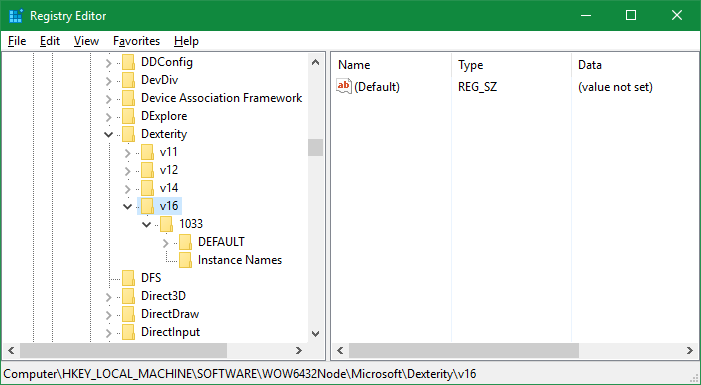
And delete the v16 key and all its sub keys.
Then Dexterity 16.0 will re-install successfully.
Hope this helps
David
This article was originally posted on http://www.winthropdc.com/blog.
Filed under: 2016, Development, Dexterity, Dynamics, GP, Microsoft Tagged: Development, Dexterity, GP 2016 


This was originally posted here.
*This post is locked for comments