







How to filter workspace list grid / form Part in D365
Views (2613)
 dasdasd
 841
841
 Like
Like Share
Share
 Report
In workspace filtering form part is quite complex task on which Microsoft has given very least documentation. In workspaces form parts are bound togther with a common datasource so we cannot add ranges for filteration. However by using SysIFilterProvider Interface it is possible to implement a method on each form part that is used on the workspace that would get a filter value from its parent workspace form and trigger those methods each time a modified() method is triggered on a workspace itself.



Step: 1
Make sure your form class implements SysIFilterProvider interface. as shown in image.

Step: 2
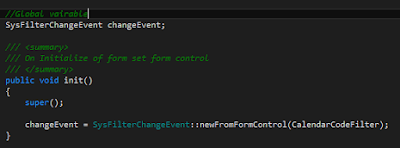
On Init method initialize your filter control change event from which you will get the value for filter your records as shown in image.

Step: 3
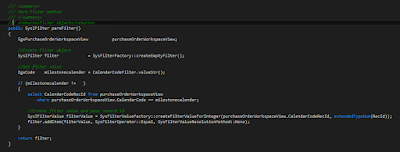
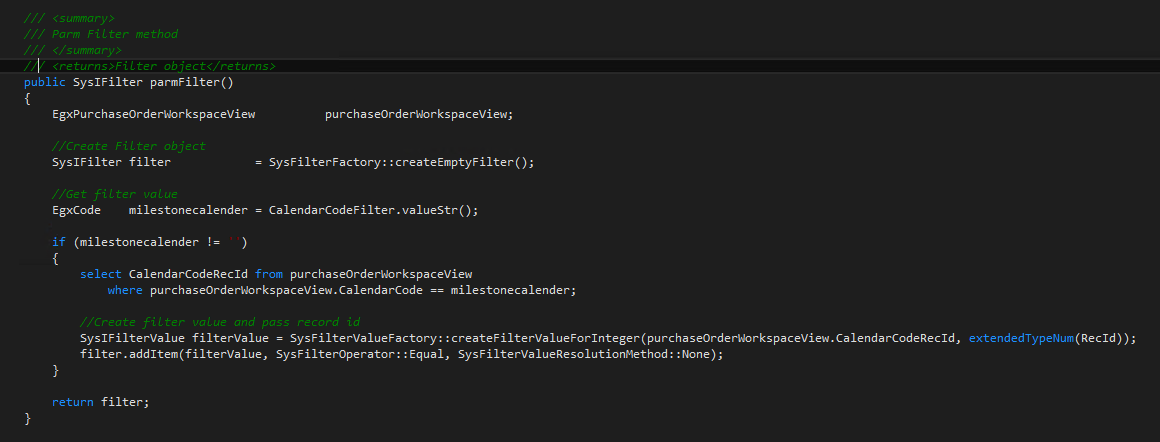
Write parmFilter method on which you passes the value to your form part as shown in image.
Note:
In SysFilterValueFactory class there are six types of filters that you can use. In my case I am using RecId filter.
1- createFilterValueForBuffer
2- createFilterValueForRecId
3- createFilterValueForDateTime
4- createFilterValueForDate
5- createFilterValueForInteger
6- createFilterValueForString
Step: 4
Write parmChangeEvent as shown in image.

Step: 5
Implement SysIFilterConsumerForm, SysIFilterEventHandler Interfaces to your form part classes as shown in image.

Step: 6
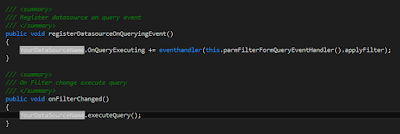
Write register & fiter events and provide implementation of your datasource as shown in image.

This was originally posted here.
*This post is locked for comments