







Tip #504 Calculated Fields Min/Max Values
Views (3825)

 Like
Like Share
Share
 Report
When setting up a Calculated Field it is imperative that you are aware of the Minimum/Maximum Values in the fields that make up the Calculated field. The Wizard will not prevent you from creating a calculated field that is dependent on fields that allow input that will be outside the min/max values allowed for the calculated field.
In the example below Field A and B allow Minimum values of less than Zero (0). However the Minimum Value for the Calculated field is set for Zero (0). You won’t discover this issue until users start entering data into the form. They will not be able to Save the record.
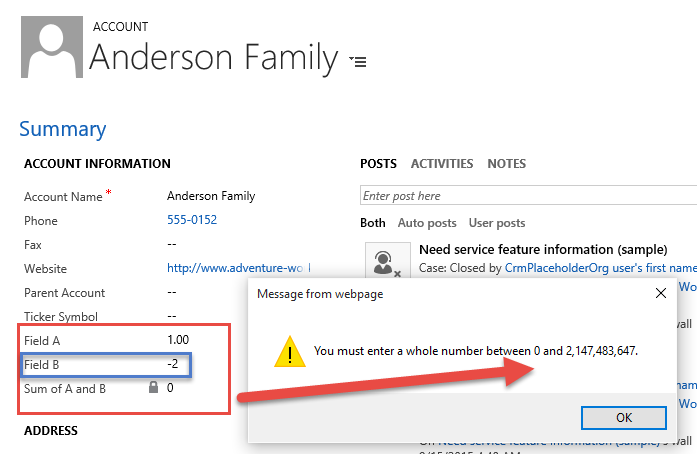
Calculated Field Out of Range Error
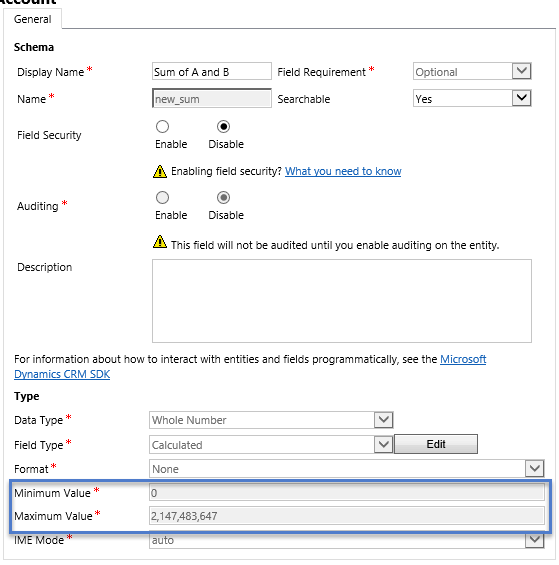
Calculated Field Min Max Values
This was originally posted here.
*This post is locked for comments