




 14,419
 Like
Like Share
Share
 Report
Hi all,
This is nothing most of you would be interested in. This post only show steps about how to display text in multiple lines from Navision Code.
If you don't know this, then please go ahead.
The intended readers for this post are the Peoples who have recently joined and are still Learning NAV.
IN Navision the New Line Character is \ . So if your text string at some point have the \ and you are displaying that in a message / error you will find the output as a New Line for the text written after \.
Let's see a Sample -
I have a Codeunit with following code as shown in below image.

When i run this i get output something like -

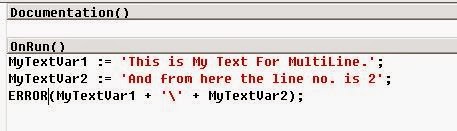
And my Output is -
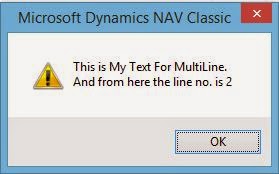
So we now know that the New Line character in Navision is \.
Hope you like the post. If you do like these kind of basic stuff let me know as comment or via Contact Me Page. If i found that you would like to read these basic stuff i would post more.
Regards,
Saurav Dhyani
saurav-nav.blogspot.com
This is nothing most of you would be interested in. This post only show steps about how to display text in multiple lines from Navision Code.
If you don't know this, then please go ahead.
The intended readers for this post are the Peoples who have recently joined and are still Learning NAV.
So Like in Programming Language C & C++ the the New Line Character used is \n.
IN Navision the New Line Character is \ . So if your text string at some point have the \ and you are displaying that in a message / error you will find the output as a New Line for the text written after \.
Let's see a Sample -
I have a Codeunit with following code as shown in below image.
When i run this i get output something like -
Let's try to use it with error, but this time with two text variables, as shown below.
Hope you like the post. If you do like these kind of basic stuff let me know as comment or via Contact Me Page. If i found that you would like to read these basic stuff i would post more.
Regards,
Saurav Dhyani
saurav-nav.blogspot.com
*This post is locked for comments