




 924
924 Like
Like Share
Share
 Report
In Dynamics 365 for Sales, Customer Service or Power Apps, you can tag user/s in Posts in Timeline of Accounts, Cases, Leads, Opportunities or any entity .
Now, when the user/s are tagged/mentioned in Timeline wouldn’t it be great to notify them automatically using In-App or Email notification?
We are happy to let you know that in the latest build release (Dec 2022) of Zap Notifications App… we have added support for notifying User if they are mentioned in Post. This notification can be an In-App Notification or an Email Notification.

Zap Notifications App allows bulk generation of In-App Notifications: onDemand, based on Triggers Or based on Recurring pattern + Form Notifications + Email Notifications!
Some common use-cases where Zap Notifications App can help: Notify all company users of system down-time; Notify user on lead/case assignment; Timesheet submission reminder every Friday; Opportunity follow-up reminder to sales users whose opportunities are nearing Close date etc. For details, refer blog: Some common user-scenarios for using In-App Notifications (link)
In this blog, we will go through the high level steps in which you can configure Zap Notifications App to automatically notify the user when they are tagged in a Post. This notification can be an In-App Notification or an Email Notification.
Step 1: Create Trigger Notification Configuration Record
Step 1a: Select entity as “Post”
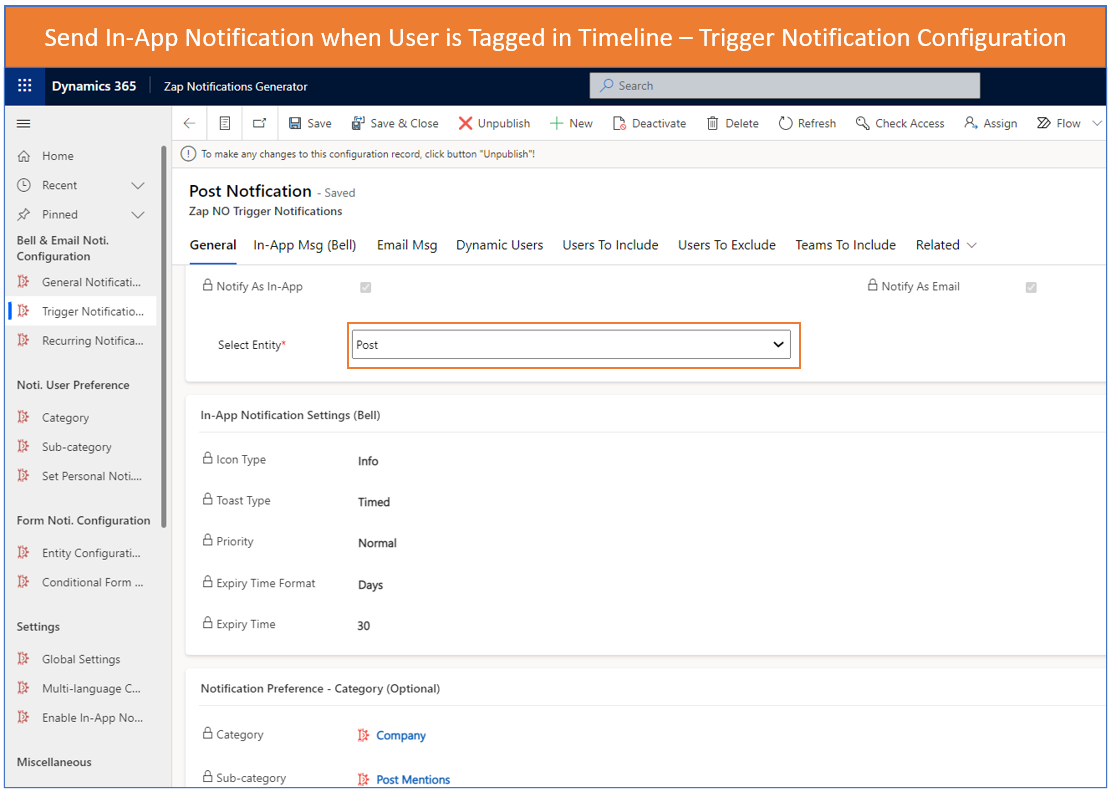
Here we select whether In-App and/or Email notification is needed…then select entity as “post”…then configure various notification level settings and finally select category / sub-category – if we need to give user the option to select.
Step 1b: Configure In-App Message

Here we can configure the title and body for the In-App Notification. We can also include dynamic values from the record.
Step 1C: Configure Email Message

Here we can configure the email subject and body. Again we can include dynamic values from the record.
Step 1D: Select Users who need to be notified

Here we can include static users, dynamic users or just users mentioned in the post.
Step 2: Create Power Automate flow OR a Workflow to trigger this configuration (Created in step 1) whenever a new post is added in timeline
Below Screenshot shows using Flow: (You can use either a flow or a workflow)

Below Screenshot shows using Workflow: (You can use either a flow or a workflow)

Now whenever any user/s are tagged / mentioned in a post… They will automatically be notified via an In-App message or email message (as configured). Besides, Zap Notifications App has a super functionality which allows user/s to configure if they would like to receive this notification as In-App or Email. As shown in screenshot below… user can select which all notifications they would like to receive and whether that should be as an In-App or Email:

This blog is part of our series “Introducing Zap Notifications Generator App for Dynamics 365 Sales, Customer Service & Power Apps”.
Below are links for all blogs in this series:
Blog 1: Generate In-App Notifications in Bulk for multiple users / teams (link)
Blog 2: Some common user-scenarios for using In-App Notifications (link)
Blog 3: Generate In-App Notifications automatically as per Recurring Schedule (link)
Blog 4: How to insert record field values within the In-App Notification message (link)
Blog 5: How to generate In-App Notification from Power Automate / Flow (link)
Blog 6: Sending out In-App Notification when User is tagged or mentioned in Timeline (link)
Latest Updates from Zap Objects (Jan 2023):
1. New Version Released: Zap In-App Notifications App (v 53.0.1.9):
Support for sending In-App Notification when User/s are mentioned in Timeline of any record (link)
2. New Version Released: Zap Report / View Scheduler App (v 33.0.1.9):
Now automatically share the generated report download link to Teams channel. For details, refer blog: Automate the generation of Report and shared to Teams channel when using Zap Report Scheduler App (link)
3. Completely Revamped: Zap Attachment Viewer (with drag-and-drop): This release doubles the features available earlier!!! Some of them are Improved UI, gallery view, drag-and-drop, rename file names, delete attachments, attach to email etc.
*This post is locked for comments