




 14,137
 Like
Like Share
Share
 Report
The Support Debugging Tool already has the ability to create and execute Dexterity sanScript and Transact-SQL scripts, without needing the Dexterity development environment or SQL Server Management Studio installed.
Now GP Power Tools adds the ability to create and execute Visual C# scripts and Visual Basic.Net scripts, without needing Visual Studio installed.
Welcome to the new .Net Execute window. Developed with the assistance of my friend Andrew Dean from Envisage Software Solutions in Sydney, the .Net Execute window allows developers with a Visual Studio and Visual Studio Tools for Microsoft Dynamics GP background to write and execute .Net scripts inside Dynamics GP.
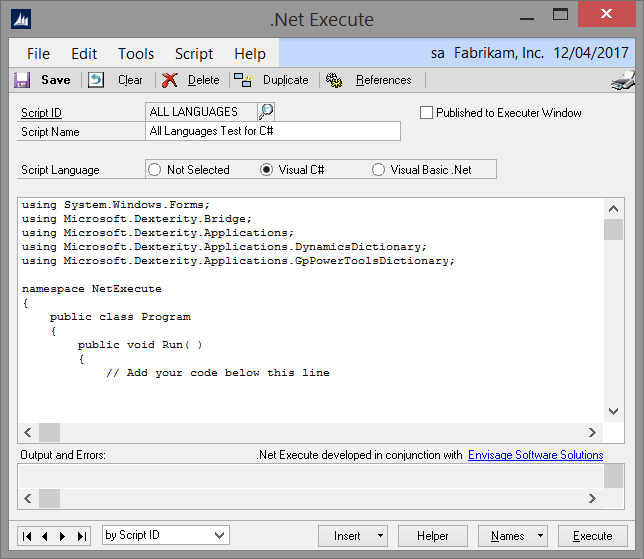
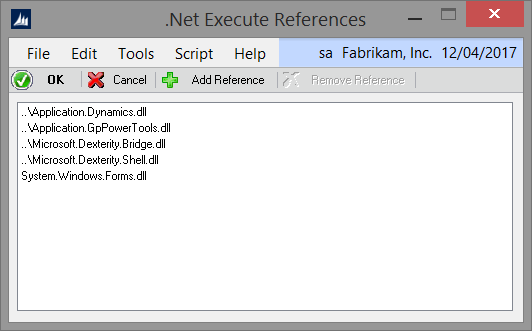
When you select a script language, a template script is automatically generated in that language including the appropriate using or Imports statements. The system also adds the references to the appropriate DLLs. You can click on the References button to add additional references for other Dynamics GP dictionaries or other system or custom features.
The script editor window provides all the standard features, such as the Insert button for inserting code constructs, the Helper button for adding calls to Helper functions, the Names button for looking up and inserting dictionary resources as well as the Script menu with find, replace and syntax checking.
Using the Helper functions it is possible to create or load scripts written in Dexterity, SQL or either of the .Net languages and execute them. This allows you to write scripts in any combination of the four languages regardless of what the base language is.
Support for Visual C# and Visual Basic.Net is provided by the two addins installed with GP Power Tools. The Visual C# extension addin providing support for Visual C# scripts and the Visual Basic.Net extension addin providing support for Visual Basic.Net. These addins DLLs must be installed for the functionality to be available.
Finally, the Visual Basic.Net extension addin also provides an additional feature in the Runtime Execute window: Dexterity sanScript code can be executed in the context of a modified form, rather than the original form, and so read and write to Modifier added local fields.
Enjoy
David
This article was originally posted on http://www.winthropdc.com/blog.
Filed under: 2010, 2013, 2013 R2, 2015, 2015 R2, Dynamics, GP, GP Power Tools, Microsoft, Products Tagged: GP 2010, GP 2013, GP 2015, GP Power Tools, GPPT


*This post is locked for comments