







Finding out the version of Office Web Components being used with your Microsoft Dynamics GP home page
Views (4131)
 MG-16101311-0
 26,225
 Like
Like Share
Share
 Report
Seriously, I wasn't planning on doing any more articles on the home page - at least not for now. But you have to admit this one is compelling. To find the version of the Microsoft Office Web Components running on your system,
1. Right-click on any metric graph currently being displayed on your home page.
Choose the About... option to continue.
2. You will now see the version number of the Office Web Components installed and being used with Microsoft Dynamics GP.
If you have any questions on a specific version, please see my article Microsoft Dynamics GP 2010 and Office Web Components for more information.
Until next post!
MG.-
Mariano Gomez, MVP
IntellPartners, LLC
http://www.intellpartners.com/


1. Right-click on any metric graph currently being displayed on your home page.
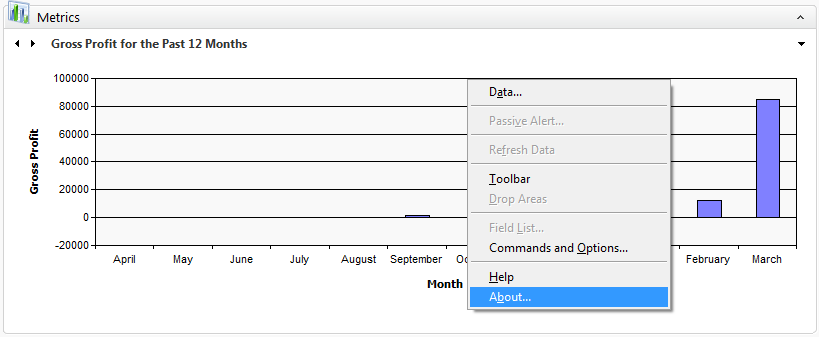 |
| Office Web Components options |
Choose the About... option to continue.
2. You will now see the version number of the Office Web Components installed and being used with Microsoft Dynamics GP.
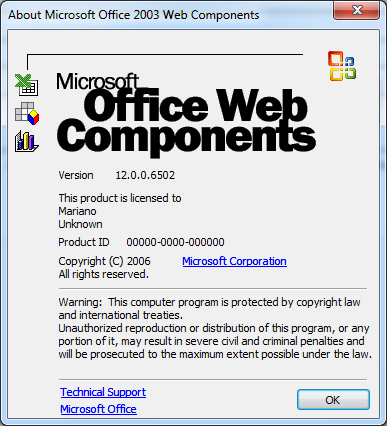 |
| Office Web Components version |
Until next post!
MG.-
Mariano Gomez, MVP
IntellPartners, LLC
http://www.intellpartners.com/
This was originally posted here.
*This post is locked for comments