




 266
266 Like
Like Share
Share
 Report
Issue:
An issue comes up today when a client could not open “View target mapping”. This is R2 CU7. The stack trace error is shown like below
“Field ‘Position’ in table ‘DMFTargetXMLToEntityMap’ has not been explicitly selected“
It works for some entities but fails for some entities


Result
After looking at stack trace I was able to find an issue with the select statement in table DMFEntity.generateXML() method. Position field was used but it was not part of Group by of the select statement; therefore, an exception was raised for missing field.
AOT > Table > DMFEntity > generateXML
I added ‘Position’ field to the select statement
while select mapping
group by MethodName, Position
where mapping.Entity == _entity.EntityName
&& mapping.MappingType == DMFMappingType::Function
exists join sourceXMLFields
where sourceXMLFields.Entity == _entity.EntityName
&& sourceXMLFields.DefinitionGroup == _defGroup
&& mapping.EntityField == sourceXMLFields.EntityField
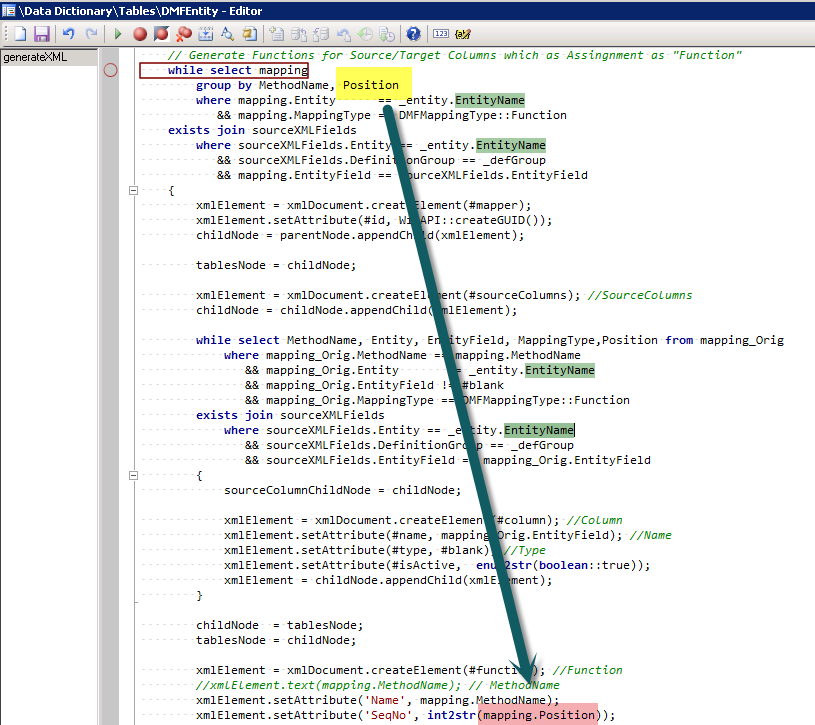
I’m now able to view the mapping. I found same issue with R3 CU8 and I haven’t tested with R3 CU9 yet.


*This post is locked for comments