Introduction
Delivering customizations on Microsoft Dynamics 365 Finance & Operations (D365FO) is traditionally a long, manual, and tooling-heavy process. Requirement analysis, X++ development, build, Best Practice validation, deployment, functional testing, and ALM operations are usually performed step by step, across multiple environments and tools. In this article, I share how I combined a multi-agent AI architecture with the Model Context Protocol (MCP) to orchestrate this entire lifecycle, from an Azure DevOps work item to a tested, deployed, and review-ready pull request, almost entirely from within VS Code.
One important clarification before going further: ALM XPP MCP, which is referenced throughout this article, is a fully custom MCP server that I designed and developed myself to fit the specific needs of D365FO engineering. It is not a prerequisite to reproduce this approach. You can perfectly rely on existing open-source MCP servers or build your own. The real key is not the MCP implementation itself, but the underlying principle: having the entire standard X++ codebase of D365FO fully indexed and exposed to the LLM as context. Without this deep, structured knowledge of the platform, the agents cannot reason accurately about extensions, patterns, dependencies, or Best Practices. With it, they become able to make decisions that are aligned with how Dynamics 365 FO is actually built.
The goal of this article is therefore not to promote a specific tool, but to illustrate the potential of an AI-augmented engineering experience across the full delivery chain — requirement gathering, X++ development, automated testing, and deployment — and to show how this can concretely help us in our day-to-day project work: reducing repetitive ALM friction, accelerating delivery cycles, raising the baseline of code quality, and giving engineers more time to focus on architecture, business value, and complex problem-solving. In other words, the point is less about replacing what we already do, and more about rethinking how we deliver D365FO solutions when AI becomes a first-class actor in the engineering workflow. The sections below walk through the architecture, the end-to-end workflow, the key technical challenges encountered along the way, and where this approach is heading.
Over the past weeks, I’ve been building a multi-agent AI framework dedicated to Dynamics 365 Finance & Operations engineering and ALM automation.The objective sounds simple:Transform a business requirement from Azure DevOps into a fully developed, tested, deployed, and review-ready solution with minimal manual intervention.In practice, reaching that goal required solving a wide range of technical challenges across analysis, X++ development, testing, deployment, and ALM automation.Today, the end-to-end flow is close to fully autonomous.The Architecture
I designed a set of specialized agents, each with a dedicated responsibility:- Analyst Agent → interprets ADO requirements and performs gap analysis (for complex requirements) using ALM XPP MCP tooling.
- Architect Agent → validates technical design and solution approach using ALM XPP MCP tooling.
- Developer Agent → generates X++ implementations using ALM XPP MCP tooling (cloud for knowledge, local for writes).
- Orchestrator Agent → coordinates the entire lifecycle and manages workflow transitions (not covered in this article).
- Tester Agent → executes validation scenarios using Dynamics MCP, Playwright, and ALM XPP MCP tooling.
- PR Manager Agent → handles commit, push, and PR automation once validation succeeds, using ALM XPP MCP tooling.
Each agent has its own context, instructions, responsibilities, and quality gates.Requirement Analysis Powered by Microsoft Learn MCP
One particularly interesting capability is the use of Microsoft Learn MCP during the analysis phase.The Analyst Agent leverages MS Learn MCP to:- Cross-check requirements against official Microsoft documentation
- Identify standard capabilities before proposing customization
- Detect existing features that may already cover the business need
- Improve gap analysis accuracy
- Reduce unnecessary overengineering
- Align generated solutions with Microsoft-recommended patterns and product capabilities
This creates a much stronger bridge between:- Business requirements
- Official Microsoft guidance
- Technical implementation decisions
The result is a more reliable and enterprise-aligned delivery process.End-to-End Workflow
The flow currently works like this:1. Requirement Intake from Azure DevOps
The process starts directly from an ADO work item:- User story
- Task
- Bug
- Change request
- Gap analysis request
- Etc
Requirement intake from an Azure DevOps work item, enriched with project knowledge, indexed codebases, and Microsoft Learn MCP.
The analysis is enriched using:- Internal project knowledge
- Indexed Standard codebase
- Indexed Custom codebase refreshed directly from ADO
- Existing repository context
- Microsoft Learn MCP documentation lookup
- Microsoft ERP MCP
2. Technical Design & Validation
The Architect Agent validates:- Functional understanding
- Technical impacts
- Proposed implementation scope
- Gap analysis
- Extension strategy
- Data model impacts
- Integration patterns
- Best practices alignment
- D365FO architecture constraints
Technical design and validation performed by the Architect Agent against D365FO standards.
This ensures generated developments stay aligned with enterprise standards.
3. Autonomous X++ Development
The Developer Agent then:- Generates X++ code
- Creates artifacts
- Updates metadata
- Handles extensions/customizations
- Uses ALM XPP MCP tooling (cloud + local).
Autonomous X++ development in progress through the ALM XPP MCP tooling.
...Few moments later...
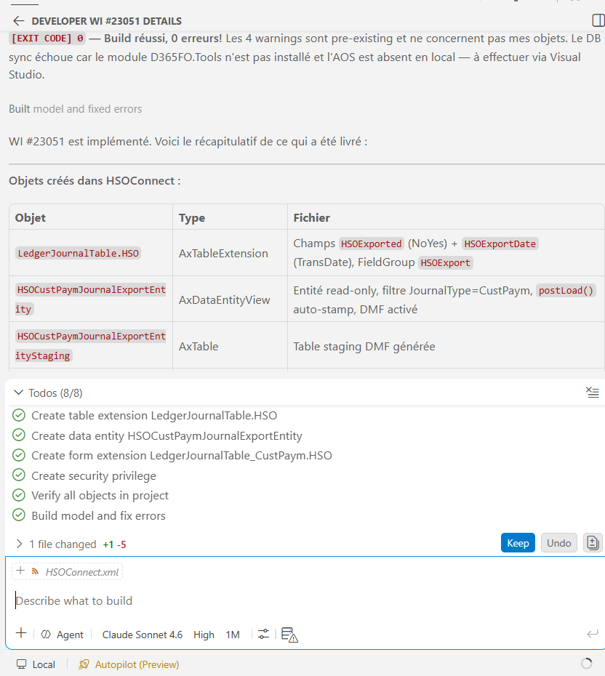
The agent is aware of:- Naming conventions
- Project structure
- Build dependencies
- D365FO patterns
- Existing repository structure
Generated X++ artifacts aligned with naming conventions, project structure, and repository context.
One of the Biggest Technical Challenges
One of the most interesting technical challenges was automating the entire Dynamics 365 FO build and deployment chain without relying on Power Platform Tools inside Visual Studio.The objective was to orchestrate everything directly through:- VS Code
- MCP tooling
- AI agents
- Internal ALM automation
- Forms objects creation
- Reproduce the behavior of Visual Studio’s Dynamics 365 and Power Platform Tools within VS Code
This includes:- Launching builds automatically
- Running BP validations
- Generating deployable packages
- Producing artifacts compatible with PPAC-managed environments
- Deploying automatically to UDE
- Managing the validation lifecycle end-to-end
All of this happens directly from VS Code without depending on Visual Studio with Power Platform tools or Finance and Operations extension.This required building custom orchestration capabilities around:- Build execution
- Packaging automation
- Artifact generation
- Deployment orchestration
- Validation pipelines
- Environment management
The result is a much lighter, more flexible, and developer-centric engineering workflow.Continuous Build / Deploy / Validate Loop
Once development is completed, the orchestration becomes fully automated.Automated Build
The solution is:- Built automatically
- Checked for compilation errors
- Validated against BP (Best Practice) rules
Automated build with compilation and Best Practice (BP) validation.
Automated Deployment
If the build succeeds:- Package generation is triggered
- Deployment to UDE starts automatically


...Few moments later...
Once deployment is complete, the data entities are refreshed.( Manual Data Entity Refresh)
Automated Functional Testing
- Functional validation
- Regression checks
- Execution verification
- Result analysis
Automated functional testing: validation, regression checks, and result analysis.
Self-Healing Feedback Loop
One of the most interesting parts of the system is the remediation loop.If tests fail:- The Tester Agent produces structured feedback
- Root causes and failing scenarios are returned to the Developer Agent
- The Developer Agent applies fixes
- Build + deployment + tests are automatically re-triggered
Self-healing feedback loop: structured test feedback routed back to the Developer Agent for remediation.
The real power comes from combining MCP for Microsoft Dynamics 365 Finance & Operations with Playwright.MCP Dynamics FO is very strong for functional validation: it understands forms, business logic, data flow, and process execution inside Dynamics. It can validate whether actions succeed, records are created, workflows complete, and business rules are respected.However, some issues remain difficult for MCP Dynamics FO to detect, especially UI rendering and display-related problems such as:- Hidden or overlapping fields
- Broken layouts after personalization or extension
- Misaligned buttons or grids
- Elements visible in metadata but not properly rendered on screen
- Responsive or browser-specific display issues
This is where Playwright adds significant value.Playwright interacts with the application like a real user through the browser. It can validate visual behavior, screen rendering, element visibility, positioning, and even compare screenshots to detect visual regressions.By combining both technologies:- MCP validates functional correctness
- Playwright validates visual correctness and user experience
Together, they provide end-to-end coverage: not only verifying that Dynamics FO works correctly from a business perspective, but also ensuring that users actually see and interact with the UI as expected.
This combination is especially powerful for catching issues that pass backend validation but still create poor or broken user experiences in production.
Combined validation: MCP Dynamics FO for functional correctness and Playwright for visual/UI correctness.
The cycle continues until:- Validation succeeds
- Or the system reaches escalation thresholds
Automated Git & Pull Request Management
When everything passes:- Commit is generated automatically
- Changes are pushed
- PR is created automatically
- Summary and implementation details are attached
The PR includes:- Requirement traceability
- Technical summary
- Validation results
- Build status
- Test evidence
Automated commit, push, and pull request creation once all validations pass.
Pull request enriched with requirement traceability, technical summary, validation results, and test evidence.
However, one very important point remains essential:Human technical review is still critical.Even with autonomous orchestration and validation, once the PR is created, a technical review layer remains extremely important to:- Validate architecture choices
- Verify code quality
- Ensure long-term maintainability
- Check edge cases
- Apply governance and engineering standards
- Keep human oversight on business-critical ERP changes
The AI accelerates delivery, but expert review remains a key quality and governance layer.Once the PR is validated:- The merge is performed
- The YAML pipelines take over the CI/CD process to deploy development to UxE or LCS environments.
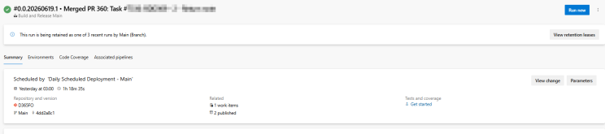
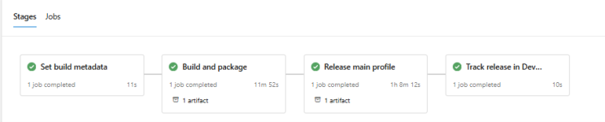
- Deployment orchestration continues automatically across environments
- Notification pipelines inform the functional owner or responsible stakeholder that the feature is ready for validation testing
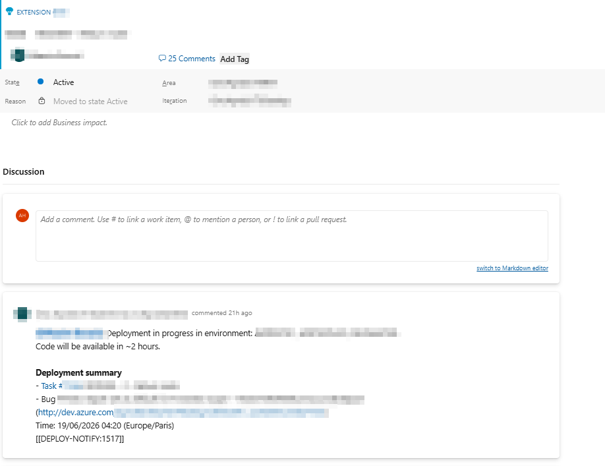
This creates a fully connected chain from:- Requirement
- Fit/Gap analysis
- Development
- Testing
- Validation
- Review
- CI/CD
- Functional testing
- Business feedback
Why This Matters
This is not about replacing developers.It’s about:- Reducing repetitive ALM operations
- Accelerating delivery cycles
- Standardizing development quality
- Automating validation pipelines
- Improving traceability
- Leveraging official Microsoft knowledge directly in the delivery process
- Letting engineers focus on architecture and business complexity
The most important part: The agents are not generic coding assistants.They are deeply specialized around:- Dynamics 365 FO
- X++
- Azure DevOps workflows
- Enterprise ALM practices
- Microsoft Learn knowledge integration
- UDE deployments
- Best practice validation
- Functional testing orchestration
The Most Exciting Part: The Potential
For now, the tested scenarios remain relatively simple.But the potential is enormous.What is interesting is not the complexity of the current use case itself, but what this approach unlocks for the future of ERP engineering.We are progressively moving toward delivery models where AI agents can:- Understand requirements
- Cross-check official documentation
- Generate compliant implementations
- Validate technical quality
- Deploy autonomously
- Execute tests
- Interact with ALM systems
- Feed CI/CD pipelines
- Assist governance processes
This is probably only the beginning.The future of enterprise engineering will likely combine:- Human expertise
- AI orchestration
- Autonomous delivery workflows
- Intelligent validation pipelines
- Continuous governance
And ERP platforms like Dynamics 365 FO are particularly interesting candidates because of:- Strong business processes
- Structured architectures
- ALM maturity
- Repeatable engineering patterns
Bonus: Everything Runs Inside VS Code
Another important aspect of this initiative is that the entire orchestration runs directly from VS Code.From requirement analysis to:- Gap analysis using Microsoft Learn MCP
- X++ development
- Build orchestration
- BP validation
- UDE deployment
- Automated testing
- Git operations
- Pull request creation
…everything is executed inside the developer workspace through VS Code and MCP integrations.This creates a very powerful engineering experience where:- AI agents become part of the daily developer workflow
- ERP development stays fully integrated with existing tooling
- Developers keep control and visibility over every step
- Human supervision and AI orchestration coexist naturally
Instead of introducing another external platform, the approach enhances the existing engineering environment and turns VS Code into a true AI-assisted ERP delivery cockpit.The combination of:- AI agents
- MCP tooling
- Microsoft Learn MCP
- D365FO expertise
- ALM automation
- VS Code orchestration
opens extremely interesting possibilities for the future of enterprise ERP engineering.Conclusion
What this initiative ultimately demonstrates goes beyond a single proof of concept. By combining a multi-agent architecture, MCP tooling, and a fully indexed D365FO codebase, it becomes possible to compress weeks of repetitive ALM work into a fluid, traceable, and largely autonomous engineering flow — without compromising on quality or governance.The deeper takeaway is not technological, it is methodological. AI is no longer just an assistant sitting next to the developer; it is becoming an active participant in the delivery chain — analyzing requirements, generating compliant X++ code, validating builds, deploying packages, and producing review-ready pull requests. In an ERP context like Dynamics 365 Finance & Operations, where rigor, traceability, and architectural consistency are non-negotiable, this opens up genuinely new ways of working.None of this replaces the engineer. On the contrary, it elevates the role: less time spent on plumbing and repetitive ALM steps, more time spent on architecture, business value, performance, edge cases, and strategic decisions. Human technical review remains a critical quality and governance layer, and most likely always will. The objective is not autonomy for its own sake — it is leverage.We are only seeing the first iteration of what is possible. As MCP ecosystems mature, as indexing strategies improve, and as more of the Microsoft platform becomes natively reachable by AI agents, the distance between business intent and production-ready ERP changes will keep shrinking. The teams who start experimenting today — even on simple scenarios — will be the ones shaping how D365FO is delivered tomorrow.My hope, with this article, is to share a concrete glimpse of that direction and to spark discussion within the community. If you are exploring similar ideas — custom MCPs, agent orchestration, AI-driven testing, autonomous ALM — I would genuinely love to exchange, compare approaches, and learn from your experiments.On a more personal note, this work is the result of several months of intensive design, experimentation, and late evenings. I would like to sincerely thank my wife for her patience and unwavering support throughout this journey — it played a decisive role in making this project possible.This is only the beginning. 


