







Azure Integration: Setting null value in Logic App Action to Dynamics 365
 Poojith Jain
 50
50
 Like
Like Share
Share
 Report
In one of my azure integration involving Dynamics 365, I had to send a null value when a field value is empty. The Dynamics 365 Actions for Update or Create a Record Action in the Logic App was always sending empty string (i.e. “”) instead of null value, which resulted in the integration failure. The sending null value fixed the integration, which was not possible to do via the Designer.
The expression was sending out null, but logic app converted to “”.
@{if(equals(items(‘XXX’)?[‘Type’], null), null,replace(items(‘XXX’)?[‘FieldName’], ‘;’, ‘,’))}
The expression for the field value resulted in the following error “Edm Object passed should have the options selected“
{
  "status": 400,
  "message": "--batchresponse_94b2278b-f1fd-4f65-94c9-c3640fba018b\r\nContent-Type: application/http\r\nContent-Transfer-Encoding: binary\r\n\r\nHTTP/1.1 204 No Content\r\nOData-Version: 4.0\r\n\r\n\r\n--batchresponse_94b2278b-f1fd-4f65-94c9-c3640fba018b\r\nContent-Type: application/http\r\nContent-Transfer-Encoding: binary\r\n\r\nHTTP/1.1 400 Bad Request\r\nREQ_ID: 64fce8db-bc4c-4653-92f7-8d976c4da1c7\r\nContent-Type: application/json; odata.metadata=minimal\r\nOData-Version: 4.0\r\n\r\n{\"error\":{\"code\":\"0x0\",\"message\":\"Edm Object passed should have the options selected. \",\"innererror\":{\"message\":\"Edm Object passed should have the options selected. \",\"type\":\"Microsoft.Crm.CrmHttpException\",\"stacktrace\":\"   at Microsoft.Crm.Extensibility.OData.TypeConverters.OptionSetValueCollectionEdmTypeConverter.ConvertToCrmTypeInternal(String edmTypeValue, String operationName)\\r\\n
  },
  "source": "XXXXXXX.crm4.dynamics.com",
  "errors": [],
  "debugInfo": "clientRequestId: 2e965f81-110b-4f77-964c-057f4651c702"
}
Azure Integration with Dynamics 365: Use case
The use case was to create or update an Address entity in Dynamics 365 based on specific conditions. I used the standard Dynamics 365 action Update or Create a record action. There is a specific field that accepts a specific value or null but nor an empty value.
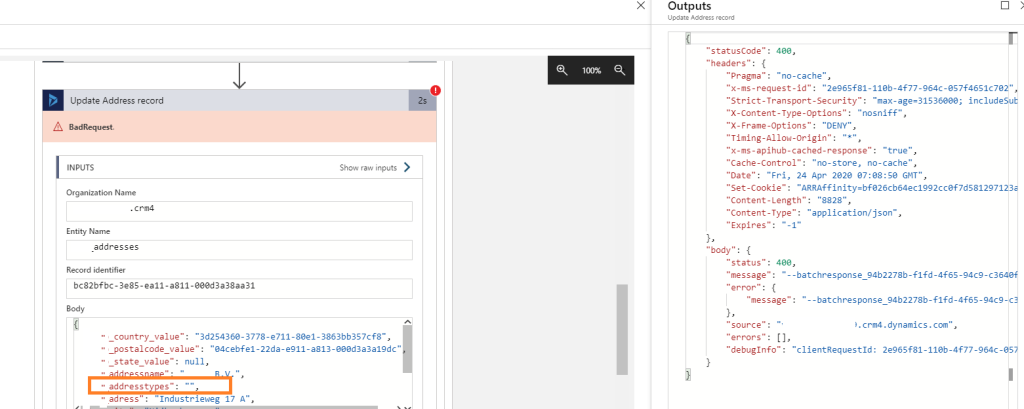
Azure Integration with Dynamics 365: Resolution
The Logic App adds curly braces {} in the expression value, the Logic App runtime will convert the null value to an empty string. The trick is to go to the code view of the Logic App designer, find the action and then remove the curly braces {} around the expression:
@{if(equals(items(‘XXX’)?[‘Type’], null), null,replace(items(‘XXX’)?[‘FieldName’], ‘;’, ‘,’))}
to
@if(equals(items(‘XXX’)?[‘Type’], null), null,replace(items(‘XXX’)?[‘FieldName’], ‘;’, ‘,’))
This was originally posted here.
*This post is locked for comments