







Explore Business Central API through Postman using Basic Authentication
Views (3609)

 Like
Like Share
Share
 Report
Introduction:
In this article, we will walk through steps on how to authenticate Business Central API using Basic Authentication in Postman
Pre-Requisite:
Business Central account
Business Central API Basic authentication in Postman:
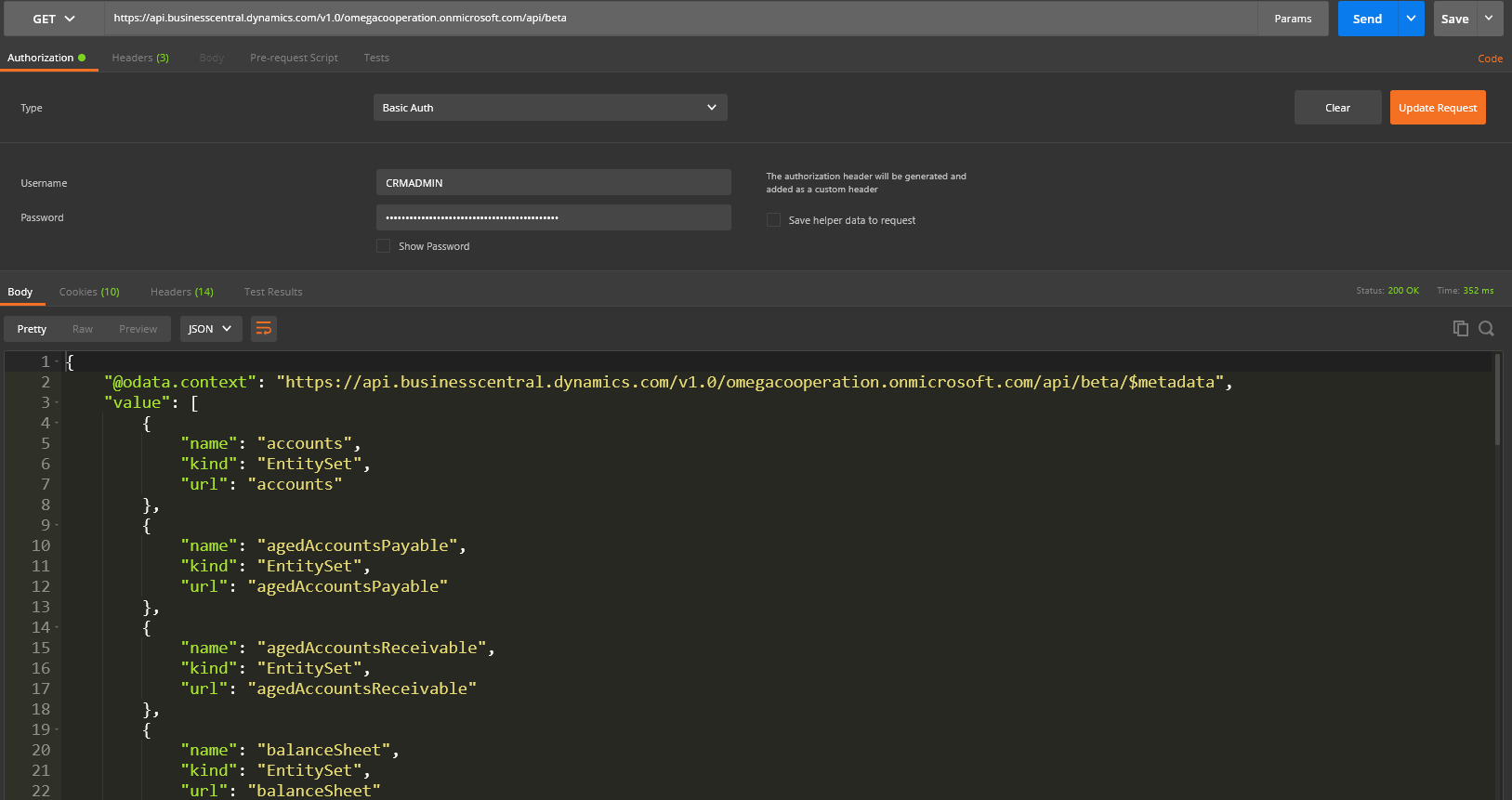
- In Postman, make a GET request to Business Central base API URL.
Base URL: https://api.businesscentral.dynamics.com/v1.0/api/beta
For using Basic Authentication, we need to add domain as well.
Domain URL: https://api.businesscentral.dynamics.com/v1.0/myusersdomain.com/api/beta - In Business Central, generate Web Service Access Key for your user.
- Now in Postman authorization tab, select Basic Auth in Type. Provide Username and Web Service Access Key
- Click Send
The post Explore Business Central API through Postman using Basic Authentication appeared first on CloudFronts - Microsoft Dynamics 365 | Power BI | Azure.
This was originally posted here.
*This post is locked for comments