






Using a Canvas app with Dynamics CE to upload an image
 ashlega
 34,477
 Like
Like Share
Share
 Report
You probably know that we can extend entity forms with the canvas apps – this feature has been in the preview for a while now:
It would be interesting to find some useful application for this new functionality, so I figured why don’t I use it to add “image upload” area to a form?
Here is what I ended up with:

Quite frankly, it took a while. A few hours.. But, also quite frankly, it took less than it might have taken me if I had to actually do some coding there. Although, this whole solution is not without its own limitations, so there are pros and cons, but, as you can see above, at the very least it’s viable.
Here is how it’s been set up:
- There is a list in sharepoint, so those files are stored as attachments on the list
- That list has an extra column (RecordId, string). That’s what my PowerApps application is using to identify the list item related to the currently open contact record in Dynamics
On the application side, I have my main screen and a form right on that screen:
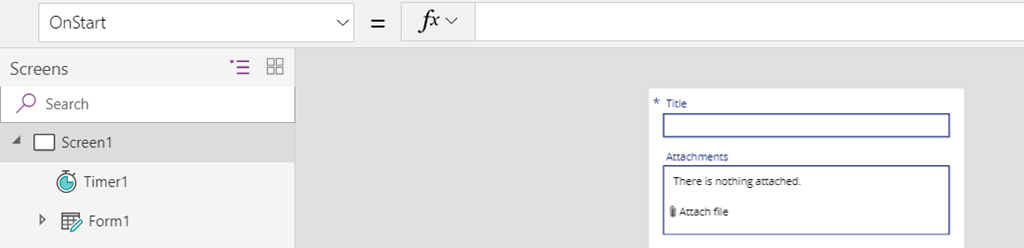
You can see that there is, also, a Timer control. Somehow, I cannot really use filter/lookup functions in the OnStart/OnVisible of the screen control but it works perfectly when done in the timer.
So the timer (which will run only once) is doing this:

It will set a variable, and, then, depending on whether a sharepoint list item exists, it will either call EditForm or NewForm.
My form “DATA” properties are set like this:
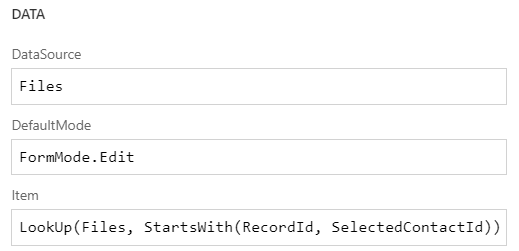
I’m using SelectedContactId, but I have to use a LookUp there, too, since, otherwise, the form does not get refreshed properly on the updates (Could have used a variable.. but the variable needs to be refreshed when a file is added/removed)
Attachments card has two controls. There is an attachment control which I’m using to add files, and there is an Image control which I’m using for the preview of the image. On the screenshot below, you’ll see how Image property of that control is set:

And, finally, whenever a file is added/removed, I need to submit the form and refresh it. So, I’m doing exactly the same in the attachment control OnRemoveFile and OnAddFile events:
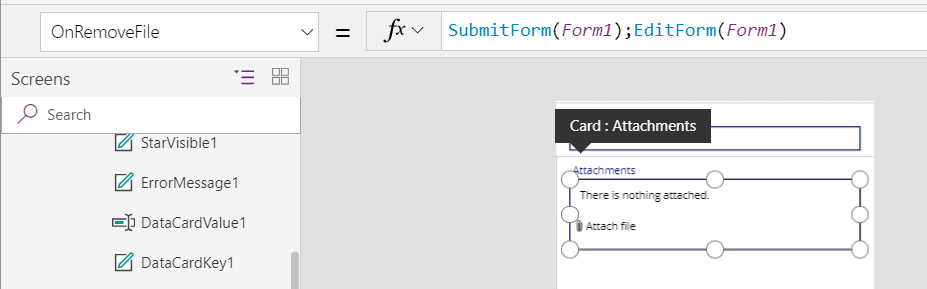
I think it took me more time to figure out how to work with all these screens/controls/events/etc than to actually write an app for this particular use case, and, yet, it only took a few hours. Not bad, it seems?
And just a couple of notes for the conclusion:
- It seems that the canvas app is created as a phone app, so there is no way to change application screen height/width. This is a little inconvenient – in my case there is a lot of empty space left on the Dynamics form when the app is displayed there
- There are some limitations still, but Microsoft is working to improve this functionality (GA by June 2019): https://docs.microsoft.com/en-us/business-applications-release-notes/april19/microsoft-powerapps/planned-features
Not sure how to end this post.. Happy Power Platforming, I guess?
This was originally posted here.
*This post is locked for comments