In Project Service Automation, a Portal could be used that would allow Sub Contractors (who don't have a license to D365 and are Resources linked to Contact records) to go and submit Time Entries. I won't go into all of the finer details in terms of provisioning the details/set up of web pages, but you can find more info here - https://docs.microsoft.com/en-us/dynamics365/customer-engagement/portals/administer-manage-portal-dynamics-365
My main aim was to be able to replicate the Submit & Recall functionality available in PSA on Time Entries, as well as making the interface as user-friendly as possible (with the least effort possible, so that it wouldn't repel users).
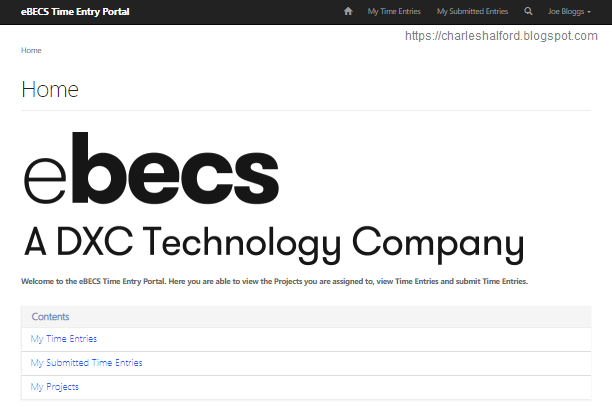
First off, I edited my Home Web Page to brand it with the eBECS logo and added a Web Link Set so that users would be able to click through to Web Pages from the landing page.
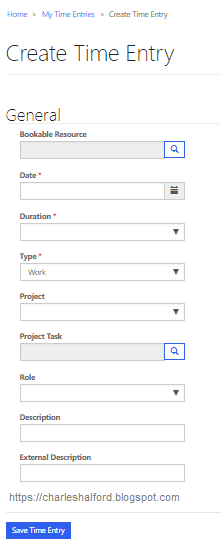
I also created a Create Time Entry Web Page that was linked to my Entity Form for Time Entries, changing some of the Entity Form Metadata along the way so that Projects and Roles were drop down options rather than Lookups.
Adding Submit & Recall Time Entry Buttons
Then I created a new Web Page for My Time Entries and an Entity List for My Time Entries, and associated the two records. I also created four new views specific to my portal for:
- My Draft Time Entries (entry status equals Draft)
- My Submitted Time Entries (entry status equals Submitted)
- My Approved Time Entries (entry status equals Approved)
- My Rejected Time Entries (entry status equals Returned)
In order to show Time Entry records that related to my Contact record, I used parent/child Entity Permissions on Bookable Resource and Time Entry.
Next on my agenda was to create two on-demand workflows that replicated PSA functionality and changed a Submitted Time Entry back to Draft status through clicking RECALL and another workflow that would change a Time Entries status to Submitted by clicking SUBMIT, if it was in a Draft or Returned state.
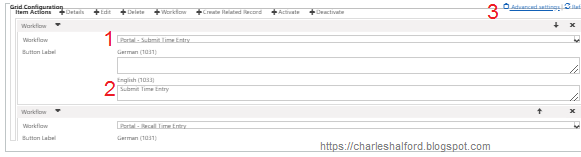
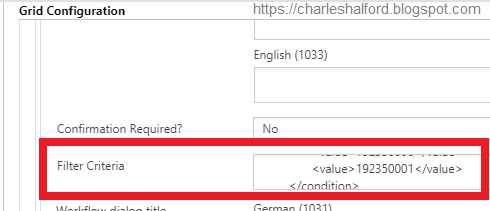
Now I'd created my relevant workflows, I wanted to add them as a button against records in my Entity List. Underneath Grid Configuration on the Entity List form, I added both of my Workflows (Step 1 below) and changed the button labels (Step 2 below). Then I navigated to my filter settings so I could ensure that my RECALL button was only available for Submitted entries and SUBMIT was only available on my Draft and Returned entries.
Then I needed to add Filter Criteria for my workflows. Under Advanced Settings (Step 3 above), I changed the success message for each workflow as necessary and then applied Filter Criteria so the button would only appear on records that met my criteria. This was just FetchXML which I had built up through an Advanced Find.
Now in practice, my Entity List works as per the below.
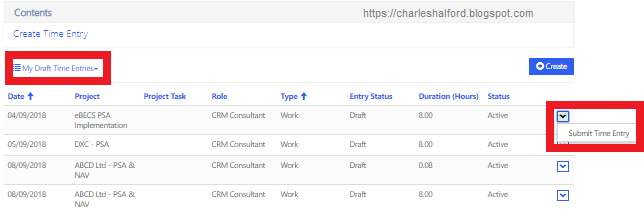
My Draft Entries only give the user an option to submit the entry -
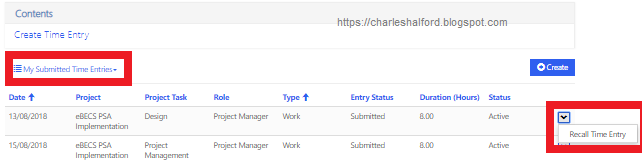
My Submitted Entries only give the user an option to recall an entry -
My Approved Entries give me no options -
My Rejected Entries only give the user the option to submit the entry again -
In conclusion, without really going in and playing around too much with the UI and other Web Pages, I've managed to replicate the Submit & Recall Time Entry functionality in PSA. Sub Contractors wouldn't need a license to D365 nor would they be accessing D365 directly, so this solution is one that may appeal to numerous organisations.





 Like
Like Share
Share
 Report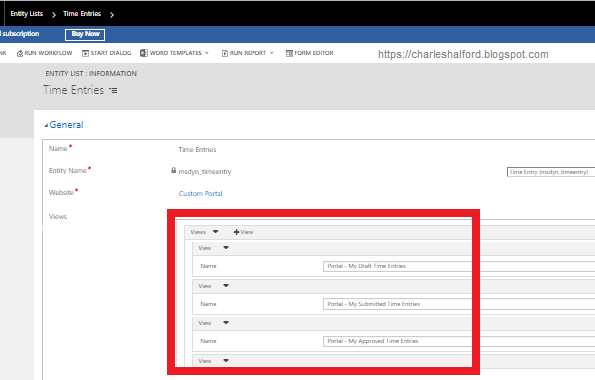




 100
100
*This post is locked for comments