







[Resolved]You don’t have permission to view files in this location, Contact your Microsoft team owner or SharePoint administrator for access.
Views (273)

 Like
Like Share
Share
 Report
We added a new User in CRM, User has the System Administrator role but still were getting the below error.
You do not have permission to view files in this location, Contact your Microsoft team owner or SharePoint administrator for access.
We did check User’s SharePoint access and, but it did not work.
Solution –
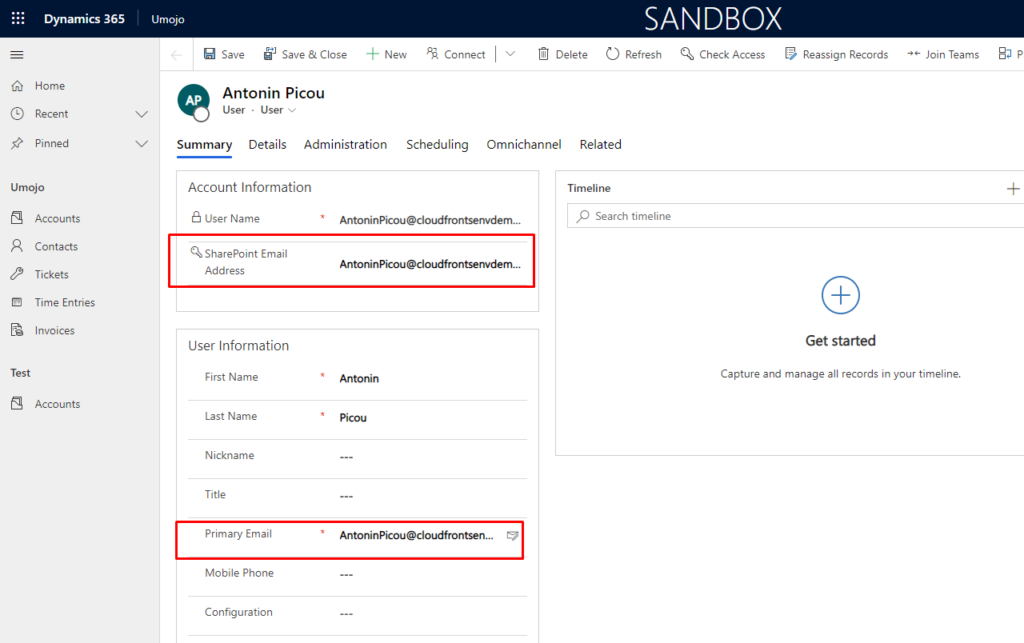
In User entity [OOB], there is OOB field called as “Sharepointemailaddress”.
Add same email id of User -> save the record and it will be resolved.
Hope this helps!
The post [Resolved]You don’t have permission to view files in this location, Contact your Microsoft team owner or SharePoint administrator for access. appeared first on Cloudfronts - Microsoft Dynamics 365 | Power BI | Azure.
*This post is locked for comments