




 1,171
1,171 Like
Like Share
Share
 Report
Sometimes it’s the little things that make a really big difference. This is one of those little things that people have been asking me about for ages, but I’ve never had a perfect answer for. Until now…
What’s it called?
The feature is called ‘Years of service calculation’ in the feature management workspace.
Why should I be interested?
If you’re tracking service dates for anyone whose continuous service date isn’t their employment start date in the current legal entity, you need this feature. This is about the number that’s shown on the right hand side of the header, either on the new (‘streamlined employee entry’) worker form or in the People workspace. Previously, this number could only be based on their employment start date – meaning anyone who had transferred between entities of the same business, or who you were recognising previous service for after a transfer in under TUPE (or equivalent, for you non-UK folks), would not have the right number showing.
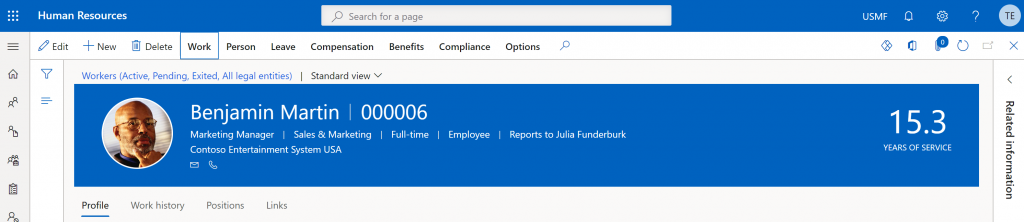
What does it do?
Enabling the feature allows you to select which date the form uses to calculate years of service. With the option to choose from employment start date, seniority date, or adjusted start date. Given that seniority date is attached to the worker themselves and not any particular employment in any particular legal entity, that’s potentially very helpful.
How do I set it up?
Enable the feature in feature management (remembering you might have to hit ‘check for updates’ to get this one to appear – especially if you haven’t been in there for a bit).
A new parameter then becomes available in Human Resources Parameters. It’s on the ‘general’ tab under ‘Years of service display’:

Hit save, do a browser refresh for luck, and you should start to see the impact of the change pretty quickly.
Anything else I should be aware of?
A couple of things:
Don’t make my mistake and assume that because you’ve picked seniority date once, the number will suddenly be visible regardless of your operating entity. Remember that because it’s found in Human Resources Parameters (and not shared parameters) this setting is legal entity specific. If you’re in GBSI, looking at a worker who’s not employed there, and you don’t see a value – check you set that parameter to seniority date in GBSI. This is the voice of confused experience.
This is obvious – but remember that seniority date isn’t a mandatory field, and it might not be populated. If there’s no data there, clearly there’s nothing to base the service calculation on.
The post What’s new – ‘fix’ that years of service figure appeared first on tomelliott.co.uk.
*This post is locked for comments