




 2,289
2,289 Like
Like Share
Share
 Report
Introduction:
In this blog we will see how to Configure Microsoft flows for Converting Speech to Text
Lets see this in 3 Different Blogs, Here we start with Microsoft Azure
Pre-Requisites :
- Canvas PowerApps
- Microsoft Azure
- Microsoft Flow
1. Navigate to https://make.powerautomate.com
2. Select New --> Select Instant Cloud Flow
3. Add Step --> Initialize Variable

Add Value as ASK FROM POWERAPPS
4. Add Another Variable

replace(variables('Data'),'data:audio/webm;base64,','')
5. Add Compose to Convert to JSON

json(variables('ReplaceValues'))
6. Now Add Parse JSON and Pass input from COMPSE

{
    "type": "object",
    "properties": {
        "Url": {
            "type": "string"
        }
    }
}
7. Get the Value from JSON and Pass value as URL

8. Trigger a HTTP Request to Function app (URL : Function APP URL)

9. Trigger HTTP Request for Cognitive Service with KEY and Content Type
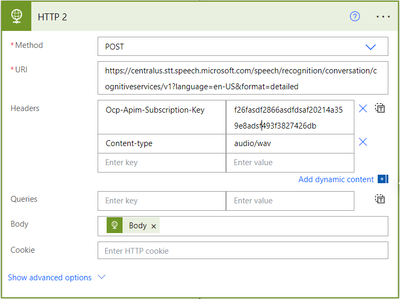
Here the URL will be Your Cognitive URL and Key as Cognitive Key
10. Parse JSON and the Input from Point 9

{
    "type": "object",
    "properties": {
        "RecognitionStatus": {
            "type": "string"
        },
        "Offset": {
            "type": "integer"
        },
        "Duration": {
            "type": "integer"
        },
        "NBest": {
            "type": "array",
            "items": {
                "type": "object",
                "properties": {
                    "Confidence": {
                        "type": "number"
                    },
                    "Lexical": {
                        "type": "string"
                    },
                    "ITN": {
                        "type": "string"
                    },
                    "MaskedITN": {
                        "type": "string"
                    },
                    "Display": {
                        "type": "string"
                    }
                },
                "required": [
                    "Confidence",
                    "Lexical",
                    "ITN",
                    "MaskedITN",
                    "Display"
                ]
            }
        },
        "DisplayText": {
            "type": "string"
        }
    }
}
10. At last Respond to PowerApps

That's it 
*This post is locked for comments