




 26,225
 Like
Like Share
Share
 Report
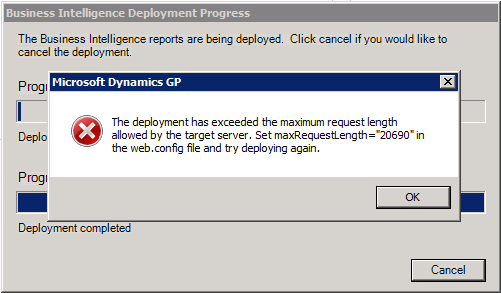 |
| maxRequestLength error deploying BI reports |
The error and it's resolution are pretty clear and called for setting the maxRequestLength attribute to "20690" in SSRS's web.config file.
 |
| Web.config |
The SSRS web.config file can typically be found under the %programfiles%\Microsoft SQL Server\MSRS10_50.MSSQLSERVER\Reporting Services\Report Server, for a Microsoft SQL Server 2008 R2 SSRS installtion done in Native mode. If you have other types of deployments, for example, SharePoint integrated, it will be necessary to consult with your system administrator.
You can then proceed to use Visual Studio or, simply, Notepad to edit the web.config file, locating the httpRuntime element of the XML document.
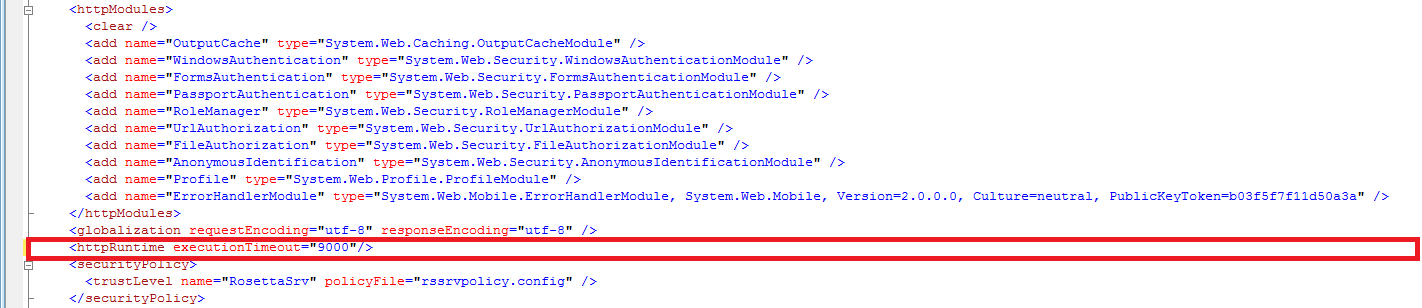 |
| web.config - httpRuntime section |
The final edit of this section should look like this, with the maxRequestLength attribute added.
 |
| web.config - Edited httpRuntime section with maxRequestLength parameter |
Once the web.config file was saved, I reinitiated the deployment and all was well. The maxRequestLength attribute specifies the maximum upload size for a file into the SSRS reports library in kilobytes. For this specific instance, 20,690 seems to be the magical number.
Until next post!
MG.-
Mariano Gomez, MVP
IntellPartners, LLC
http://www.intellpartners.com/


*This post is locked for comments