





How to hide G/L amounts from specific users by applying the security filters in Business Central?
Views (76)
 Alexandra Horbatenko
 401
User Group Leader
401
User Group Leader
 Like
Like Share
Share
 Report
A common business scenario is when G/L amount must be hidden for a specific group of users. However, daily tasks performed by this group required users to view G/L accounts and G/L names. Here is the overview how to deliver the solution using the security filters in the Business Central.

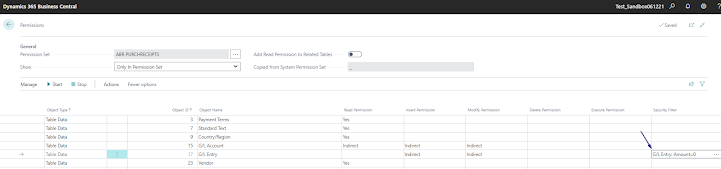

1. On the permission set assigned to the users with the limited view permissions, set table15 G/L account and table 17 G/L entry to Indirect.
2. Under the security filter, set Field Caption Amount to 0 for the Field Number 17.
Thank you for reading.
Hope you find it interesting.
#businesscentral #msdyn365bc #erponsulting #technologythesedays #microsoft #dynamics365businesscetral #securityfilters #permissionsets #effectivepermissions #automation
This was originally posted here.
*This post is locked for comments