




 34,477
 Like
Like Share
Share
 Report
When talking to the client about the business requirements, it’s always tempting to think that we can do just about anything in the plugins if we really have to.
And it’s true that plugins allow us to implement very powerful customizations, but, on the other hand, that power does not come for free – we may have to pay a certain price since all those plugins will be running on the Dynamics server, and, so, they’ll be slowing down the application.
So I figured I’d do a quick comparison to see how the plugins affect performance just to illustrate what may happen. Imagine an oversimplified scenario (which might not even require a plugin) where we would need to make sure that any time an account record is updated, it will have “TEST” in the description field.
I’ve run 3 different tests to measure average update request execution time in each case:
1. For the first test, I have disabled all the plugins on account “update” to get the baseline. There were 1000 updates, every 100 of them were done using ExecuteMultiple request.
2. For the second test, I used North52 formula
In general, North52 is a great solution that simplifies all sorts of calculations in Dynamics.. but, it seems, I don’t quite agree with their own assessment of the performance impact which you can find here:
You can download a free edition of North52 to use it in your environment – it does have some limitations, of course, but it can still be very useful.
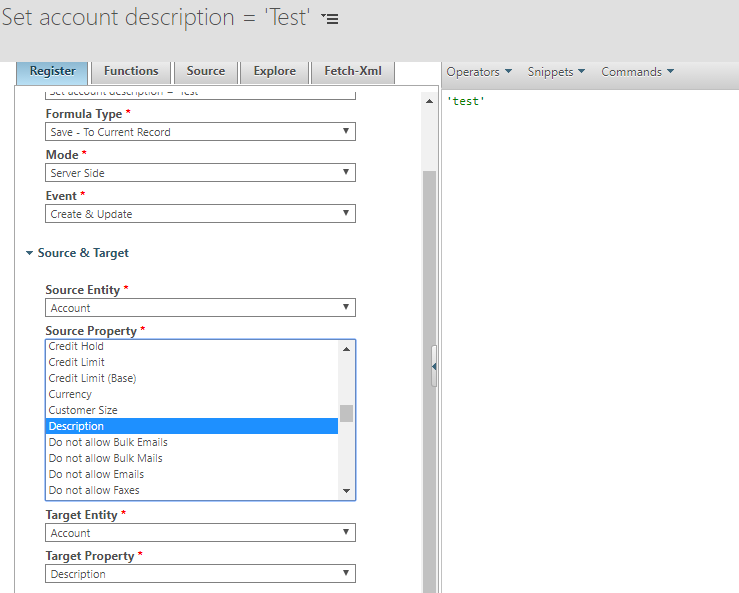
Anyway, here is how the formula looked like:
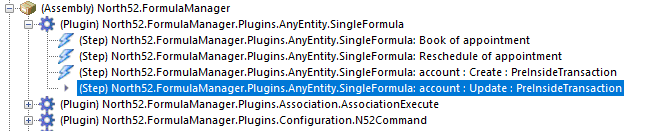
Just keep in mind that, when defining a formula there, you are, actually, registering a plugin step (more exactly, North52 is doing it for you):
3. For the third test, I used a separate plugin
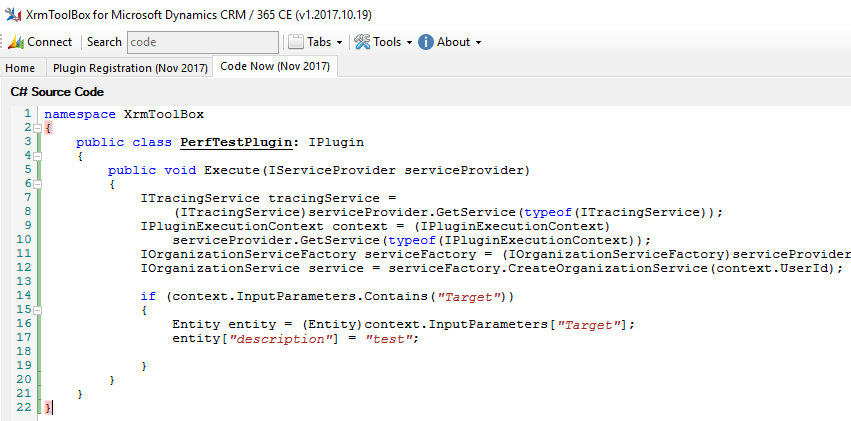
That one is not doing much – it’s just setting the description field.
And there are a few more things which are worth mentioning:
- When running test #2, the plugin from test #3 was disabled
- When running test #3, the plugin from North52 was disabled
- Finally, I used a console utility for testing – you’ll see the code below:
class Program
    {
        public static IOrganizationService Service = null;

        static void Main(string[] args)
        {
            var conn = new Microsoft.Xrm.Tooling.Connector.CrmServiceClient(System.Configuration.ConfigurationManager.ConnectionStrings["CodeNow"].ConnectionString);
            Service = (IOrganizationService)conn.OrganizationWebProxyClient != null ? (IOrganizationService)conn.OrganizationWebProxyClient : (IOrganizationService)conn.OrganizationServiceProxy;


            int testCount = 10;
            int requestPerTest = 100;
            double totalMs = 0;

            for (int i = 0; i < testCount; i++)
            {
                Console.WriteLine("Testing..");
                totalMs += UpdateAccountPerfTest(requestPerTest);

            }

            double average = totalMs / (testCount * requestPerTest);
            Console.WriteLine("Average update time: " + average.ToString());
            Console.ReadKey();
            //SolutionStats();
        }


        public static double UpdateAccountPerfTest(int requestCount)
        {
            Guid accountId = Guid.Parse("475B158C-541C-E511-80D3-3863BB347BA8");
            Entity updatedAccount = new Entity("account");
            updatedAccount["description"] = "1";
            updatedAccount.Id = accountId;

            UpdateRequest updateRequest = new UpdateRequest()
            {
                Target = updatedAccount
            };
            Service.Execute(updateRequest);


            OrganizationRequestCollection requestCollection = new OrganizationRequestCollection();
            for (int i = 0; i < requestCount; i++)
            {
                requestCollection.Add(updateRequest);
            }
            DateTime dtStart = DateTime.Now;
            ExecuteMultipleRequest emr = new ExecuteMultipleRequest()
            {
                Requests = requestCollection,

                Settings = new ExecuteMultipleSettings()
                {
                    ContinueOnError = true,
                    ReturnResponses = true
                }

            };
            var response = Service.Execute(emr);
            return (DateTime.Now - dtStart).TotalMilliseconds;

        }
  }
All that said, here is how the tests worked out(ran a few tests, actually. Those numbers are the “best” I saw):
- Test#1 (No plugins): 99 ms per update request
- Test#2 (North52): 126 ms per update request
- Test#3 (Separate plugin): 114 ms per update request
So, realistically, it’s almost impossible to notice the difference on any single update request. However, it’s still about 20-30% difference, and it seems to be a little worse with North52 when compared to a dedicated plugin. Which could be expected since North52 would be using some additional calculations. Although, that difference between North52 and dedicated plugin might be just something else since I saw those numbers going a bit up and down in different test runs for both Test#2 and Test#3.
The problem, though, is not those individual calls – it’s when you start looking at the really large number of updates, that’s where 20-30% suddenly become something to keep in mind.
But that’s not all yet.. There are a couple of message processing steps on the account entity that come with the FIeld Service solution, so what if I do the tests again with Field Service plugins disabled?
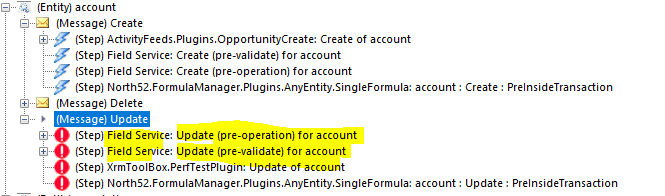
- Test#1 (No plugins): 27-32 ms per update request
- Test#2 (North52): 59-63 ms per update request
- Test#3 (Separate plugin): 59-63 ms per update request
In other words, when there were no plugins at all, average update request performance was about 3-4 times better. At the same time, North52 seemed to be about as efficient as independent plugins, at least with that simple formula.. Except in one scenario:
Normally, we won’t register plugins to run off just any attribute – we will configure the plugins to run on the update of some specific attributes only. For example, when running Test#2, I tried using only a single attribute (“name”) for the trigger, and I got exactly the same average execution time as if there were no plugins at all. With North52, we can do the same using plugin registration utility, but, it seems, there is no way to do it directly in the Formula Editor. Something to keep in mind then..
So, be aware. You may not notice the difference on every single update/create operation, but, at some point, you may have to start optimizing plugin performance by adjusting the list of attributes they’ll be triggered on, by simplifying the calculations, even by moving those calculations into an external process, etc.
*This post is locked for comments