







Microsoft Dynamics GP Tip: Get Visual Cues for Vendors That Accept EFT Payments
 AC@CAL
 3,100
3,100
 Like
Like Share
Share
 Report
A vendor requests to be paid by EFT. Since it is combined in a batch with other payments, you don’t notice the request and send a check. The vendor still gets paid, but you’ve wasted time and postage.
Now the Microsoft Dynamics GP purchasing module includes visual cues for EFT payments.
When you process checks and go into the edit checks window, it shows you all the vendors and their invoices that need to be paid. Now you can see right away which vendors can be paid by EFT so you won’t accidentally process a check.
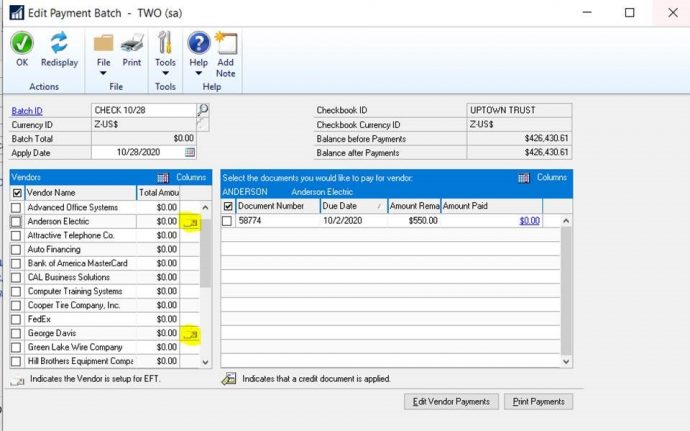
In the window above, notice how you can see vendors who are set up to receive EFT payments.
If you are interested in upgrading to the most recent version of Microsoft Dynamics GP or need support or training, contact us at support@calszone.com.
For more Microsoft Dynamics GP tips visit www.calszone.com/tips.
By Stephanie Olbrych CAL Business Solutions, Microsoft Dynamics GP and Acumatica Partner, www.calszone.com
The post Microsoft Dynamics GP Tip: Get Visual Cues for Vendors That Accept EFT Payments appeared first on CAL Business Solutions-Acumatica-Microsoft Dynamics GP-ERP Partner.
This was originally posted here.
*This post is locked for comments