




 2,289
2,289 Like
Like Share
Share
 Report
Introduction:
In this Blog, we will see how we can increase size of File Column in Dataverse/MSCRM Environment.
Implementation Steps:
1. Navigate to https://make.powerapps.com
2. Select the Respective Environment
3. Click Solutions if you have any else click Dataverse and Select Tables

4. Click on Respective Table and Open it.
5. Click New --> Select Columns

6. Once Selected New Column it will open a Popup in that Select Data Type as File and Select File as an Option

7. On Selected Click Advance Settings to Increase file Size
Default Size will be 32768
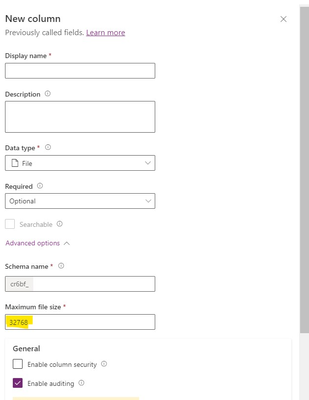
8. If we want to Increase the Default File Size you can increase the same in Maximum File Size Column.
9. Once Done Click On Save
That's it 
*This post is locked for comments