




 50,091
 Like
Like Share
Share
 Report
Sometimes we may have requirement to prevent BPF stage to set active or move next stage based on some condition.
Here I want to describe similar kind of requirement , let say I am in opportunity stage called “Develop” , I want to validate one subgrid in the form which having at least one record when user click on “Next Stage” or “Save” or “Set Active” one . If the record count = 0 then stage will not move forward and not been saved.
You may use this concept to validate any field value or some custom logic.
Here is few high level steps –
Copy below scripts in a JavaScript web resource. Replace the stage name and subgrid name and don’t forget to replace double comma with double quote.
function ValidateSelectedStageOnSave(context) {
var result = true;
// Get current stage name
var stageName = Xrm.Page.data.process.getSelectedStage().getName().toString().toLowerCase();
if (stageName == "develop") { // Need to replace the stage name which you want to validate
var count = 0;
//Replace the subgrid name in below
if (Xrm.Page != null && Xrm.Page != undefined && Xrm.Page.getControl("subgridcompetitorid") != null && Xrm.Page.getControl("subgridcompetitorid") != undefined) {
count = Xrm.Page.getControl("subgridcompetitorid").getGrid().getTotalRecordCount();
}
if (count == -1 || count == 0) {
Xrm.Page.ui.setFormNotification("Please add at least one competitor", "INFO", "2001"); // Set notification
context.getEventArgs().preventDefault();
return false;
}
else {
Xrm.Page.ui.clearFormNotification("2001"); // Clear notification
}
}
}
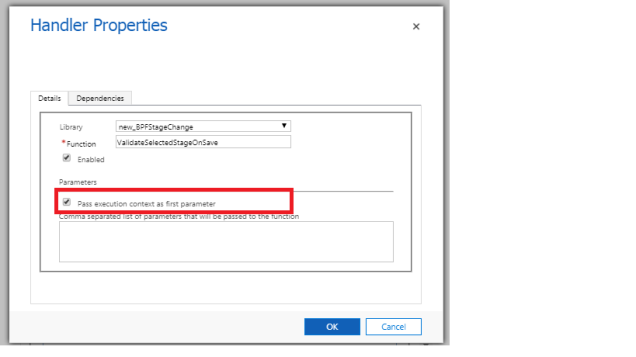
Register the function ValidateSelectedStageOnSave in “OnSave” of the Opportunity entity form. Make sure you passed the execution context while registering the method “OnSave” event.
Here you can see the Develop Stage can’t move and its showing a form notification as there is no record in the subgrid.

*This post is locked for comments