web
You’re offline. This is a read only version of the page.
close
Skip to main content

Announcements

No record found.

News and Announcements icon
Community site session details

Community site session details

Session Id :
Customer experience | Sales, Customer Insights,...
Answered

Contextual Help Browser has stopped working with current update version: 9.1.19.10 for on-premise

(1) ShareShare
ReportReport
Posted on by 613
Hi.

After installing CU 9.1.17.29 for Microsoft Dynamics CRM 9.1 on a clients deployment we noticed that the custom help panes and guided tasks(contextual help) has stopped working.
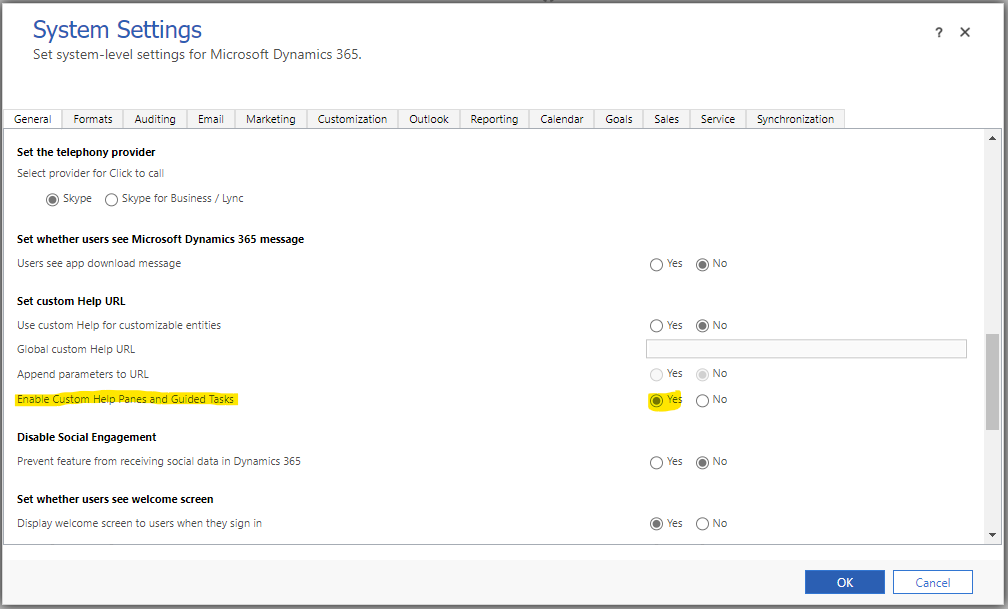
//
The client deployment was upgraded from CU 9.1.10.102 where it was working.
We have confirmed that this hasn't been fixed in neither of the CU that was released after this one, which is 9.1.18.22 and 9.1.19.10(latest), so we can safely say that the issue was introduced in any of the updates released between CU 9.1.10.102 - CU 9.1.17.29.

As we do have a working deployment with the old CU 9.1.10.102 I ran some DevTools to see the differences between that version and the most current update CU 9.1.19.10.

On CU 9.1.19.10 (non working) it seems to be related to a missing javascript(111.js) that is not present in the //CRMWeb//uclient//scripts// when you click the Help button(?)
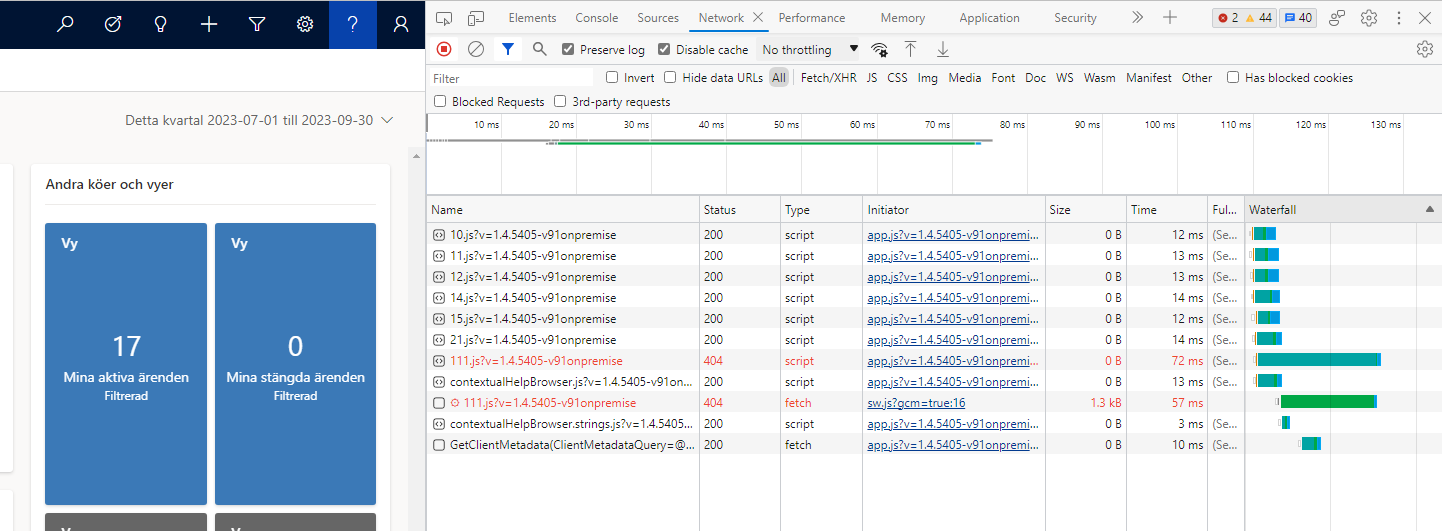
//
 
Compared to CU 9.1.10.102(working) where it loads another set of javascript that are present.
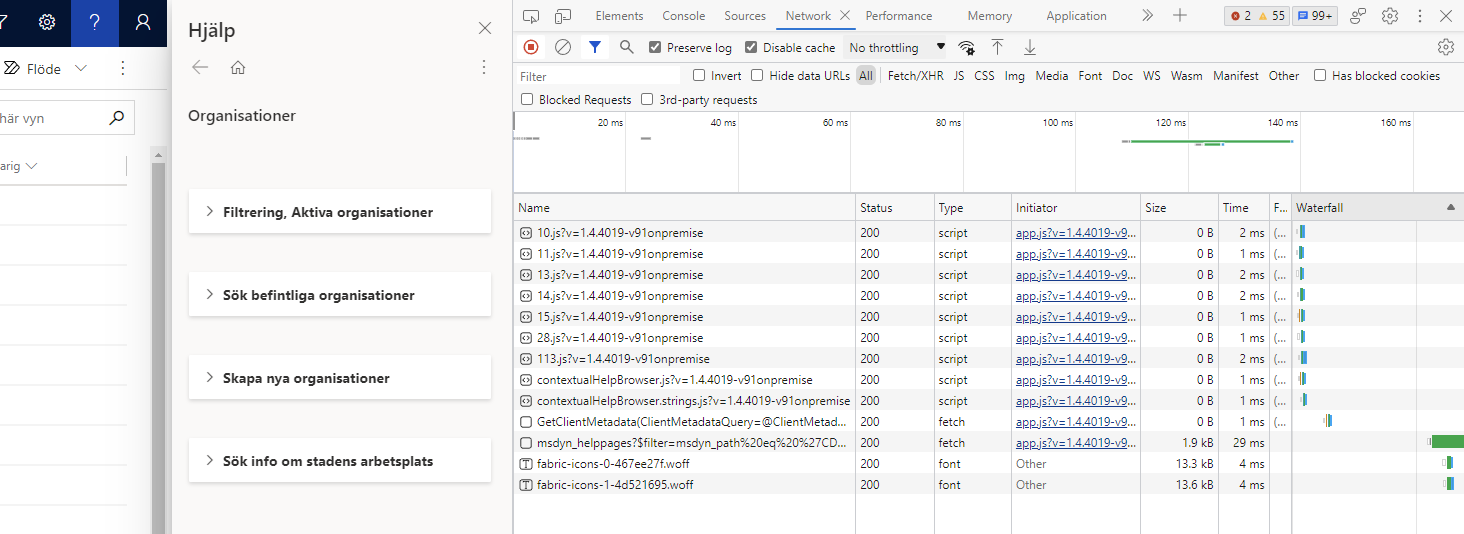
//

As an little experiment in a lab env. I copied the contents of //CRMWeb//uclient//scripts// from CU 9.1.10.102 deplyment to the lab. CU 9.1.19.10 and with this the Contextual help started working.
Obviousy this isn't a valid workaround, but it sort of tell that the issue is isolated to a new set of scripts in one of the CU's released after CU 9.1.10.102.

I hope this finds any MS Rep. in this community to forward to the on-premise packaging team to be addressed.

Best regards.
Philip
I have the same question (0)
  • gabri_ava Profile Picture
    5 on at
    Same problem for me, i've just installed a new D365 on premises server and applied CU 9.1.19.10 and it shows the same JS error.
     
     
    Gabriele
  • PhilipK Profile Picture
    613 on at
    We have opened a support ticket with Microsoft on this, and I'll let you know once I know more.

    Best regards.
    Philip
  • PhilipK Profile Picture
    613 on at
    Microsoft has answered that this issue should be fixed in the upcoming service update in august.
     
    Best regards.
    Philip
     
  • Verified answer
    PhilipK Profile Picture
    613 on at
    I've verified that contextual help is now working again as per the latest update, Microsoft Dynamics 365 (on premises) Update 1.20, Version: 9.1.20.11.

Under review

Thank you for your reply! To ensure a great experience for everyone, your content is awaiting approval by our Community Managers. Please check back later.

Helpful resources

Quick Links

Introducing the 2026 Season 1 community Super Users

Congratulations to our 2026 Super Stars!

Congratulations to our 2025 Community Spotlights

Thanks to all of our 2025 Community Spotlight stars!

Leaderboard > Customer experience | Sales, Customer Insights, CRM

#1
ManoVerse Profile Picture

ManoVerse 180 Super User 2026 Season 1

#2
11manish Profile Picture

11manish 119

#3
CU11031447-0 Profile Picture

CU11031447-0 100

Last 30 days Overall leaderboard

Product updates

Dynamics 365 release plans
