web
You’re offline. This is a read only version of the page.
close
Skip to main content

Announcements

News and Announcements icon
Community site session details

Community site session details

Session Id :
Small and medium business | Business Central, N...
Suggested Answer

Creating Purchase Invoice from Configuration File

(0) ShareShare
ReportReport
Posted on by 77

Hello,

We need to create Purchase Invoices using configuration files. I am creating a Purchase Header (table 38) and a Purchase Line (table 39) file for import to BC. When I do the import it works fine, when I do the Apply, I get the following message “If you change Buy-from Vendor, the existing purchase lines will be deleted and new purchase lines based on the new information in the header will be created”. I have tried several different things, and I cannot get that message to not happen during the apply step. I tried importing just the Header file by itself and I get the same message. Attached is an example of the Purchase Header file I am trying to use. Please help me understand what I am doing incorrectly.

Thanks,

Lisa

I have the same question (0)
  • Kevin Feige Profile Picture
    19 on at

    Hi Lisa,
    Are you positive that the No. you are using for the Purchase Invoice is not already an active Purchase Invoice that you are potentially updating. If you run the validate process on the package for both tables 38 and 39 does it give you any errors as well? 

    Thanks,

    Kevin

    Business Central Partner | Dynamics 365 ERP | Navisiontech

  • Suggested answer
    Teagen Boll Profile Picture
    3,660 Super User 2026 Season 2 on at

    It seems like some validation is being triggered. I would confirm what fields you have for each table that are included. For the Purchase Lines (Table 39) you may want to include the Buy-from Vendor No. field and make sure that the lines include the exact same Buy-from Vendor No. as the header.


    Or an alternative in the lines setup just disable validation for that field:
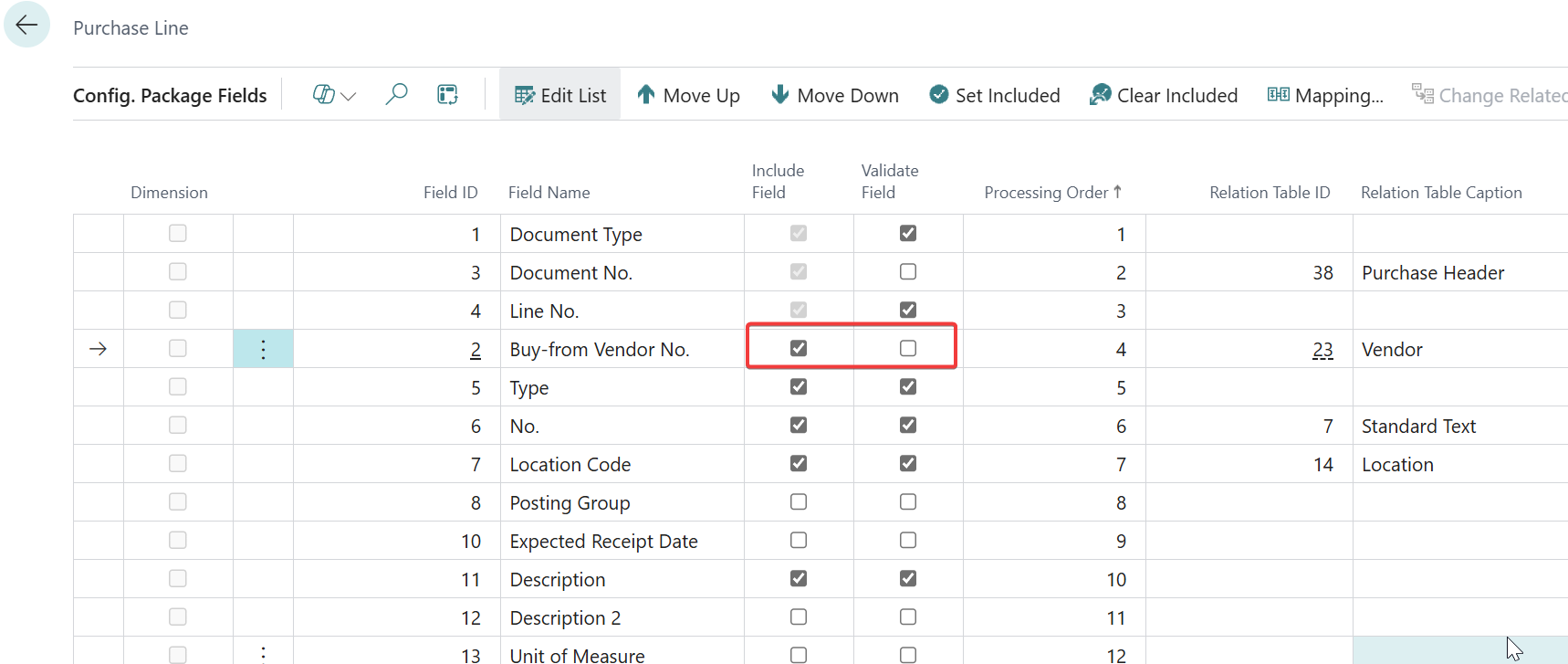
     

    If you get that error on the header that may mean the document no. already exists. You can complete the same step, just disable validation. Check your Purchase Order/Invoice list and make sure there aren't any duplicate numbers being loaded. You may want to set that No. Series for Purchase Documents to be manual so that it doesnt auto assign a number:

     

    Best,

    Teagen Boll, CPA


Under review

Thank you for your reply! To ensure a great experience for everyone, your content is awaiting approval by our Community Managers. Please check back later.

Helpful resources

Quick Links

Season of Sharing Community Challenge Winners!

Congratulations to our community stars!

Women in Power Builds Momentum

Expanding mentorship, skilling, and AI innovation

Congratulations to the July Top 10 Community Leaders

These are the community rock stars!

Leaderboard > Small and medium business | Business Central, NAV, RMS

#1
OussamaSabbouh Profile Picture

OussamaSabbouh 577 Super User 2026 Season 2

#2
YUN ZHU Profile Picture

YUN ZHU 390 Super User 2026 Season 2

#3
Grigorios Mavrogeorgis Profile Picture

Grigorios Mavrogeorgis 335 Super User 2026 Season 2

Last 30 days Overall leaderboard

Featured topics

Microsoft Training Manuals

Product updates

Dynamics 365 release plans
